
Dell Precision vs Latitude for Engineering and CAD

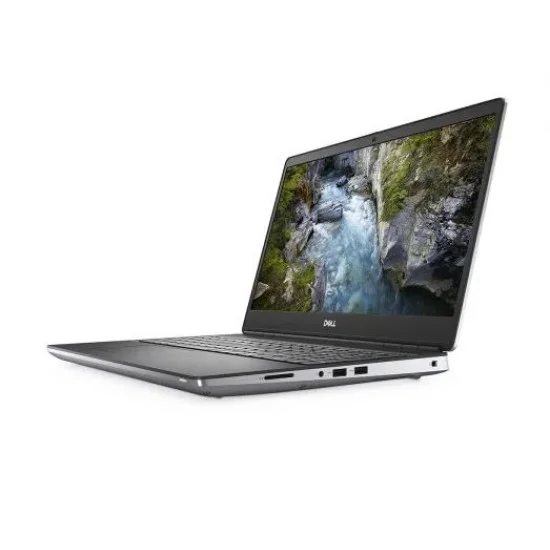
For engineering and CAD, the right Dell purchase depends on the software version and the size of the projects, not simply whether the lid says Precision or Latitude. A mobile workstation can offer relevant graphics options, but the actual adapter, memory and processor must be identified. This guide uses a real Precision 7550 listing and Latitude alternatives to explain what a Kenyan buyer should verify before ordering.
Catalogue and references checked: 20 October 2026. Prices below are Infinite Tech catalogue asking prices for the stated configuration. Confirm the actual unit, availability, accessories and written warranty before payment.
Use the engineering laptop guide to define your workload before choosing a family. The HP ZBook GPU guide explains why the actual graphics adapter matters in another workstation range.
Match the offer to the AutoCAD, Civil 3D and Revit requirements guide. The Acer GPU and cooling guide adds hardware questions for gaming-style alternatives without establishing professional software certification.
Dell Precision vs Latitude: workstation requirements
| Choice | What to compare | Buying implication |
|---|---|---|
| 2D drafting and ordinary coursework | Check the publisher’s requirements for the exact release | A suitable business configuration may be enough for some tasks |
| Complex 3D and visualisation | Identify GPU model, dedicated memory and driver support | Do not select from a vague ‘4GB graphics’ label |
| Large projects and multitasking | Compare RAM, storage capacity and project behaviour | Minimum install requirements are not a project-performance guarantee |
Name the application and the work before the laptop
AutoCAD, its specialised toolsets and other engineering programs can have different requirements. A statement that a laptop runs CAD is too broad to establish suitability. Write down the application, version, plugins and typical project size, then read the publisher’s current requirements.
Separate opening a small teaching file from working with complex models, point clouds or rendering tasks. If the course or employer provides a hardware standard, use it as the shortlist filter. A higher specification may be sensible for larger projects, but avoid buying a workstation purely because the word sounds professional when the actual workload is ordinary documents and browser work.
Identify the Precision’s actual graphics adapter
Dell documents multiple graphics options for the Precision 7550. The catalogue example below advertises 4GB graphics, but that capacity alone does not identify the adapter or prove a particular professional certification. Request the exact GPU name, dedicated memory and installed driver information before deciding.
Compare the proposed hardware with the application’s supported and, where relevant, certified graphics information. A workstation family name is not a certificate for every application version or configuration. If a seller provides only shared graphics memory from a system-information screen, clarify how that differs from dedicated GPU memory. Keep the complete adapter name on the quotation.
Balance memory, CPU and storage with the project
GPU capability is only one part of the machine. Check how much memory the project and other applications need, and allow working storage space for files, caches and software. A larger SSD does not compensate for too little RAM, while an i7 label does not reveal the processor’s exact platform or sustained behaviour.
If possible, test a representative project on the proposed unit using a legitimate installation. Observe whether the task completes comfortably under the intended power and display conditions. This guide does not report measured render times or frame rates for the stock units. A useful demonstration should disclose the actual configuration rather than borrowing results from a different workstation with the same family name.
Consider the mobile workstation’s practical costs
Check the size and suitable power adapter, because a workstation purchase is also a carrying and desk-setup decision. Inspect cooling behaviour, fan noise, battery health, screen condition and ports on a used unit. Ask about supported RAM and drive changes using the matching Dell manual.
For lighter technical tasks, compare a suitable Latitude instead of assuming the workstation is always better value. For demanding GPU work, reject a cheaper configuration that does not meet the publisher’s requirements. Include software licences, external display needs, backup storage and any required service work in the full budget. Obtain written warranty terms and confirm normal setup before paying.
Real Infinite Tech catalogue examples
These links lead to individual listings, not a promise that every model in the wider family is available. Compare the complete configuration rather than the processor badge alone.
| Exact listing | Listed price | Next check |
|---|---|---|
| Dell Precision 7550 Core i7 10th Gen 16GB RAM 512GB SSD 4GB Graphics | KSh 65,000 | Confirm unit condition, exact components and what is included |
| Dell Latitude 5420 Intel Core i7-1185G7 16GB RAM 512GB SSD 14 Inch HD Display | KSh 42,500 | Confirm unit condition, exact components and what is included |
| Dell Latitude 5410 14-inch Laptop Intel i5-10210U 10th Gen 8GB DDR4 256GB NV Me Windows10 BOXED | KSh 31,995 | Confirm unit condition, exact components and what is included |
A practical buying decision
Shortlist Precision when the verified graphics and workstation configuration address a documented professional need. Consider Latitude for workloads its exact hardware can meet. Let the application requirements and a realistic project test decide, and resolve any unnamed GPU before ordering.
Frequently asked questions
Does 4GB graphics identify the GPU?
No. Capacity does not establish the adapter model, performance or application certification.
Is every Precision certified for every CAD version?
No. Check the relevant hardware and driver certification for the exact application and release.
Can a Latitude run any engineering task?
Do not assume it. Compare the exact hardware with the software and project requirements.
Does this guide provide benchmark results?
No. It is a documented buying comparison, not a measured performance test of the stock units.
Related Infinite Tech buying pages
- Laptop Knowledge Centre
- Compare all laptops
- Best Laptops for Engineering Students in Kenya 2026/2027
- AutoCAD, Civil 3D and Revit guide
More Dell buying guides
- Dell Laptop Prices in Kenya: Latitude, Inspiron, XPS and Precision
- Buying an Older Dell Latitude: How to Check Windows 11 Compatibility
- Used Dell Inspection Guide: Battery, BIOS Passwords and Charger Recognition
- HP ZBook Graphics Explained: Choosing the Right GPU for Your Work
Manufacturer references and research method
This is a research-based buying guide, not a hands-on test or a benchmark report. Manufacturer references describe supported options; the linked catalogue identifies the configuration being offered. Model-specific details should be matched to the full product code or service tag.
- Dell Precision 7550 graphics options
- Autodesk AutoCAD system requirements
- Autodesk AutoCAD certified graphics hardware
Confirm your laptop with Infinite Tech
Contact Infinite Tech at Rehema House, Nairobi, on 0720450148. Ask for the full model code, a written specification and the applicable warranty. Read warranty information, delivery information and contact Infinite Tech before placing an order.