
Surface Keyboard and Pen Compatibility: A Guide by Exact Model

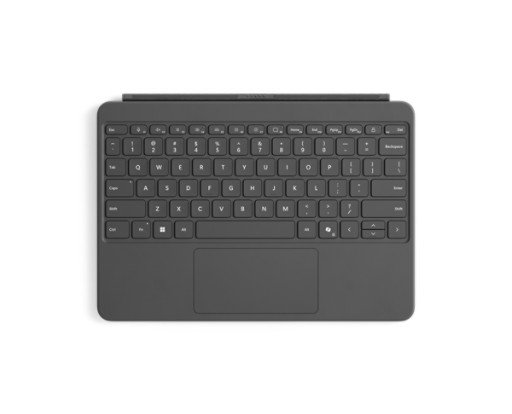
Surface keyboard and pen compatibility must be checked by exact device and accessory model. Physical keyboard fit, pen writing support, storage and charging are separate questions. A Surface logo, a similar connector or a pen holder does not establish the complete arrangement. This guide helps Kenyan buyers compare real accessory listings with Microsoft’s compatibility information before ordering.
Catalogue and references checked: 20 October 2026. Prices below are Infinite Tech catalogue asking prices for the stated configuration. Confirm the actual unit, availability, accessories and written warranty before payment.
The university laptop guide helps determine which input accessories are actually needed. The Surface complete-cost guide explains how separate accessories affect the purchase total.
The business laptop guide covers wider office requirements. Compare Surface Pro and Surface Laptop before assuming that every Surface design uses the same keyboard arrangement.
Surface keyboard and pen compatibility: exact models
| Choice | What to compare | Buying implication |
|---|---|---|
| Older Pro Type Covers | Microsoft groups Pro 7+ and earlier separately | Do not assume fit on newer 13-inch Pro designs |
| Newer 13-inch Pro keyboards | Check the listed compatible Surface generation and accessory | Match the full model and features |
| 12-inch Pro keyboards | A separate size-specific family | Do not substitute a 13-inch keyboard |
| Surface pens | Device-specific writing and charging features | Check the exact pen and Microsoft’s feature table |
Identify the device before choosing the keyboard
Find the full Surface model in its system information or the Surface app, then use Microsoft’s keyboard guide. A short label such as Surface Pro can describe devices from very different accessory generations. Keep the exact size and edition in the order.
Microsoft distinguishes older Type Covers, newer keyboard families and the 12-inch Pro keyboard group. Do not buy from a photograph or an assumption that a newer accessory will fit an older device. Check the precise accessory code, keyboard layout and the features actually supplied. A catalogue title listing several models is useful context but should still be matched against the manufacturer’s guidance.
Test the complete keyboard behaviour
Where practical, attach the keyboard to the intended Surface and test every key, the touchpad and the supported typing positions. If detached or wireless operation matters, verify that the particular accessory supports it; physical attachment support alone does not promise that feature.
Inspect connectors and any pen storage area, especially on a used accessory. Storage, supplied pen and charging support are different specifications. A keyboard with a pen holder should not be priced as a pen bundle unless the written package says a pen is included. Record the actual keyboard and bundle code on the quotation to avoid substitution.
Check pen writing and charging in Microsoft’s matrix
Microsoft’s pen table lists supported devices and feature differences. Some Surface Laptop models do not support inking, so a touchscreen or Surface name alone is not enough. Confirm the exact pen, device and writing features required by your application.
Then check how the pen attaches, is stored and is charged. Those arrangements vary across devices and accessories. Try a real page of notes or a drawing task where possible, including the features you need rather than only Bluetooth pairing. Pairing, physical attachment and successful writing are separate observations. Do not assume that a pen from another device will provide every feature on the new Surface.
Compare the exact bundle with separate items
The catalogue links below include 12-inch keyboards, keyboard-and-pen offers and a separately listed Slim Pen 2. They should not be combined into one purchase without first checking compatibility and contents. Compare the complete required arrangement, including any supported charger or accessory needed for the pen.
Ask for a written statement of included items and applicable warranty. For used equipment, inspect condition and test with the actual device. If the accessory title is incomplete or uses an ambiguous edition label, request the part code before payment. The cheapest keyboard is not good value if it cannot attach to the device or provide the intended pen workflow.
Real Surface accessory listings to check by model
These links lead to individual listings, not a promise that every model in the wider family is available. Compare the complete configuration rather than the processor badge alone.
| Exact listing | Listed price | Next check |
|---|---|---|
| Microsoft Surface Pro Keyboard 12-inch | KSh 30,500 | Confirm unit condition, exact components and what is included |
| Microsoft Surface Pro Keyboard 12-inch with Pen | KSh 54,500 | Confirm unit condition, exact components and what is included |
| Microsoft Surface Pro Keyboard for Pro 8/9/X/XI with Pen | KSh 51,500 | Confirm unit condition, exact components and what is included |
| Microsoft Surface Pro Keyboard for Pro 8/9/X/XI with Pen Holder | KSh 38,500 | Confirm unit condition, exact components and what is included |
| Microsoft Surface Slim Pen 2 | KSh 25,500 | Confirm unit condition, exact components and what is included |
A practical buying decision
Match the exact Surface, keyboard and pen using Microsoft’s compatibility guides, then verify the actual package. Treat fit, writing support, storage, charging and bundle contents as separate checks before comparing prices.
Frequently asked questions
Will a 13-inch Pro keyboard fit a 12-inch Pro?
Do not substitute them. Use the size-specific compatibility guidance.
Does a pen holder include a pen?
No. Confirm the actual bundle contents.
Does Bluetooth pairing prove the pen writes correctly?
No. Check writing compatibility and the required features on the actual device.
Can every Surface Laptop use a Surface Pen?
No. Microsoft’s table identifies models without inking support.
Related Infinite Tech buying pages
- Laptop Knowledge Centre
- Compare all laptops
- Best Laptops for University Students in Kenya 2026: Course & Budget Guide
More Microsoft Surface buying guides
- Microsoft Surface Prices in Kenya: Include the Keyboard, Pen and Charger
- Surface Pro vs Surface Laptop: Which Fits Your Daily Work?
- Used Surface Pro 6 vs 7 vs 9: Price, Condition and Support
Manufacturer references and research method
This is a research-based buying guide, not a hands-on test or a benchmark report. Manufacturer references describe supported options; the linked catalogue identifies the configuration being offered. Model-specific details should be matched to the full product code or service tag.
- Microsoft: Surface Pen compatibility
- Microsoft: Surface keyboards and Type Covers
- Microsoft Surface Pro 12-inch first-edition features
- Microsoft: use the 12-inch Pro keyboard
Confirm your laptop with Infinite Tech
Contact Infinite Tech at Rehema House, Nairobi, on 0720450148. Ask for the full model code, a written specification and the applicable warranty. Read warranty information, delivery information and contact Infinite Tech before placing an order.
3 thoughts on “Surface Keyboard and Pen Compatibility: A Guide by Exact Model”
Comments are closed.