
Business Laptop vs Gaming Laptop for Professional Work: Where Should Your Budget Go?

A professional laptop feels well chosen when your budget pays for the work you actually do. Business and gaming machines can both handle professional tasks, but they allocate money and space differently. Start with your applications and daily setup before deciding which category deserves your attention.
Catalogue and prices checked: 21 October 2026. Listing prices can change and do not reserve stock. This guide uses catalogue and manufacturer information; individual unit condition and measured performance require inspection. Read our laptop review methodology for the evidence behind our recommendations.
Start with a task, then choose the hardware
Write down the application, the kind of file or project and where the work happens. Browser-based administration, accounting and many coding tasks lead to different priorities from GPU rendering, demanding 3D work or gaming after hours. Check the software publisher’s current requirements and test a representative file where possible.
Neither the word business nor the word gaming establishes the full configuration. A slim business model can have limited upgrade options; a gaming model can be inconvenient to carry with its adapter. Compare the exact machine, rather than treating either category as a guarantee of quality or suitability.
Compare three actual Infinite Tech offers
| Offer | Listed configuration | Price checked |
|---|---|---|
| HP EliteBook 840 G8 | i7-1165G7, 16GB RAM, 512GB SSD, 14-inch FHD | KSh 49,500 |
| ThinkPad T14s touchscreen | Core i7 10th Gen, 32GB RAM, 512GB SSD | KSh 53,500 |
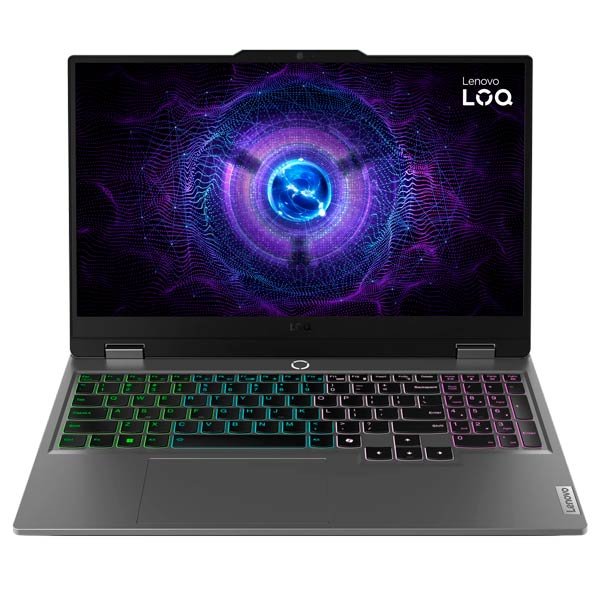
| Lenovo LOQ 15IRX9 83DV00FNUE | i7-13650HX, 16GB RAM, 512GB SSD, RTX 3050 6GB, 144Hz | KSh 161,500 |
The LOQ costs KSh 112,000 more than the selected EliteBook in this dated comparison. This is not a same-price performance contest: the processors, graphics, format and overall offers differ. The T14s has more listed system RAM than the LOQ, which also shows why a single memory number cannot describe the entire computer.
When a business laptop deserves the first look
If your main work is documents, calls, browser tools, accounting or general development, prioritise adequate memory, a readable display, useful connections and a keyboard you enjoy. Evaluate the actual workload before paying for graphics capability that your applications may not use. Our business features guide and accounting laptop guide make those checks concrete.
For local development, consider how many services and environments run together. 16GB vs 32GB for programming covers capacity planning, and the T14s working-day guide gives a demonstration sequence. These are workload-based choices, not claims that all business laptops outperform gaming models for coding.
When dedicated graphics changes the shortlist
If your application uses GPU acceleration or specifies dedicated graphics, check the exact GPU, video memory, supported features and application compatibility. Lenovo’s model-specific reference for 83DV00FNUE identifies an i7-13650HX with RTX 3050 6GB. Those specifications justify investigating GPU-dependent work; they do not prove a particular render time or suitability for every professional project.
Ask the software publisher about its supported hardware and any certification required by your workplace. A gaming GPU listing does not by itself establish workstation certification. Try a suitable project and decide whether a dedicated workstation, gaming machine or another configuration meets the requirement.
Compare the whole working experience
| Question | How to evaluate it |
|---|---|
| Will I carry it daily? | Handle the laptop and the supplied charger together |
| Will I take frequent calls? | Try camera, microphone, fan behaviour and your headset |
| Do I work away from power? | Review battery evidence and demonstrate your own workload |
| Will I add memory or storage? | Check exact manufacturer slot and capacity documentation |
| Do I use external displays? | Confirm ports, adapter requirements and intended display mode |
Do not infer measured noise, heat, battery runtime or rendering speed from a model label. Ask for a demonstration. If replacing an existing computer, the upgrade-or-replace guide helps decide whether the current limitation is CPU, memory, storage, networking or workspace.
Put the complete budget alongside the decision
Price any required monitor, adapter, headset, software and delivery before choosing. The home-office equipment plan illustrates the cost of a usable desk. For independent client work, the freelancer buying guide connects equipment choices to the deliverables you expect to produce. Paying for a useful capability can be satisfying at either end of the price range.
Frequently asked questions
Can a gaming laptop do office work?
Yes, subject to the actual configuration and software. Decide whether its extra capabilities and physical format justify the complete cost for your use.
Can a business laptop be used for programming?
Many can. Match the full processor, memory, storage, operating system and any graphics needs to your actual development tools.
Does 32GB RAM make the T14s faster than the LOQ?
Not as a general conclusion. The machines have different processors and graphics, and the benefit depends on the workload.
What dedicated graphics does the linked LOQ list?
The checked 83DV00FNUE offer lists an NVIDIA GeForce RTX 3050 with 6GB video memory. Confirm the quoted machine identity.
Are these laptops the same price?
No. The selected EliteBook was KSh 49,500 and the LOQ KSh 161,500, a KSh 112,000 gap in the dated check.
Do all professional applications need dedicated graphics?
No. Check the publisher’s requirements and how your specific projects use the hardware before allocating budget to a GPU.
Is a gaming GPU the same as workstation certification?
No. Check any required application certification and supported hardware separately.
Which category has better battery life?
This guide has no measured runtime comparison. Evaluate the actual battery, settings and workload on the offered units.
What should I check before assuming upgradeability?
Use manufacturer documentation for the exact model, then confirm the installed parts, available slots and supported capacities.
How can I choose confidently?
Start with applications and deliverables, compare a representative project, inspect the unit and obtain a complete written quotation.
Choose a laptop you can feel confident using
Explore Infinite Pro: Serious work. Smart investment. and Developer Pro. Contact Infinite Tech at Rehema House, Nairobi, or call 0720 450 148 with your applications, budget and preferred setup. Request the actual unit details and complete quotation, and review warranty information and delivery information before ordering.
2 thoughts on “Business Laptop vs Gaming Laptop for Professional Work: Where Should Your Budget Go?”
Comments are closed.