
Developer Pro by Infinite Tech. Choose a laptop that fits the software you build, the tools you keep open and the way you move between workspaces. Compare the memory, SSD and exact processor before choosing by brand.
Start with your development stack
Write down your IDE, language tools, browser sessions, local database, containers and virtual machines. A laptop used mainly for editing code and working with remote services has different needs from a machine hosting several local environments. The 16GB and 32GB choices below provide clear points of comparison.
16GB options for everyday professional development
| Exact laptop listing | CPU generation | RAM / SSD | Listed price |
|---|---|---|---|
| Dell Latitude 5420 — Business laptop | 11th | 16GB / 512GB SSD | KSh 42,500 |
| HP EliteBook 840 G8 — Business laptop | 11th | 16GB / 512GB SSD | KSh 49,500 |
| Lenovo ThinkBook 14 G2 — Business laptop | 11th-generation Intel ITL platform; verify the CPU code | 16GB / 512GB SSD | KSh 50,000 |
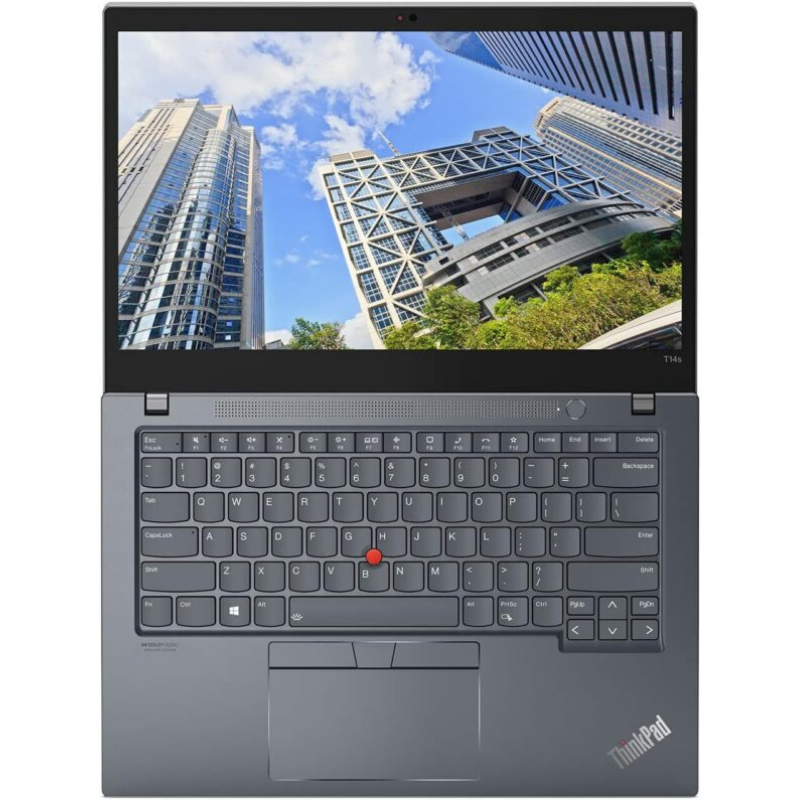
| Lenovo ThinkPad T14s — Business laptop | 10th | 16GB / 512GB SSD | KSh 53,000 |
Price snapshot checked 21 October 2026. Open each product for the current selling price and availability. Model-family images illustrate the laptop; the product listing identifies the configuration.
These 16GB/512GB configurations are useful shortlist candidates for moderate development and professional multitasking. Try a representative project, check keyboard comfort and compare the screen resolution. The Latitude 5420 listing describes an HD panel, so confirm its resolution before using price alone to decide.
32GB options for more local workloads
| Exact laptop listing | CPU generation | RAM / SSD | Listed price |
|---|---|---|---|
| Lenovo ThinkPad T14s — Touch | 10th | 32GB / 512GB SSD | KSh 53,500 |
| Dell XPS 13 9310 — Non-Touch | 11th | 32GB / 512GB SSD | KSh 59,000 |
| HP EliteBook 840 G9 — Business laptop | 12th | 32GB / 512GB SSD | KSh 70,000 |
| HP ZBook Firefly 14 G8 — Non-Touch | 11th | 32GB / 512GB SSD | KSh 64,500 |
Price snapshot checked 21 October 2026. Open each product for the current selling price and availability. Model-family images illustrate the laptop; the product listing identifies the configuration.
If an IDE, database, containers and a guest operating system regularly share memory, compare 32GB configurations. Buying installed memory can be especially relevant when a model has limited RAM upgrade options. Confirm the exact hardware before assuming a 16GB version can later become the 32GB version.
Docker, virtualisation and operating-system checks
Docker Desktop on Windows has operating-system, WSL or Hyper-V and hardware-virtualisation requirements. Check the current Docker installation requirements for your intended setup. Verify BIOS access, virtualisation support and the available Windows edition before purchase.
Storage and workspace matter
A 512GB SSD is the starting capacity in this shortlist. SDKs, container images and VM disks can consume space quickly, so consider both free capacity and backup needs. Check external-display connections with the exact monitor or dock you use, and test Wi-Fi, webcam and battery condition if you work away from a desk.
Read the developer guides
- 16GB vs 32GB RAM for programming, Docker and VMs
- Full programming laptop buying guide
- Computer science, Python and data analysis laptop guide
- 32GB Core i7 laptops under KSh 75,000
Frequently asked questions
Which Developer Pro laptop should I choose?
Shortlist by your workload, then compare the exact CPU, memory, display, condition and price. No single model is best for every developer.
Is 16GB RAM suitable for coding?
It is a practical starting point for many moderate development workflows. Several containers, emulators or VMs can make 32GB worth considering.
When should I choose 32GB?
Consider it when measured memory use is regularly high or several substantial local environments must run together.
Does Docker only depend on RAM?
No. Check the supported OS, chosen backend, CPU virtualisation and BIOS settings as well as RAM and storage.
Is a dedicated graphics card necessary?
General web and application development may not require one. GPU computing, 3D and game development have separate compatibility requirements.
Can I install Linux?
Check the exact model, Wi-Fi adapter, peripheral compatibility and your required software. Test the intended setup rather than assuming every variant behaves identically.
Is the ThinkPad T14s 32GB listing a touchscreen?
Yes, that linked listing specifies touchscreen. The separate 16GB T14s listing does not establish touch support.
Is 512GB enough for containers and VMs?
It depends on image and virtual-disk sizes. Plan for project growth, free space and a separate backup.
Does a higher i7 generation guarantee faster builds?
Compare the exact processor, cooling and build workload. Generation alone is insufficient to predict every task.
Can I compare an executive laptop too?
Yes. Executive Pro compares compact and convertible options when travel and meetings also matter.
Our shortlists compare the stated configuration, workload, screen format and listed Kenyan price. They are buying recommendations, not results from unit-specific performance testing. Read the laptop review methodology and confirm the individual machine’s condition, battery, installed software and accessories.
Choose your work laptop with Infinite Tech
Visit Infinite Tech at Rehema House, Nairobi, or call 0720450148. Share your software, budget, preferred screen size and travel needs when requesting a recommendation. Check the warranty terms, delivery information and the exact unit before ordering.