
Business Laptop Features Worth Paying For: Keyboard, Display, Build Quality and Connections

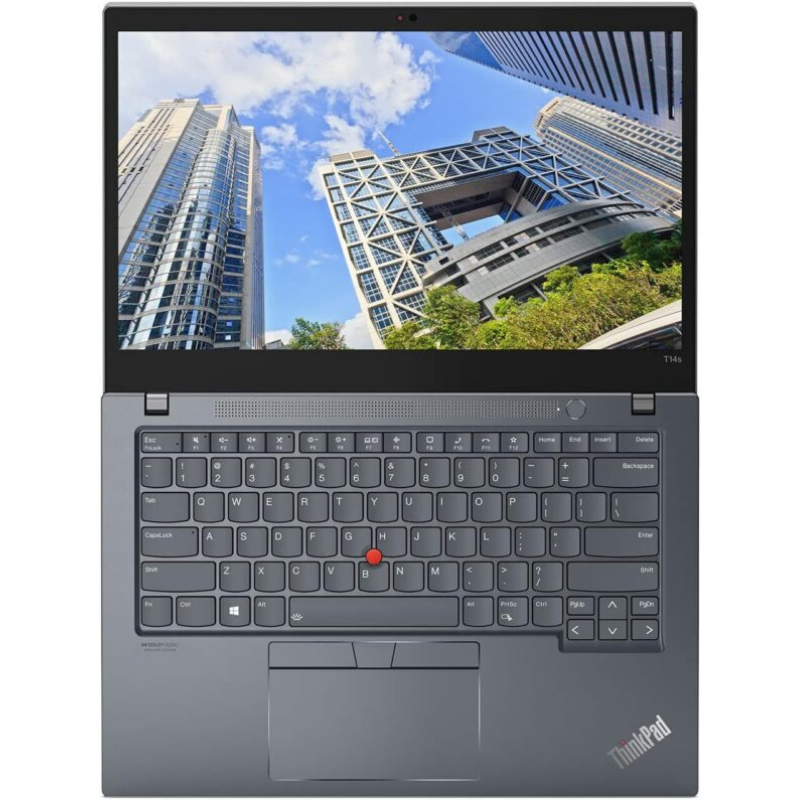
Premium is easiest to appreciate in the details you use every day. A readable display, comfortable keyboard, dependable hinge and suitable connections can make a work laptop feel like a considered choice. This guide helps you decide which qualities deserve part of your budget and how to check them on the actual machine.
Catalogue and prices checked: 21 October 2026. These are dated listing prices, not reserved stock or a unit inspection. Follow each product link for the current offer. Our review methodology explains the use of catalogue and manufacturer evidence.
1. A keyboard that suits your working habits
Type a familiar paragraph and test the keys used in your work. Check the keyboard language, Enter key, arrows, function controls and any backlight you expect. Inspect key wear, missing caps and uneven response. A keyboard praised in a model review can still feel different on a heavily used unit.
For repeated number entry, confirm a numeric keypad on the exact keyboard. Screen size does not guarantee one. A separate full-size keyboard can be useful at a desk: Logitech’s MK120 reference describes a wired USB keyboard and mouse with a number pad. Our home-office equipment plan includes an actual priced example.
2. A display you can read comfortably
Compare the native resolution, scaling, physical size, glare and visible condition. Open the same worksheet or document on the shortlisted machines. A screen that looks bright in a catalogue image may be a different panel option from the unit being sold. Touch input and sharp text are also separate questions.
For instance, the Latitude 5420 16GB/512GB listing says HD at KSh 42,500, while the EliteBook 840 G8 16GB/512GB lists a 14-inch FHD panel at KSh 49,500. Their price difference reflects more than the screen. Use the 14-inch vs 15.6-inch guide to evaluate readability without assuming that bigger always shows more content.
3. Physical condition that matches the description
Inspect the corners, lid, palm rest, hinge action, base feet and charging socket. Ask for photographs of the actual unit, then confirm that what arrives matches the agreed condition. A metal-looking finish or a familiar business badge cannot establish that a used machine has been treated well.
Ask what the seller means by a cosmetic grade and which marks are present. If a feature matters to you, such as a touchscreen, a firm hinge or an intact display coating, check it directly. The refurbished vs new buying guide puts condition and support alongside configuration and price.
4. Connections that reduce daily friction
List your monitor, keyboard, mouse, headset, projector and any wired network requirement. Count the ports needed at the same time. A USB-C connector alone does not describe every supported function, and a dock needs a suitable host connection. Check the manufacturer’s model documentation and test the combination.
The T14s vs XPS 13 9310 comparison explains why two compact 32GB offers can lead to different adapter needs. A smaller machine can still be an excellent fit when its accessories are planned. For client visits, the meeting and presentation guide provides a practical connection checklist.
5. Memory and storage chosen at purchase time
Consider whether the installed capacity covers your work and whether later changes are supported. Some slim designs have soldered memory. Lenovo’s T14s Gen 1 Intel reference describes no RAM slots, making the original capacity an important choice. Confirm the exact model rather than applying that rule to every ThinkPad.
The listed T14s 32GB/512GB touchscreen is KSh 53,500. That can be attractive where the workload needs memory, but it does not establish suitability for every rendering, gaming or analytical task. Read the RAM comparison and SSD capacity planning for the separate decisions.
6. Camera, battery and support you can verify
Test the webcam, microphone, speakers and wireless connection with the application you use. Review a current battery report and try a representative unplugged task when possible. Original brochure runtime is not a measurement of a particular older battery. Read the support terms and confirm who handles a problem after purchase.
Use a short decision scorecard
| Quality | Evidence to collect |
|---|---|
| Typing | A paragraph and your normal shortcuts |
| Reading | Your document at comfortable scaling |
| Condition | Actual-unit photographs and inspection |
| Connectivity | Your devices connected together |
| Workload fit | A representative file or non-confidential project |
| Ownership | Battery evidence, included charger and written warranty |
Score these against your own priorities rather than a universal premium score. Choose the machine with the qualities you will actually use. The professional shortlist under KSh 60,000 and first-professional-laptop guide help turn the scorecard into a purchase decision.
Turn useful features into a practical evaluation
Follow the T14s working-day evaluation plan to observe the features in actual tasks. Compare business and gaming laptops for professional work when deciding whether your applications justify dedicated graphics, and use the upgrade-or-replace guide to identify the improvement you need.
Frequently asked questions
Does premium always mean the latest generation?
No. Judge the full device, relevant features, unit condition and workload fit alongside generation.
Does a business badge prove build condition?
No. Inspect the actual chassis, hinges, keyboard, ports and display.
Should I pay extra for a backlit keyboard?
It depends on where you work. Confirm the exact unit has the feature and that it operates correctly.
Does every 15.6-inch keyboard have a number pad?
No. Inspect the actual layout. A separate numeric or full-size keyboard is another option.
Is a touchscreen the same as a better display?
No. Touch describes input; resolution, glare, readability and panel condition are separate characteristics.
Does USB-C guarantee monitor output?
No. Check the documented port capabilities and test the required monitor or adapter.
Can every slim laptop receive more RAM?
No. Some have soldered memory without slots. Verify the exact model before planning an upgrade.
How should I judge battery quality?
Use a current battery report and a relevant practical test, rather than relying on an original family runtime claim.
Are these recommendations hands-on test results?
No. They are practical inspection criteria supported by product listings and model documentation.
What proves a satisfying purchase?
An exact, useful configuration, condition you accept, a comfortable daily setup and clear written ownership terms.
Find your Infinite Pro fit
Start with Infinite Pro: Serious work. Smart investment. or Executive Pro. Contact Infinite Tech at Rehema House, Nairobi, or call 0720 450 148. Tell us your applications, spending limit and daily setup so the quotation can specify the actual unit, accessories and total cost. Review warranty information and delivery information before ordering.
3 thoughts on “Business Laptop Features Worth Paying For: Keyboard, Display, Build Quality and Connections”
Comments are closed.