
Your First Professional Laptop: A First-Salary Buying Guide for Kenyans

Your first professional laptop should feel like progress you chose carefully. Starting a job, winning an initial contract or setting aside part of your salary can be the right moment to build a better working setup. Choose a laptop that fits the work ahead and a complete budget you are comfortable spending.
Catalogue and prices checked: 21 October 2026. These are dated listing prices, not reserved stock or a unit inspection. Follow each product link for the current offer. Our review methodology explains the use of catalogue and manufacturer evidence.
A first-salary purchase is a milestone, not an instruction to spend an entire month’s pay. Decide what you have set aside for equipment before looking at model names. You can be proud of a practical purchase at any sensible price point when you know why the configuration suits you.
Start with the work you are stepping into
Write down the applications you will use, the kind of files you expect and how often you will travel. An accounting graduate working in browser applications has a different brief from a developer running local databases and containers. If an employer or client sets operating-system, security or software requirements, obtain those requirements first.
For finance, use the Excel, QuickBooks and Sage guide. For coding, start with the programming laptop buying guide and the RAM comparison. These resources help you ask precise questions rather than choosing by Core i7 alone.
Build a complete purchase allowance
| Part of the purchase | Question to answer |
|---|---|
| Laptop | What exact CPU, RAM, SSD, screen and unit condition are quoted? |
| Power and connections | Is the correct charger included, and do you need an adapter or cable? |
| Software | Which operating system and application licences do you need? |
| Your desk | Do you already own a monitor, keyboard, mouse or headset? |
| Handover | What are the delivery, setup, migration and warranty arrangements? |
Keep these lines visible when comparing offers. An attractive advertised price is easier to judge once the essentials are included. If you already have a workable desk and peripherals, you may be able to prioritise the laptop itself. If you need several items, the itemised home-office plan shows how accessory costs change the decision.
Three real configurations to compare
| Offer | Configuration stated | Price checked | Decision to consider |
|---|---|---|---|
| Dell Latitude 5420 | i7-1185G7, 16GB / 512GB SSD, HD screen | KSh 42,500 | Leave more of a fixed allowance for other essentials |
| HP EliteBook 840 G8 | i7-1165G7, 16GB / 512GB SSD, FHD screen | KSh 49,500 | Compare readability and carrying comfort |
| ThinkPad T14s touchscreen | Core i7 10th Gen, 32GB / 512GB SSD | KSh 53,500 | Evaluate extra installed memory for a heavier local workload |
These examples are different machines, not guaranteed upgrade steps for every buyer. The T14s model family uses soldered memory, according to Lenovo’s specification reference. Confirm the exact machine identity and buy the memory configuration you need; do not assume that another 16GB offer can simply be upgraded to match it.
Choose something you will enjoy using, with evidence
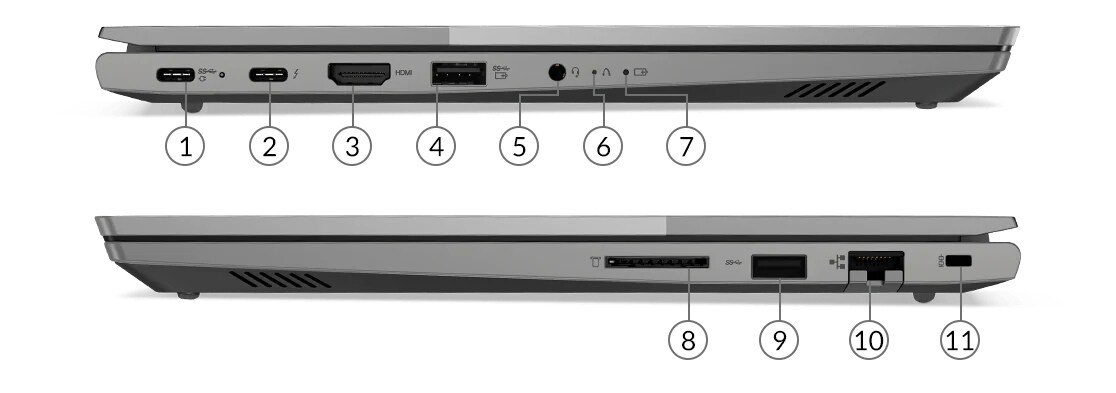
Try the keyboard with a paragraph you would actually type. Read a document and an ordinary web page at comfortable scaling. Pick up the laptop, inspect the charger and look at the ports needed for your normal day. Appearance matters when it affects your satisfaction with the purchase, but photographs of the offered unit should support that decision.
For calls and client visits, use the client-meeting laptop guide. For the physical details that distinguish a satisfying daily setup, read business laptop features worth paying for. You are choosing a tool you will live with, so a short hands-on check is more useful than a vague premium label.
Finish with a confident handover
- Get the model, full CPU, installed RAM and SSD, display and unit condition written on the quotation.
- Check the battery report, charger, keyboard, ports, webcam and Wi-Fi.
- Confirm the operating system and any separately supplied software licences.
- Read the warranty, delivery and return arrangements before payment.
- Use sample files during demonstrations and keep an independent backup when migrating your own work.
Compare additional options in the professional shortlist under KSh 60,000. If your requirements are still uncertain, share them with Infinite Tech before selecting a configuration. A clear reason for your choice is a strong foundation for enjoying the purchase.
Frequently asked questions
Must I spend my whole first salary?
No. Choose the equipment allowance you are comfortable with before comparing products. The milestone does not determine the amount.
Should I choose a new or refurbished laptop?
Compare exact specifications, unit condition, support terms and the complete cost. Neither condition label alone decides the best fit.
Is Core i7 a complete specification?
No. Ask for the full processor model, memory, storage, display and operating-system details.
Is 16GB a useful starting point?
It is a practical shortlist capacity for many office workflows, but confirm your actual applications and files.
When should I consider 32GB?
Consider it when larger local development environments, virtual machines or analytical files justify additional memory.
Can I upgrade every laptop later?
No. Memory and storage layouts vary by model. Check manufacturer documentation and the offered unit before relying on an upgrade.
What should I try in a demonstration?
Type a document, read at your usual scaling, test calls and connect the peripherals you intend to use.
Are the software applications included?
Only when explicitly stated in the offer. Confirm licences, editions and installation separately.
What should my quotation contain?
The exact unit configuration, condition, charger and accessories, complete price, delivery arrangements and written support terms.
Where can I compare the current offers?
Use the under-KSh-60,000 shortlist and follow each product page for its current price.
Find your Infinite Pro fit
Start with Infinite Pro: Serious work. Smart investment. or Executive Pro. Contact Infinite Tech at Rehema House, Nairobi, or call 0720 450 148. Tell us your applications, spending limit and daily setup so the quotation can specify the actual unit, accessories and total cost. Review warranty information and delivery information before ordering.
2 thoughts on “Your First Professional Laptop: A First-Salary Buying Guide for Kenyans”
Comments are closed.