
ThinkPad T14s vs Dell XPS 13 9310: Comparing the 32GB Options in Kenya

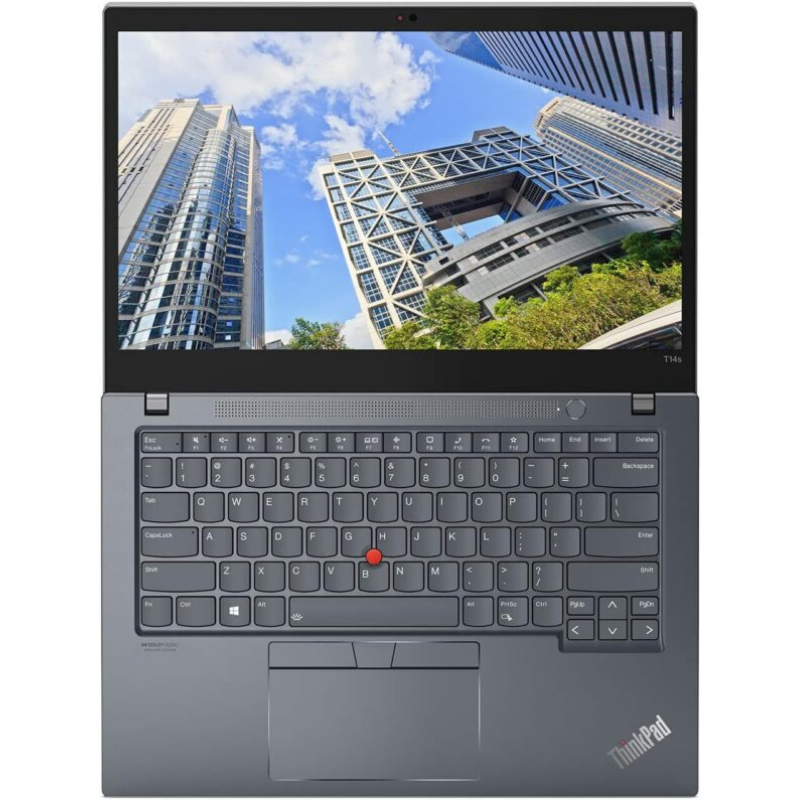
Quick answer: Choose the ThinkPad T14s 32GB touchscreen if touch input and built-in USB-A/HDMI matter. Compare the XPS 13 9310 32GB non-touch if a smaller laptop and Thunderbolt 4 suit your setup. Their current listed difference is KSh 5,500; condition and your daily workflow should decide whether it is worth paying.
Compare this pair with a wider shortlist: Our existing programming laptop buying guide and business laptop guide connect these two offers to other models, workload requirements and complete setup costs.
The two exact offers being compared
This comparison concerns the 10th Gen Intel T14s with 32GB RAM, 512GB SSD and touchscreen, and the 11th Gen Intel XPS 13 9310 with 32GB RAM, 512GB SSD and non-touch display. Other T14s generations, XPS touch variants and different memory capacities are separate products. Start with the Infinite Pro collection if you also want to compare 16GB options.
| Exact configuration | Listed price |
|---|---|
| ThinkPad T14s i7 10th Gen, 32GB/512GB, Touch | KSh 53,500 |
| Dell XPS 13 9310 i7 11th Gen, 32GB/512GB, Non-Touch | KSh 59,000 |
Website price snapshot checked 21 October 2026. These pages were marked in stock at the check; confirm the available unit and current price before ordering.
Display and input: touch versus a compact workspace
The T14s Gen 1 Intel family uses a 14-inch screen; this linked offer specifies touch. Dell documents a 13.4-inch screen for the XPS 13 9310 family, while the offer here is explicitly non-touch. Ask for the actual resolution and panel on each offered machine. The same model can have different display options, so a family photograph cannot establish brightness, resolution or colour performance.
For spreadsheet work, try your normal Excel zoom and a side-by-side document before choosing. For coding, open the editor, terminal and browser together. A larger physical display may improve readability, while resolution and operating-system scaling determine how much content fits. Touch is useful for particular habits, but it is not a substitute for a comfortable keyboard.
Ports: count the equipment you already own
Lenovo documents USB-A, HDMI, USB-C and Thunderbolt 3 on the T14s Gen 1 Intel platform. Dell documents two Thunderbolt 4 USB-C ports on the XPS 13 9310. If your desk uses USB-A accessories or HDMI, include the cost and convenience of an appropriate adapter or dock when assessing the XPS. Test the exact monitor, cable and power arrangement rather than assuming every USB-C accessory supports the same functions.
A consultant presenting at client offices may value a direct HDMI connection. A developer who already owns a compatible dock may prefer a compact laptop with one desk connection. Neither arrangement is automatically better; compare the complete setup you will carry and use.
32GB RAM: an important purchase-time decision
Both manufacturer references describe onboard memory without conventional RAM upgrade slots: the Intel T14s Gen 1 has soldered memory, and the XPS 13 9310 integrates memory on its system board. Buy the installed capacity you need. A separately advertised 16GB machine is not a reliable route to a later 32GB upgrade.
For several development tools, local databases or virtual machines, 32GB can provide useful headroom. For ordinary documents and browser work it may not be your limiting component. Compare the 16GB versus 32GB programming guide before deciding that more memory is the best use of your budget.
CPU generation does not settle the comparison
The listings identify 10th Gen and 11th Gen Core i7 processors but do not establish a full CPU suffix for these exact units. Request that code before drawing a processor-performance conclusion. Family documentation lists options, not proof of the CPU fitted to the machine being sold.
Cooling condition, power settings and the workload also matter. A sensible demonstration is your own typical project build, spreadsheet or reporting task. We have not benchmarked these individual laptops and do not claim a percentage performance advantage for either offer. Use the Core i7 generation comparison to understand what the label can and cannot tell you.
Condition, battery and the real price difference
The listed prices are KSh 53,500 for the T14s and KSh 59,000 for the XPS. The KSh 5,500 difference is a buying comparison, not a prediction of speed. Include any dock, replacement charger, external keyboard or battery work in your total budget. Request a battery report and inspect charging, hinges, screen, keyboard and ports on the available unit.
Choose the T14s when its input options, connections and actual condition fit your work at the lower listed price. Choose the XPS when its smaller format and your existing USB-C setup justify the additional spend. For another 32GB alternative, compare the HP EliteBook 840 G9 i7 12th Gen, 32GB/512GB and read the 32GB shortlist under KSh 75,000.
Frequently asked questions
Do both offers have 32GB RAM?
Yes. The two linked listings specify 32GB RAM and 512GB SSD storage. Confirm those values on the available unit.
Which offer has a touchscreen?
The linked T14s offer specifies touchscreen. The XPS offer compared here specifies non-touch.
Is the XPS screen exactly 13 inches?
The product name is XPS 13, but Dell documents a 13.4-inch diagonal for this model family.
Can I upgrade their 16GB versions to 32GB later?
These model references describe onboard memory without ordinary RAM slots. Choose the required installed capacity when buying.
Which costs less in this comparison?
The T14s was listed at KSh 53,500 versus KSh 59,000 for the XPS on 21 October 2026.
Does 11th Gen guarantee the XPS is faster for every task?
No. Obtain the exact CPU codes and compare your workload, cooling condition and complete configurations.
Does either offer include 1TB storage?
No. Both linked configurations specify 512GB SSDs. A different capacity needs a separate quotation.
Will I need an HDMI adapter with the XPS?
The XPS uses Thunderbolt 4 USB-C for display connections. Check the adapter or dock required by your monitor or projector.
Are the photos of the exact units?
They are model-family catalogue photographs. Request actual-unit evidence for condition and installed parts.
Which is better for a travelling programmer?
Compare keyboard comfort, your development workload, battery condition and the full weight of chargers and adapters. Either may suit a different setup.
Related professional laptop guides
- Developer Pro shortlist
- Executive Pro shortlist
- Choosing a laptop screen for professional work
- 512GB versus 1TB SSD
Manufacturer and software references
This guide compares listed configurations and published model references; it does not report hands-on benchmarks or certify individual units. Read our laptop review methodology.
Compare your shortlist in Nairobi
Visit Infinite Tech, Rehema House, Nairobi, or call 0720450148. Share your software, budget and travel needs for a quotation covering the exact configuration. We are open Monday–Saturday, 8:30 AM–7:30 PM. Check the warranty terms and delivery information before ordering.
4 thoughts on “ThinkPad T14s vs Dell XPS 13 9310: Comparing the 32GB Options in Kenya”
Comments are closed.