
ThinkPad T480 vs T480s vs T490s: Which Should You Buy?

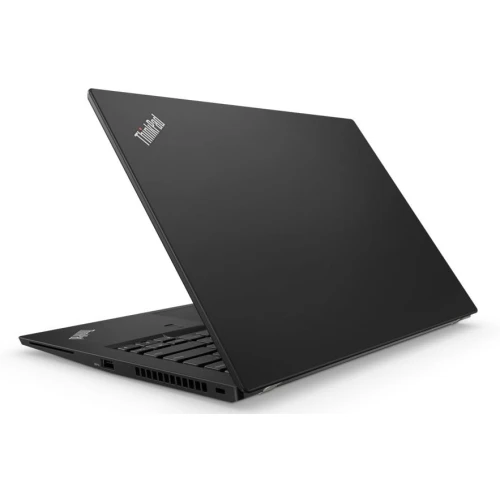
Choosing between the ThinkPad T480, T480s and T490s in Kenya is mainly a decision about installed memory, upgrade flexibility, portability and the condition of the actual laptop. The letter “s” identifies a different design; it does not mean that every T480s is faster than every T480. A good comparison starts with equal RAM, storage, display and battery condition, then looks at the price difference.
For a buyer planning to increase memory later, the three designs deserve particular attention. A low purchase price can become poor value if the laptop cannot take the memory capacity your work will need.
Catalogue and references checked: 20 October 2026. Prices below are Infinite Tech catalogue asking prices for the stated configuration. Confirm the actual unit, availability, accessories and written warranty before payment.
The ThinkPad buying guide places these models in the wider Lenovo range. Read the ThinkPad RAM and SSD upgrade guide before assuming the three models have the same expansion options.
Apply the used-laptop inspection checklist to the actual machine. The used ThinkPad checklist adds checks for USB-C charging, firmware access and the quoted configuration.
ThinkPad T480, T480s and T490s at a glance
| Choice | What to compare | Buying implication |
|---|---|---|
| T480 | Socketed memory design; verify the exact installed configuration | Useful candidate when future RAM changes matter |
| T480s | Some memory soldered, with one SO-DIMM socket in Lenovo’s platform specification | Check the soldered amount and the occupied socket |
| T490s | Memory soldered to the system board with no RAM slots | Buy enough installed RAM at the start |
Memory is the most useful difference to understand
Lenovo’s documentation distinguishes the T480’s socketed memory configurations from the mixed soldered-and-socket arrangement in the T480s. For the T490s, Lenovo lists soldered memory without upgrade slots. That distinction is more useful than assuming that the later model must be the better purchase for everyone.
A student using documents, research tabs and online classes may be comfortable with a suitable 8GB configuration today. Someone running development tools, larger spreadsheets or several demanding applications should compare 16GB options and consider the expected workload over the next few years. These are purchasing targets, not promises that a given capacity will handle every project. Ask the seller to show the installed memory and explain exactly what can be changed on that particular machine.
Compare like-for-like offers, not just the model names
The catalogue examples below include a T480 with a touchscreen, a non-touch T480s and a T490s with 16GB memory. A price difference therefore cannot be attributed solely to generation. Touch capability, RAM capacity and SSD capacity are part of the offer, and each can change the sensible choice.
For example, comparing the listed 8GB/256GB T480s with the 16GB/256GB T490s means comparing two memory capacities as well as two chassis designs. Compare the 16GB/512GB T480s separately if storage matters. Do not treat the Core i7 badge as a guarantee of a large improvement: request the full processor model and run your own representative document, spreadsheet or development task before choosing.
Portability should include the charger and your working setup
A commuter should assess the complete carry package: laptop, charger, dongles and any external storage. The thinnest computer is not automatically the most convenient if it needs extra adapters for the equipment used every day. Check the actual USB, video and network connections against your monitor, projector or office desk.
Try the keyboard and touchpad for several minutes, not just long enough to see the desktop. Check that the display can be used comfortably at your normal brightness and viewing angle. If a touchscreen is important, test its entire surface and confirm whether pen input is supported separately. The product label “touch” should not be interpreted as proof of active-pen support.
Inspect charging and the battery before deciding on value
A used laptop’s present battery condition is different from the runtime advertised when the model was launched. Ask for a recent battery report, then test the computer away from mains power with a realistic task. Check charging at every supported charging port and inspect the sockets for looseness or intermittent behaviour.
Confirm that you can enter the firmware settings and that no unknown organisation prevents a normal setup. Keep any authorised firmware update or repair work with a qualified technician using Lenovo’s instructions. Finally, write down the cost of any proposed battery, SSD, charger or RAM work. The useful comparison is the total cost of the machine ready for your workload, not the cheapest headline listing.
Real Infinite Tech catalogue examples
These links lead to individual listings, not a promise that every model in the wider family is available. Compare the complete configuration rather than the processor badge alone.
| Exact listing | Listed price | Next check |
|---|---|---|
| Lenovo ThinkPad T480 Intel Core i5 8th Gen 8GB RAM 256GB SSD 14 Inches |TOUCH SCREEN | KSh 23,500 | Confirm unit condition, exact components and what is included |
| Lenovo ThinkPad T480s Core i5 8th Gen 8GB RAM 256GB SSD Non-Touch | KSh 25,000 | Confirm unit condition, exact components and what is included |
| Lenovo ThinkPad T490s Core i7 8th Gen 16GB RAM 256GB SSD Non-Touch | KSh 30,000 | Confirm unit condition, exact components and what is included |
| Lenovo ThinkPad T480s Core i7 8th Gen 16GB RAM 512GB SSD Non-Touch | KSh 35,000 | Confirm unit condition, exact components and what is included |
A practical buying decision
Shortlist the T480 when upgrade flexibility is important, the T480s when its particular configuration balances your carrying needs and budget, and the T490s when its installed memory is already sufficient. Then let the exact screen, hardware health and complete price decide between them. A well-kept older configuration can be a better fit than a newer label with inadequate memory.
Frequently asked questions
Can I upgrade the RAM in a T490s?
Lenovo’s platform specification lists soldered memory without RAM slots. Choose the installed capacity you need before buying.
Is a T480s always faster than a T480?
No. Compare the exact processor, memory, storage, power settings and hardware condition. The model suffix alone does not establish performance.
Are all three models touchscreen laptops?
No. Display options vary. The linked T480 example is listed as touch, while the linked T480s and T490s examples are non-touch configurations.
Should I pay more for 16GB RAM?
Consider it when your normal work already involves heavier multitasking or development tools. First check your actual applications and whether a later upgrade is possible.
Related Infinite Tech buying pages
- Laptop Knowledge Centre
- Compare all laptops
- Lenovo ThinkPad buying guide
- Student laptops under KSh 30,000
More Lenovo buying guides
- Lenovo Laptop Prices in Kenya: ThinkPad, IdeaPad and Yoga Compared
- Best Refurbished Lenovo Laptops Under KSh 30,000
- ThinkPad RAM and SSD Upgrades: A Guide by Exact Model
- Used ThinkPad Buying Checklist: Battery, USB-C Charging and BIOS Locks
Manufacturer references and research method
This is a research-based buying guide, not a hands-on test or a benchmark report. Manufacturer references describe supported options; the linked catalogue identifies the configuration being offered. Model-specific details should be matched to the full product code or service tag.
- Lenovo ThinkPad T480 specifications
- Lenovo ThinkPad T480s platform specifications
- Lenovo ThinkPad T490s specifications
Confirm your laptop with Infinite Tech
Contact Infinite Tech at Rehema House, Nairobi, on 0720450148. Ask for the full model code, a written specification and the applicable warranty. Read warranty information, delivery information and contact Infinite Tech before placing an order.
One thought on “ThinkPad T480 vs T480s vs T490s: Which Should You Buy?”
Comments are closed.