
HAVIT HF610 Portable Fan Not Charging? USB, Battery and Motor Checks

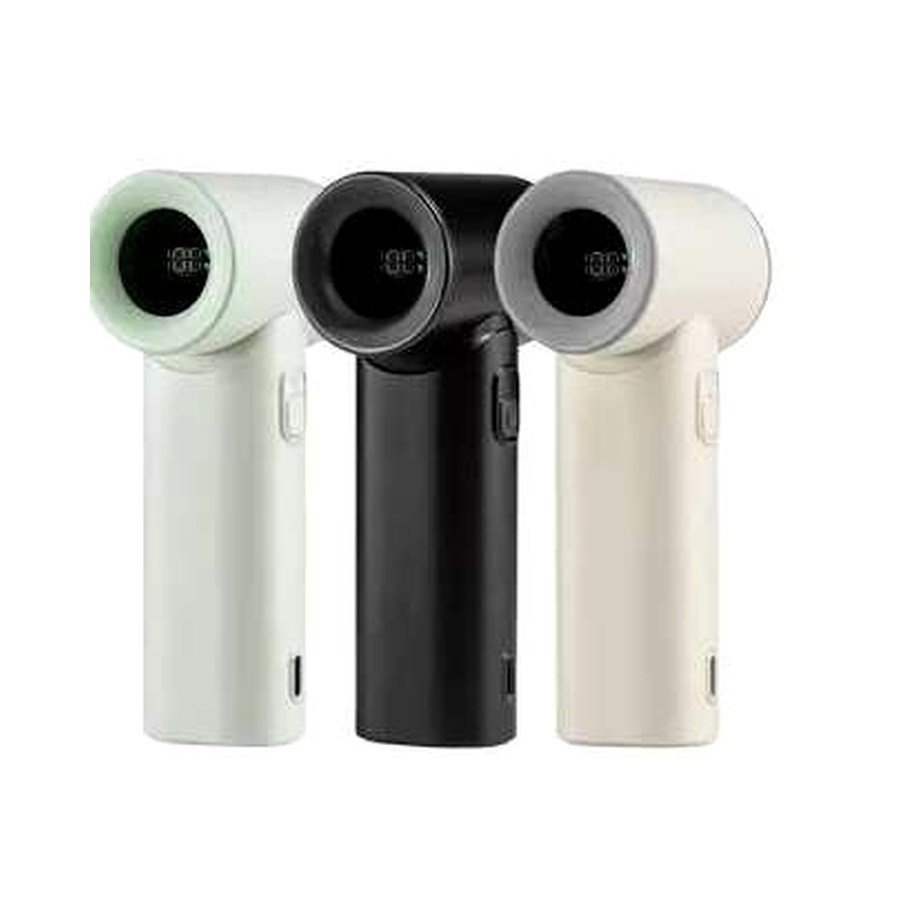
HAVIT HF610 is a compact rechargeable handheld fan, not a mains-powered desk fan. If it won’t charge, its digital battery display remains blank or the motor cuts out quickly, first check the USB power source, charging cable, connector, battery temperature and fan obstruction. The November 2026 HAVIT supplier catalogue lists a 3,000mAh battery, 5V/2A charging input, 3–4-hour charge-time claim, five speed settings and 4–12 hours quoted usage depending on speed. These are supplier estimates, not a diagnostic guarantee for a particular unit.
1. Use the specified safe charging input
The HAVIT HF610 is listed with a 5V/2A input. Connect using a compatible genuine USB cable and normal approved 5V source. Check that the charger works with another suitable low-power device if safe. Do not apply 9V, 12V or unregulated power directly to the fan because another USB-C accessory supports those profiles. USB connector shape alone does not guarantee the same accepted voltage. If the charging cable is frayed or the plug becomes abnormally hot, disconnect and replace it with a safe compatible item.
2. Inspect the charging port without using tools
Look for visible dust, lint, bent pins or moisture around the port. Remove external lint only in a manner permitted by the manual. Do not scrape contacts with metal, flood the port with cleaner, or use excessive insertion force. If the fan has been carried in a handbag or backpack, pocket debris may obstruct a proper connection. If the port feels loose or power connects only when the cable is forced sideways, stop: a damaged port needs professional assessment.
3. Check the display and charging state
The supplier describes an LED digital indicator for wind speed and battery status. The display may behave differently when the motor is off, when charging begins or when the battery is nearly depleted. Read the specific indicator guide from the product manual; do not assume that every blank display means the battery is dead. Let it charge under normal approved conditions and recheck without keeping it inside a hot bag or under fabric. The quoted 3–4 hours is not a universal maximum for all chargers, battery ages and temperature conditions.
4. Why the fan can stop during use
The fan’s five speed settings draw different power. Higher speed often gives shorter endurance within the supplier’s 4–12-hour range. A battery that is almost discharged can cause the fan to stop or lower speed, and battery management may limit operation under abnormal temperature conditions. The quoted 17,400rpm motor number is a specification, not a promise that the fan should run at that speed at all five settings. If the motor stops abruptly while the display still shows substantial charge, note the selected speed and the battery indication before contacting service.
5. Inspect for physical obstruction safely
Switch the fan off and disconnect it from power. Check whether hair, cloth threads or other debris are caught against the accessible front grille. Do not insert fingers, pins or sharp tools through the guard and do not pry open the battery compartment. Removing an obstruction must follow the actual manufacturer cleaning instructions. If the fan makes grinding sounds, its grille is cracked or the blades wobble visibly, stop operating it to avoid injury or further damage.
6. Don’t confuse low airflow with charging failure
If the motor spins but airflow seems weak, check the selected speed and whether the air inlet or outlet is blocked. A poorly placed handheld fan may have its intake covered by a hand, a wall or fabric. The supplier does not give a standardized airflow measurement for each speed, so there is no reliable published metres-per-second target in this source. Compare the different settings using normal safe operation rather than an improvised high-current power supply.
7. Battery safety and storage
Rechargeable lithium devices should not be charged unattended in unsafe environments, left in direct sun or stored in very hot cars. Stop use immediately if the body swells, leaks, smells chemically abnormal, shows smoke or overheats. Do not puncture the battery or attempt to replace it without an approved service procedure. If keeping the fan for a long period between seasons, follow the manufacturer battery-storage guidance instead of repeatedly deep-discharging it.
8. What to tell the seller
Record the HF610 model, the 5V charger and cable tested, any display icons, whether the fan spins, and whether the problem happens on all five speeds. If the device will not respond despite a suitable power supply and safe port checks, service or replacement assessment is appropriate. This guide does not invent a warranty term or assert the exact reason for a specific fan’s failure.
Frequently asked questions
Can I charge the HF610 from a laptop USB port?
Only if it provides an appropriate, functioning 5V output and the product’s charging instructions allow it.
Is a fan with 3,000mAh guaranteed to last 12 hours?
No. The supplier’s 4–12-hour range depends on selected speed and other conditions.
Should I open the fan to replace its lithium battery?
Not without an approved service procedure; damaged lithium cells can present fire and injury hazards.
See the HF610 product listing, our HAVIT portable fan and lamp guide and the HAVIT Kenya hub. Infinite Tech: Rehema House, Standard Street, First Floor Shop 2, Nairobi CBD; 0720 450 148.
Source: HAVIT November 2026 supplier catalogue, HF610 model row. Safety checks are general; the exact manual governs disassembly, cleaning and charging.
