
HAVIT HB41 USB-C Hub: Laptop Compatibility and Port Guide Kenya

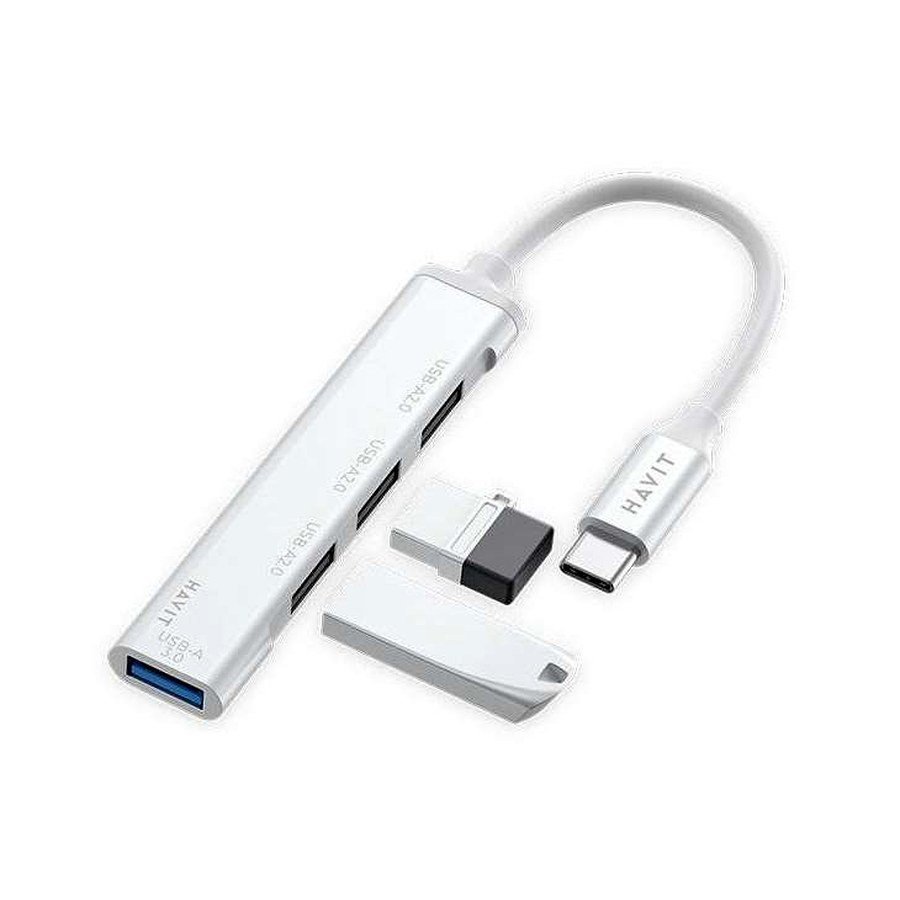
A USB-C laptop with too few ports does not necessarily need an expensive docking station. The HAVIT HB41 is a compact USB-C hub in Infinite Tech’s November 2026 supplier catalogue, marketed as a four-in-one accessory with USB-A 3.0 and USB-A 2.0 support. It may be useful for connecting a traditional keyboard, mouse or flash drive to a compatible USB-C laptop. But the catalogue does not state an HDMI video output, Ethernet port, SD reader or laptop charging passthrough, so none should be promised. This guide explains the difference between a basic data hub and the features that require a more capable docking station.
HAVIT HB41: documented product details
| Feature | Supplier information |
|---|---|
| Exact model | HAVIT HB41 |
| Retail price from live WooCommerce | KSh 1,050 at inspection |
| Product type | 4-in-1 USB-C hub |
| USB-A 3.0 data rate | Up to 5Gbps, per catalogue |
| USB-A 2.0 data rate | Up to 480Mbps, per catalogue |
| Materials and cable | Aluminium-alloy body, approximately 11.8cm captive cable |
| Enclosure dimensions | 80 × 15 × 7mm |
| HDMI / Ethernet / SD / PD input | Not documented in supplier row |
Product information is a distributor specification, not a performance test. Verify the exact installed host-port support before purchase.
What can you plug into an HB41 hub?
The documented USB-A interfaces make the HAVIT HB41 a candidate for traditional USB peripherals such as a wired mouse, keyboard, compatible USB flash drive or low-power receiver. If you have an ultrabook with only USB-C ports, that can free you from using multiple separate adapters. But “four-in-one” is a product description, and the supplier row does not itemize every physical socket in the summary. Confirm the actual physical layout from the product image or a demonstration before ordering several peripherals simultaneously.
Is USB 3.0 5Gbps equal to the speed of a flash drive?
No. 5Gbps is the advertised link ceiling of a compatible USB 3.0 interface under ideal signaling, not a guaranteed file-copy rate. The computer’s USB-C host mode, drive controller, file-system overhead, cable quality, thermal behavior and other attached USB devices affect transfer speed. USB 2.0’s 480Mbps link is suitable for many basic peripherals but can be a bottleneck for a fast SSD. A shared hub may also distribute available throughput across active devices, so the sum of advertised individual port speeds should not be treated as a guaranteed sustained aggregate.
USB-C connectors do not all support the same features
A laptop’s USB-C socket can support data, power, DisplayPort alternate mode, Thunderbolt or other combinations depending on the model. A hub needs its own hardware to expose those functions. The HB41 supplier sheet mentions USB-A data interfaces only; it does not confirm display output or a USB-C Power Delivery charging input. Do not promise that connecting an HB41 will charge a laptop, provide HDMI or mirror to a projector. For those tasks, choose a verified video/PD-capable docking station instead and confirm the exact laptop’s capabilities.
What if the hub is not detected?
- Make sure the laptop USB-C socket supports data; a charge-only device port will not provide standard USB host functionality.
- Reconnect the hub firmly without forcing the connector and check for dust or bent contacts.
- Test one simple known-working USB mouse or flash drive first, without attaching other power-hungry devices.
- Try another suitable USB-C port or computer when available, then inspect the operating system’s device-management information.
- If high-power external drives disconnect, check the computer’s port power capability and choose an appropriately powered hub when necessary.
- Do not open the hub’s enclosure or bypass electrical protection to make a device work.
Pairing the hub with a better desk setup
The HAVIT ST7304 laptop stand is a separate accessory worth considering for a small Kenyan study or work desk. Its supplier entry describes an aluminium-alloy foldable stand with six tilt-height adjustments, supporting laptops and tablets up to 16 inches. It was listed at KSh 920 in WooCommerce at inspection. A raised screen can help improve line of sight in some setups, while an external keyboard/mouse connected through HB41 may make prolonged typing more comfortable. Confirm stand stability, laptop fit and cable reach; the hub’s captive cable is only about 11.8cm long.
What should Nairobi buyers choose?
For a keyboard, mouse receiver and occasional USB flash-drive access on a compatible USB-C laptop, a basic data hub such as HB41 may be sufficient. If you need to connect an external 4K monitor, HDMI projector, Ethernet, SD card or laptop charger, verify an entirely different hub’s published ports and power budget rather than assuming all USB-C hubs perform those tasks. Shop for your real use case, not the largest “in-one” marketing number.
Frequently asked questions
Does HAVIT HB41 connect to HDMI?
No HDMI capability is documented in the supplier row. Do not buy it expecting projector or monitor video output without a confirmed port specification.
Can I plug in a USB mouse and keyboard?
The advertised USB-A data interfaces suggest common low-power USB peripherals may work, subject to host compatibility and the number of ports on the specific unit.
Will HB41 charge my laptop while it connects peripherals?
The source does not describe Power Delivery charging passthrough. Check a different verified PD hub if that is essential.
Check the exact HAVIT listings
View HB41 USB-C hub and ST7304 laptop stand. See also the HAVIT computer accessories buying guide and HAVIT Kenya hub. Infinite Tech is located in Rehema House, Standard Street, First Floor Shop 2, Nairobi CBD. Call 0720 450 148 for current prices and physical port confirmation.
Source: HAVIT November 2026 supplier catalogue, page 9; WooCommerce products HB41 (97178) and ST7304 (97183). No throughput/compatibility testing performed.

One thought on “HAVIT HB41 USB-C Hub: Laptop Compatibility and Port Guide Kenya”
Comments are closed.