
HAVIT GSC107-US 27-Inch 1440p 180Hz Monitor: Kenya Buyer Guide

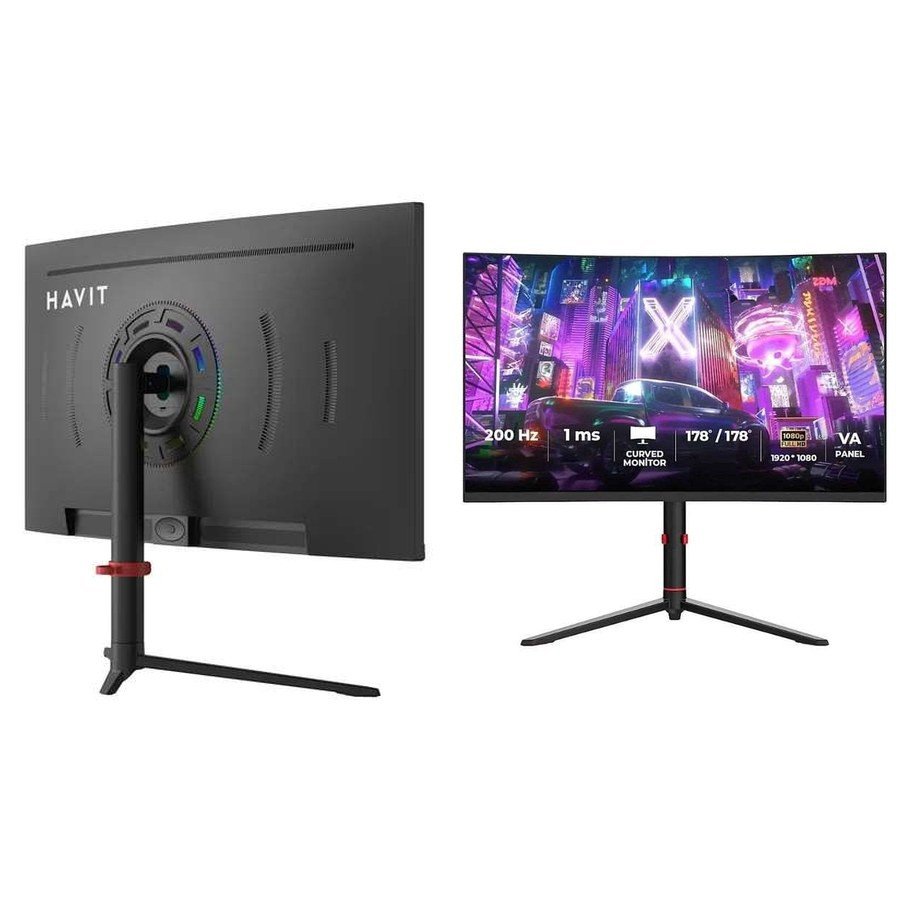
Is the HAVIT GSC107-US a 27-inch Full HD or QHD gaming monitor? This is the most important specification to resolve before buying it in Kenya. The November 2026 supplier catalogue uses the phrase “Curved 27-inch Full HD 2560 × 1440 VA Computer Monitor,” but repeats 2560 × 1440 in the technical resolution field. A 2560 × 1440 image is ordinarily called QHD/WQHD (1440p), not Full HD (1920 × 1080). That wording inconsistency should be clarified against the physical monitor or exact manufacturer’s manual, rather than copied uncritically into search descriptions.
HAVIT GSC107-US: verified listing and documented features
| Specification | Supplier listing |
|---|---|
| Infinite Tech WooCommerce price checked | KSh 36,995 |
| Screen size and panel | 27-inch VA, described as curved |
| Specified pixel resolution | 2560 × 1440 (QHD/WQHD by pixel count) |
| Refresh-rate claim | Up to 180Hz typical |
| Inputs listed | 2 × HDMI, 2 × DisplayPort, audio output, DC input |
| Response timing claims | 5ms GTG, 2ms with overdrive, 1ms MPRT |
| Typical static contrast claim | 5000:1 |
| Viewing angle claim | 178° horizontal / 178° vertical |
| Height adjustment | 130mm ±5mm |
| VESA mount reference | 100 × 100mm with stated adapter plate |
These are supplier facts and marketing claims, not measurements obtained by Infinite Tech. The manufacturer label and exact supported timing mode should be checked before paying.
1440p vs 1080p: what is the actual difference?
Full HD contains 1920 × 1080 pixels, approximately 2.07 million pixels per frame. 2560 × 1440 contains approximately 3.69 million, about 78% more. On a 27-inch screen, that extra pixel density can make text and desktop work appear sharper at appropriate scaling, but it also places a higher graphics-rendering load on the PC in games. Because the HAVIT supplier description contradicts itself by calling 2560 × 1440 “Full HD,” confirm the screen’s supported native display resolution in the product OSD, box label or official model-specific manual.
Will every PC show 180Hz?
No. The supplier lists a 180Hz typical refresh rate, but the table does not say which connector, cable, colour depth, timing standard or graphics card is required to achieve 2560 × 1440 at 180Hz. Some HDMI and DisplayPort versions support different limits, and laptop adapters can impose additional restrictions. Before purchasing, check whether your GPU and chosen cable support the monitor’s exact maximum mode. In Windows, the refresh rate can often be reviewed under Advanced Display settings after connection. Do not assume that enabling a 180Hz option improves game frame rates if the computer cannot render them.
Is “1ms” the same as measured pixel response?
The manufacturer sheet separates 5ms GTG, 2ms with overdrive and 1ms MPRT. These measure or describe different aspects of motion. An MPRT marketing figure is not interchangeable with full-range grey-to-grey response behavior, and an aggressive overdrive setting may introduce visible inverse ghosting. A proper independent response-time test would evaluate a range of transitions, several refresh rates and overdrive modes. Those tests have not been conducted for this model in this guide.
What should a shopper know about a VA panel?
VA stands for vertical alignment, a common LCD panel technology. The catalogue lists a typical 5000:1 contrast ratio, but real contrast varies by brightness setting, sample and measurement method. A VA panel can be attractive for deeper dark scenes compared with certain alternatives, while fast transitions in dark areas may need inspection for smearing. The catalogue does not establish HDR certification, adaptive-sync support, factory colour calibration or gamut coverage; avoid assuming those features merely because the monitor is positioned for gaming.
Stand, desk space and wall mounting
The supplier lists a 130mm height-adjustment range, forward tilt of 5° ±3°, backward tilt of 20° ±3° and limited side rotation. An adapter plate is mentioned for 100 × 100mm VESA mounting. Check whether that plate is included and whether your chosen monitor arm supports the unit’s actual weight and mounting position. The stated assembled dimensions are 612 × 212 × 512mm, useful for checking desk depth, nearby speakers and multi-monitor placement. The exact curvature radius is not given in the supplier row, so do not invent an “R” curvature number.
Which Kenyan buyers should consider it?
- PC gaming: investigate when your graphics card can run suitable games at 1440p, and verify how 180Hz is attained.
- Office multitasking: the 27-inch size and advertised 2560 × 1440 pixels may suit spreadsheets, editing and side-by-side documents after checking the actual native mode.
- Console gaming: confirm that your console supports the monitor’s accepted input timings and refresh modes. A PC-centric 180Hz specification does not promise identical console behavior.
- Colour-critical creation: request verified colour-gamut and calibration data; those are not included in the supplier summary.
Frequently asked questions
Is the HAVIT GSC107-US a 2K monitor?
The supplier repeatedly lists 2560 × 1440 pixels, usually marketed as QHD or 1440p; its “Full HD” phrase is inconsistent. Confirm the physical unit’s native resolution before purchase.
Does it have DisplayPort?
The November 2026 sheet lists two DisplayPort and two HDMI inputs, but does not state their protocol versions.
Is it guaranteed to run at 180Hz on HDMI?
No. Supported resolution-refresh combinations by connector are not documented in the provided catalogue row.
Inspect the exact product in Nairobi
See the HAVIT GSC107-US gaming monitor product listing for its current WooCommerce price, or browse the HAVIT computer accessory guide and HAVIT Kenya hub. Infinite Tech is at Rehema House, Standard Street, First Floor Shop 2, Nairobi CBD. Call 0720 450 148 to confirm the actual monitor label, display mode, accessories and physical availability.
Source: HAVIT Accessories November 2026 supplier catalogue, page 9, and live WooCommerce listing 97174. Native-resolution wording is internally inconsistent in the supplier source and remains a verification item.
