
Affordable Laptops for Client Meetings and Presentations in Kenya: Choose With Confidence

Feeling ready for a client meeting starts with a setup you know how to use. Choose a laptop that handles your documents, connects to the room display and works with your meeting software. A tidy, well-kept machine can be satisfying to carry, while preparation gives that purchase a practical purpose.
Catalogue and prices checked: 21 October 2026. These are dated listing prices, not reserved stock or a unit inspection. Follow each product link for the current offer. Our review methodology explains the use of catalogue and manufacturer evidence.
Start with the meeting you actually attend
A consultant sharing a proposal, an accountant discussing a workbook and a developer demonstrating a web application need different preparation. List the files and applications involved, how you will present and whether you will join a video call. Include your actual browser and expected network access. Prepare an appropriate offline copy when your work allows it.
Avoid judging a purchase by appearance alone. A compact chassis is useful when you carry it often, but the keyboard, display readability, microphone and output connections must support your routine. The business-features guide and screen-size comparison help assess those details.
Four configurations to shortlist
| Offer | Listed strength to assess | Price checked |
|---|---|---|
| HP EliteBook 840 G8 i7 16GB/512GB | 14-inch FHD working format | KSh 49,500 |
| Dell Latitude 5520 i7 16GB/512GB | 15.6-inch FHD for larger on-device viewing | KSh 53,000 |
| ThinkPad T14s i7 32GB/512GB touch | Touch input and installed memory | KSh 53,500 |
| Dell XPS 13 9310 i7 32GB/512GB non-touch | Compact format; plan adapters | KSh 59,000 |
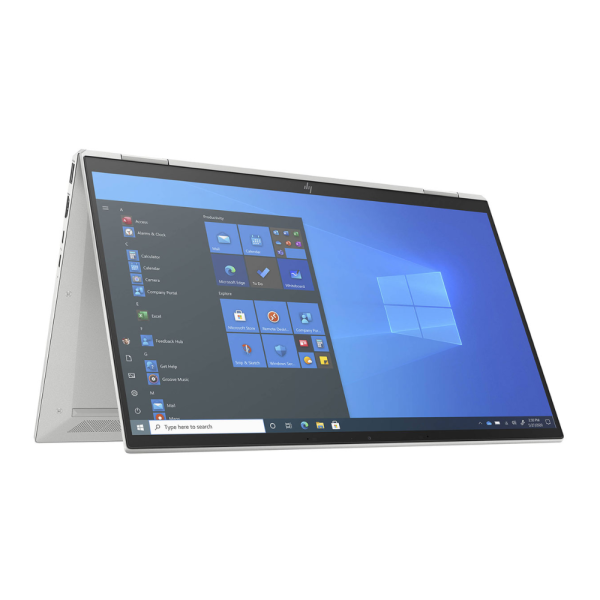
These are catalogue-based shortlists, not a promise that any offer will run your presentation or application flawlessly. Check the exact CPU, panel, unit condition and intended software. If 360-degree conversion is useful, compare the separate EliteBook x360 1040 G8 32GB/512GB at KSh 65,000 and confirm its touchscreen and hinges. A touchscreen T14s is not automatically a convertible.
Prepare the display connection before the day
Ask whether the venue uses HDMI, DisplayPort, VGA or another connection. Match it against the actual laptop and adapter. Test the same cable route, display mode and resolution with an external screen where possible. Confirm any adapter or dock is part of your quoted purchase if you need it.
Microsoft explains the Windows multiple-display options. Windows + P opens the projection choices: Duplicate shows the same content on both screens, while Extend creates additional desktop space. Rehearse with your application so you know which screen contains the audience view and which contains your working windows.
Check calls as a complete audio and video setup
Join a test meeting using the intended camera, microphone, speaker or headset. Check input and output selection, framing, lighting and the connection used to reach the internet. An external monitor is not proof of an included camera. Keep the laptop camera available when it is the device you plan to use.
A USB headset can be useful for a consistent audio connection. The Logitech H340 is listed at KSh 6,500, and Logitech’s reference identifies its USB-A connection. Count that socket alongside other peripherals. Test real compatibility instead of assuming that any adapter arrangement will work.
Handle battery and documents deliberately
Review the battery condition of the offered unit and test a realistic unplugged session. Carry the correct charger when the venue permits it. Do not plan a full day around an original model-family runtime claim. Confirm the meeting location’s power and connection arrangements beforehand.
Use non-confidential sample files when shopping. For the actual presentation, confirm access to the required documents and apply your organisation’s sharing and notification rules. A prepared, clear demonstration should be the focus of the meeting; no particular laptop can guarantee a client’s opinion or a business outcome.
A rehearsal checklist
- Open the final document and check fonts, media, links and any offline material.
- Connect the intended display and confirm the audience view.
- Test camera, microphone, audio output and network access.
- Pack the correct charger and any confirmed adapter or cable.
- Review the battery report and your actual unplugged needs.
For everyday desk use between meetings, see the home-office equipment plan. Use the under-KSh-60,000 shortlist for a tighter purchase ceiling, or the corporate buying checklist when sourcing machines for a team. The existing business laptop guide gives a wider selection framework.
Check the machine behind the meeting setup
Use the battery-report guide alongside an agreed unplugged demonstration. The T14s working-day plan brings calls, presentations, documents and coding into one evaluation sequence; the freelancer guide adds a client-project equipment brief.
Frequently asked questions
Which laptop looks professional in a meeting?
Choose a well-kept unit and a working setup you are comfortable using. Appearance is personal; verify useful features and condition.
Does an expensive laptop make a client trust me?
A device does not guarantee a client’s opinion. Preparation, clear communication and a working demonstration remain essential.
Is a larger laptop always better for presentations?
No. Compare travel needs, on-device readability and the external screen you will use.
Should I buy touch for presentations?
Choose touch if it serves your workflow. A standard touchscreen laptop is different from a convertible design.
What does Windows + P do?
It opens Windows projection options such as Duplicate and Extend when preparing compatible displays.
Does the XPS offer include an HDMI adapter?
Inclusion is not established by the listing. Confirm the exact adapter and accessory package before ordering.
How much RAM do meeting users need?
Match the applications and files involved. Presentation work does not automatically require 32GB.
Should I test the microphone before purchase?
Yes. Test the intended meeting application with the actual camera, microphone and audio output you plan to use.
Can I assume a full-day battery?
No. Check the current battery report and a representative unplugged task on the available unit.
Where can a new professional start?
Use the first-professional-laptop guide to plan requirements, budget and inspection.
Find your Infinite Pro fit
Start with Infinite Pro: Serious work. Smart investment. or Executive Pro. Contact Infinite Tech at Rehema House, Nairobi, or call 0720 450 148. Tell us your applications, spending limit and daily setup so the quotation can specify the actual unit, accessories and total cost. Review warranty information and delivery information before ordering.
3 thoughts on “Affordable Laptops for Client Meetings and Presentations in Kenya: Choose With Confidence”
Comments are closed.