
Lenovo ThinkPad vs IdeaPad for University Students

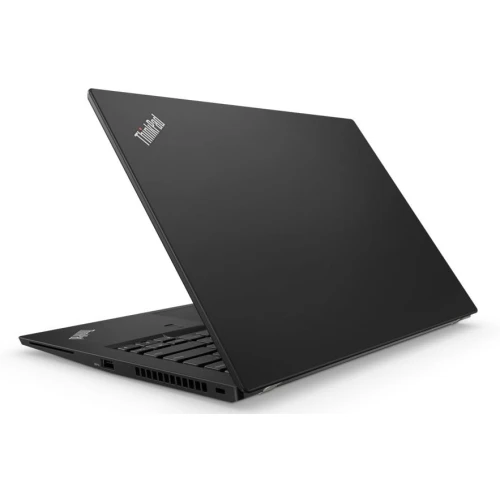
For university students in Kenya, the useful ThinkPad-versus-IdeaPad question is whether a particular configuration meets the course requirements at the right complete cost. A refurbished business model and a newer everyday laptop can both be sensible choices. Neither family guarantees a better result without checking processor, memory, display, battery condition and software support.
Catalogue and references checked: 20 October 2026. Prices below are Infinite Tech catalogue asking prices for the stated configuration. Confirm the actual unit, availability, accessories and written warranty before payment.
Use the university laptop buying guide to establish your course requirements first. The Lenovo options below KSh 30,000 provide a separate route when budget is the main constraint.
For coding courses, consult the programming laptop guide before choosing a processor badge. Compare Yoga and ThinkPad Yoga if convertible features would improve your study workflow.
ThinkPad vs IdeaPad: match the student’s workload
| Choice | What to compare | Buying implication |
|---|---|---|
| Ordinary coursework | Documents, browser research and online classes | Prioritise SSD responsiveness, sufficient memory and a usable battery |
| Programming and technical courses | Check the institution’s exact software list | Compare CPU architecture, memory requirements and supported OS |
| Handwriting or presentations | Confirm a true convertible and compatible pen | Do not pay for touch unless it improves the workflow |
Start with the university’s applications and assessment tools
Write down the programs required by the course, including any exam software, VPN, specialist driver or laboratory application. Then check the publisher’s current operating-system and hardware requirements. A laptop that opens lecture PDFs is not automatically suitable for every engineering, architecture or data-analysis assignment.
This step can save more money than choosing between two brand tiers. If the course requires a specific Windows application, confirm the exact supported setup before buying. If the work is mostly browser-based, documents and video calls, a suitable older business machine may offer a more affordable route. The decision should follow actual course tasks, not a claim that all students need the same processor.
Compare equal memory and storage before comparing families
An 8GB/256GB ThinkPad should not be judged against a 16GB/512GB IdeaPad without accounting for those differences. Ask how many applications will be open together and whether large files will be stored locally. Memory and storage have different roles: a larger SSD does not substitute for enough RAM.
Also check whether future upgrades are possible. Some ThinkPads have replaceable memory, while compact models such as the T490s use soldered RAM. IdeaPad designs also vary. Request the exact machine code and supported upgrade path instead of relying on a seller’s general statement about the family. Include the cost of any necessary work in the comparison.
Give the keyboard, screen and battery a real trial
Try writing a paragraph, editing a spreadsheet and joining a short video call on the candidate laptop. These simple tasks reveal keyboard problems, screen discomfort and microphone issues that a specification table can miss. Test the brightness you will use in a classroom and check the webcam in ordinary indoor lighting.
For a used ThinkPad, inspect present battery health and charging behaviour. For a newer IdeaPad, confirm the stated condition and warranty rather than assuming a recent-looking model is factory-new. If the laptop will spend most of its time in a hostel room, an external keyboard or monitor may matter more than the smallest chassis. A daily commuter may make the opposite trade-off.
Budget for the full academic year, not just the laptop
Allow for a suitable charger, transport protection, required software licences and dependable backup storage. A low purchase price loses its advantage if the battery needs immediate replacement or the required display adapter is missing. Keep a small margin for these practical needs instead of spending the entire budget on a processor badge.
Read the written warranty and ask what it covers for the specific new or refurbished unit. Check the support status of the operating system and the exact CPU’s eligibility for the intended Windows version. When comparing the linked offers, remember that the different prices reflect different configurations and conditions; they are catalogue examples, not evidence that every ThinkPad or IdeaPad has the same value.
Real Infinite Tech catalogue examples
These links lead to individual listings, not a promise that every model in the wider family is available. Compare the complete configuration rather than the processor badge alone.
| Exact listing | Listed price | Next check |
|---|---|---|
| Lenovo ThinkPad T480s Core i5 8th Gen 8GB RAM 256GB SSD Non-Touch | KSh 25,000 | Confirm unit condition, exact components and what is included |
| Lenovo ThinkPad T490s Core i7 8th Gen 16GB RAM 256GB SSD Non-Touch | KSh 30,000 | Confirm unit condition, exact components and what is included |
| Lenovo IdeaPad Slim 3 Ryzen 5 8GB 512GB SSD 15" (82XQ01BGRM) | KSh 79,500 | Confirm unit condition, exact components and what is included |
| Lenovo IdeaPad Flex 5 14IAU7, Intel Core i7 1255U, 16GB RAM, 512GB SSD, 14-inches – 82R700E0UE | KSh 120,000 | Confirm unit condition, exact components and what is included |
A practical buying decision
For a tight budget, compare a well-checked refurbished ThinkPad with enough memory and an SSD. For a higher budget, compare an appropriate IdeaPad on equal specifications, support and condition. Choose the machine that handles your real course work comfortably and leaves room for the essential accessories.
Frequently asked questions
Is ThinkPad only for office workers?
No. A suitable configuration can serve university work; course requirements and unit condition determine suitability.
Is IdeaPad automatically better because it is newer?
No. Compare the exact CPU, RAM, display, software support and complete price.
Do all students need a touchscreen?
No. It is useful when supported handwriting or presentation workflows justify it. It is optional for many document-based tasks.
Can I choose from the Core i5 or Core i7 label alone?
No. Ask for the full processor model and compare the rest of the configuration.
Related Infinite Tech buying pages
- Laptop Knowledge Centre
- Compare all laptops
- Best Laptops for University Students in Kenya 2026: Course & Budget Guide
- Computer science laptop guide
More Lenovo buying guides
- Lenovo Laptop Prices in Kenya: ThinkPad, IdeaPad and Yoga Compared
- Lenovo Yoga vs ThinkPad Yoga: Differences Buyers Should Understand
- Best Refurbished Lenovo Laptops Under KSh 30,000
Manufacturer references and research method
This is a research-based buying guide, not a hands-on test or a benchmark report. Manufacturer references describe supported options; the linked catalogue identifies the configuration being offered. Model-specific details should be matched to the full product code or service tag.
- Lenovo ThinkPad T480 specifications
- Lenovo ThinkPad T480s platform specifications
- Lenovo ThinkPad T490s specifications
Confirm your laptop with Infinite Tech
Contact Infinite Tech at Rehema House, Nairobi, on 0720450148. Ask for the full model code, a written specification and the applicable warranty. Read warranty information, delivery information and contact Infinite Tech before placing an order.
One thought on “Lenovo ThinkPad vs IdeaPad for University Students”
Comments are closed.