
Dell Latitude 5400 vs 5410 vs 5420: Which Offers Better Value?

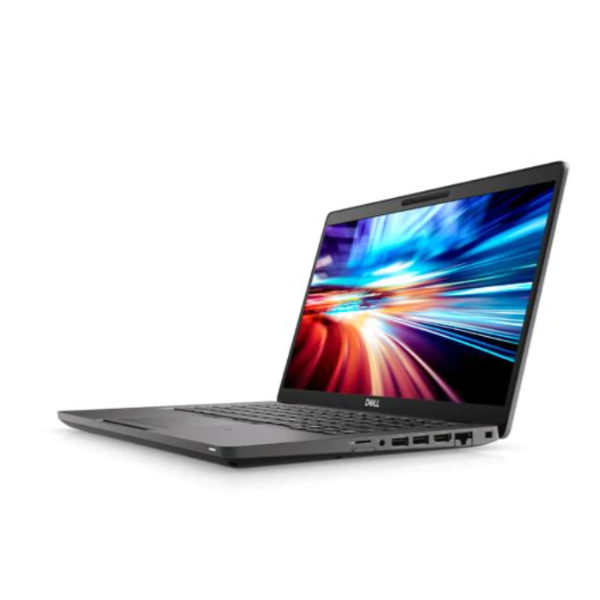
The Latitude 5400, 5410 and 5420 can sit close together on a Kenyan buyer’s shortlist, but a later model number is only part of the value calculation. Compare the actual CPU, installed RAM, SSD, display and condition, then decide whether the extra cost improves your work. The linked examples are different configurations rather than a controlled performance test.
Catalogue and references checked: 20 October 2026. Prices below are Infinite Tech catalogue asking prices for the stated configuration. Confirm the actual unit, availability, accessories and written warranty before payment.
The Latitude buying guide explains the broader business range. The Dell guide below KSh 40,000 provides budget context without treating different configurations as identical offers.
Use the second-hand inspection checklist on the actual machine. The used Dell inspection guide adds charger recognition and firmware-access checks to the comparison.
Dell Latitude 5400, 5410 and 5420 at a glance
| Choice | What to compare | Buying implication |
|---|---|---|
| 5400 example | Core i5 8th Gen, 16GB RAM, 512GB SSD | More listed memory and storage than some newer offers |
| 5410 example | Core i5-10210U, 8GB RAM, 256GB SSD | Compare the complete cost if upgrades are needed |
| 5420 example | Core i7-1185G7, 16GB RAM, 512GB SSD; listed HD display | Confirm the exact panel before paying for the generation |
Normalise memory, storage and display before judging price
The 5400 example below lists 16GB RAM and a 512GB SSD, while the 5410 example lists 8GB and 256GB. Comparing their prices as if only the CPU generation changed would give a misleading result. Add the cost of any necessary upgrade before deciding which offer is cheaper for your workload.
The 5420 listing also deserves a display check because its title identifies an HD panel. Do not silently assume Full HD from the model family. Ask for the resolution and inspect it in use. A buyer who spends hours reading documents or spreadsheets may value a better-matched screen more than a processor tier that does not change the daily task.
Pay for improvements you can identify in your own workflow
For ordinary office use, research and calls, test a realistic combination of applications on the actual machine. For development or analysis, compare the required CPU features, memory and storage against the tools you will run. A newer processor can be relevant, but the benefit should be assessed alongside the other limitations.
Avoid assigning an invented percentage improvement from the model name. These machines have different CPU options and can behave differently with power settings, cooling condition and memory configuration. If a benchmark matters, use the same test conditions and disclose the exact hardware. This guide makes no measured performance claim for the stock units.
Check ports, docking and upgrade support by service tag
A useful office upgrade may be better compatibility with your existing monitor, dock or network setup. Check the supported connections in the exact model’s Dell documentation and test the equipment you use. The shape of a USB-C socket does not establish every charging, video or docking feature.
Ask which memory modules and drives are fitted and which upgrade options are supported. Keep the service tag or model code on the quote so that a technician consults the matching manual. Do not transfer a RAM limit or storage assumption from one generation to another merely because all three names begin with Latitude 54.
Let unit condition and the final cost settle the shortlist
Inspect the battery report, charger recognition, screen, hinges and keyboard. Test charging and a short unplugged task. Verify firmware access and normal personal setup before paying. These checks matter on all three generations because a clean newer-looking chassis does not establish battery health or ownership status.
Then compare a written ready-to-use total. If the older machine already meets the task with enough memory and storage, its price advantage may be useful. If the newer machine supplies a verified feature your work needs, the premium can be justified. Keep the exact display, warranty and included accessories visible so that a later substitution does not change the basis of your decision.
Real Infinite Tech catalogue examples
These links lead to individual listings, not a promise that every model in the wider family is available. Compare the complete configuration rather than the processor badge alone.
| Exact listing | Listed price | Next check |
|---|---|---|
| Dell Latitude 5400 Core i5 8th Gen 16GB RAM 512GB SSD 14-inch | KSh 32,500 | Confirm unit condition, exact components and what is included |
| Dell Latitude 5410 14-inch Laptop Intel i5-10210U 10th Gen 8GB DDR4 256GB NV Me Windows10 BOXED | KSh 31,995 | Confirm unit condition, exact components and what is included |
| Dell Latitude 5420 Intel Core i7-1185G7 16GB RAM 512GB SSD 14 Inch HD Display | KSh 42,500 | Confirm unit condition, exact components and what is included |
A practical buying decision
Shortlist all three only when the configurations genuinely meet your needs. Compare equal RAM, SSD, display quality and condition, then pay for a generation change when its specific advantages matter to your work.
Frequently asked questions
Is the 5420 automatically the best value?
No. Check the actual panel, memory, processor and condition against its price.
Can I compare an 8GB 5410 directly with a 16GB 5400?
You can compare them, but the memory difference and any upgrade cost must remain part of the decision.
Does every 5420 have a Full HD display?
Do not assume it. Confirm the panel on the exact listing and unit.
Are the prices a benchmark ranking?
No. They are catalogue asking prices for different configurations, not measured speed results.
Related Infinite Tech buying pages
More Dell buying guides
- Dell Laptop Prices in Kenya: Latitude, Inspiron, XPS and Precision
- Dell Latitude vs Inspiron for Students and Office Work
- Best Dell Laptops Under KSh 40,000 in Kenya
Manufacturer references and research method
This is a research-based buying guide, not a hands-on test or a benchmark report. Manufacturer references describe supported options; the linked catalogue identifies the configuration being offered. Model-specific details should be matched to the full product code or service tag.
Confirm your laptop with Infinite Tech
Contact Infinite Tech at Rehema House, Nairobi, on 0720450148. Ask for the full model code, a written specification and the applicable warranty. Read warranty information, delivery information and contact Infinite Tech before placing an order.
One thought on “Dell Latitude 5400 vs 5410 vs 5420: Which Offers Better Value?”
Comments are closed.