
ThinkPad X280 vs X390 vs X13: Portable Laptop Buying Guide

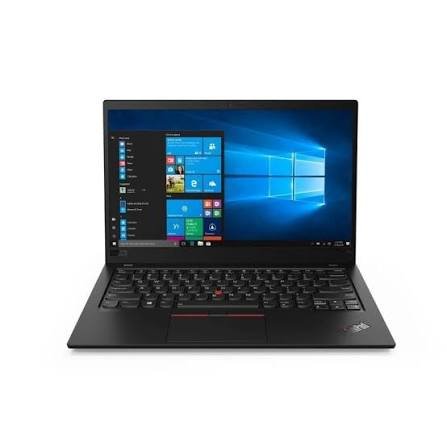
The ThinkPad X280, X390 and X13 are useful candidates for Kenyan buyers who want a portable work or study laptop. The important differences are not just the number in the name. Screen size, installed memory, exact processor and the condition of the particular unit should decide the shortlist. This comparison concerns the conventional X280, X390 and X13 Gen 1 examples below; X390 Yoga and X13 Yoga are separate convertible designs.
Catalogue and references checked: 20 October 2026. Prices below are Infinite Tech catalogue asking prices for the stated configuration. Confirm the actual unit, availability, accessories and written warranty before payment.
The university laptop guide helps balance carrying comfort with course requirements. Compare ThinkPad T480, T480s and T490s if a larger business notebook is also under consideration.
The ThinkPad buying guide explains the broader model families. Read Yoga vs ThinkPad Yoga if your shortlist also includes a convertible rather than a conventional notebook.
ThinkPad X280, X390 and X13: portable options
| Choice | What to compare | Buying implication |
|---|---|---|
| X280 | 12.5-inch platform; verify HD or Full HD panel | Compact screen, with installed memory important |
| X390 | 13.3-inch platform with multiple panel and CPU options | More screen area without treating every configuration as identical |
| X13 Gen 1 Intel | 13.3-inch platform; generation must be specified | Check the Intel configuration separately from AMD and Yoga variants |
Choose screen comfort before choosing a smaller bag
The X280’s 12.5-inch screen and the 13.3-inch X390/X13 designs create a practical choice for mobile work. Smaller can be convenient for travel, but it can also make side-by-side documents or spreadsheets less comfortable. Open a real assignment or workbook and test text scaling at a distance you would normally use.
Resolution matters alongside diagonal size. Lenovo lists different panel options for these platforms, so a family-level specification is not proof of the panel in a used unit. Ask for the display resolution shown by the operating system and inspect viewing angles, brightness uniformity and any pressure marks. Touch capability should be confirmed independently of the model name.
Installed RAM deserves special attention on compact models
Lenovo’s X280 and X13 Gen 1 Intel documentation describes soldered memory configurations. The X390 also has model-specific soldered memory options. Do not buy a low-memory unit assuming that an inexpensive RAM module will solve the limitation later.
Compare a 16GB example with an 8GB one using the complete price difference and your expected workload. A student who will run virtual machines or several development tools has different needs from someone writing documents and attending online classes. SSD capacity should also be considered, but an external drive can solve some storage needs while it cannot create an internal RAM slot that the design does not have.
Keep the exact CPU and generation visible in the quote
An X13 label alone is incomplete because there are several generations and processor variants. Likewise, the X390 should not be reduced to an assumption about one processor. Request the full CPU identifier and full machine type, then compare them with Lenovo’s platform reference.
The linked catalogue examples identify their advertised RAM and SSD, but those descriptions are not a fresh inspection of the unit reserved for you. At collection, compare the system information screen with the invoice. Do not treat ‘Core i7’ as a guarantee of better value than every Core i5 configuration, especially when memory capacity, battery condition or the display differ between offers.
Test the mobile features that make the purchase useful
A portable laptop needs a dependable charging connection, useful battery health and working wireless connections. Test Wi-Fi, webcam, microphone and speakers with a short call. Plug in the charger and check for stable charging before testing the laptop away from the socket.
Also check how you will connect a projector or desktop monitor. An adapter that is required every day belongs in the purchase budget. If you need handwriting, consider the distinct Yoga models only after confirming pen compatibility; a standard X390 with a touch option should not automatically be treated as an X390 Yoga. Finally, confirm firmware access and that normal personal setup is possible without an unknown organisation’s restrictions.
Real Infinite Tech catalogue examples
These links lead to individual listings, not a promise that every model in the wider family is available. Compare the complete configuration rather than the processor badge alone.
| Exact listing | Listed price | Next check |
|---|---|---|
| Lenovo ThinkPad X280 Core i7 8th Gen 16GB RAM 256GB SSD Touchscreen | KSh 28,000 | Confirm unit condition, exact components and what is included |
| Lenovo ThinkPad X390 Intel® Core i5(8 CPUs) 8GB RAM 256GB SSD 13.3 Full HD | KSh 29,000 | Confirm unit condition, exact components and what is included |
| Lenovo ThinkPad X13 Gen 1 Core i5 10th Gen 16GB RAM 256GB SSD Non-Touch | KSh 34,495 | Confirm unit condition, exact components and what is included |
A practical buying decision
Choose the X280 when its compact screen and installed memory meet your needs. Compare X390 and X13 Gen 1 offers when you want a 13.3-inch workspace, then let the exact CPU, battery health and full price decide. Keep conventional and Yoga models separate.
Frequently asked questions
Is an X390 the same as an X390 Yoga?
No. Keep the conventional notebook and convertible model separate when checking specifications.
Can I add RAM to every X280?
No. Lenovo documents soldered memory, so the installed capacity matters before purchase.
Is every X13 newer than every laptop listed as X390?
Use the full generation and CPU information. A short product name is not a complete age or performance comparison.
Which is best for frequent travel?
Compare the actual carry weight, battery health, charger and screen comfort. There is no universal winner from the family name alone.
Related Infinite Tech buying pages
More Lenovo buying guides
- Lenovo Laptop Prices in Kenya: ThinkPad, IdeaPad and Yoga Compared
- ThinkPad T480 vs T480s vs T490s: Which Should You Buy?
- Used ThinkPad Buying Checklist: Battery, USB-C Charging and BIOS Locks
Manufacturer references and research method
This is a research-based buying guide, not a hands-on test or a benchmark report. Manufacturer references describe supported options; the linked catalogue identifies the configuration being offered. Model-specific details should be matched to the full product code or service tag.
Confirm your laptop with Infinite Tech
Contact Infinite Tech at Rehema House, Nairobi, on 0720450148. Ask for the full model code, a written specification and the applicable warranty. Read warranty information, delivery information and contact Infinite Tech before placing an order.