
PS5 Accessories Buying Guide Kenya: What to Buy First

Checked 20 October 2026. Prices below are Infinite Tech catalogue snapshots in Kenyan shillings. Confirm the exact model, physical availability, package and warranty before ordering. This is a research-based buying guide using manufacturer documentation, rather than a hands-on laboratory review.
A PS5 accessories buying guide should help you solve the next problem in your setup. Start with the console and what its package includes. A disc drive, charging station, camera and storage upgrade each serve a different purpose; none belongs in every buyer’s basket.
Match accessories to the exact CFI console revision, controller and intended use. The catalogue also includes licensed and third-party products alongside Sony items. WD_BLACK storage is a Western Digital product, and a generic cooling stand should not be presented as an official Sony requirement.
| Model | Listed price | Main buying consideration |
|---|---|---|
| PS5 DualSense Wireless Controller | KSh 9,895 | Second DualSense for supported local multiplayer |
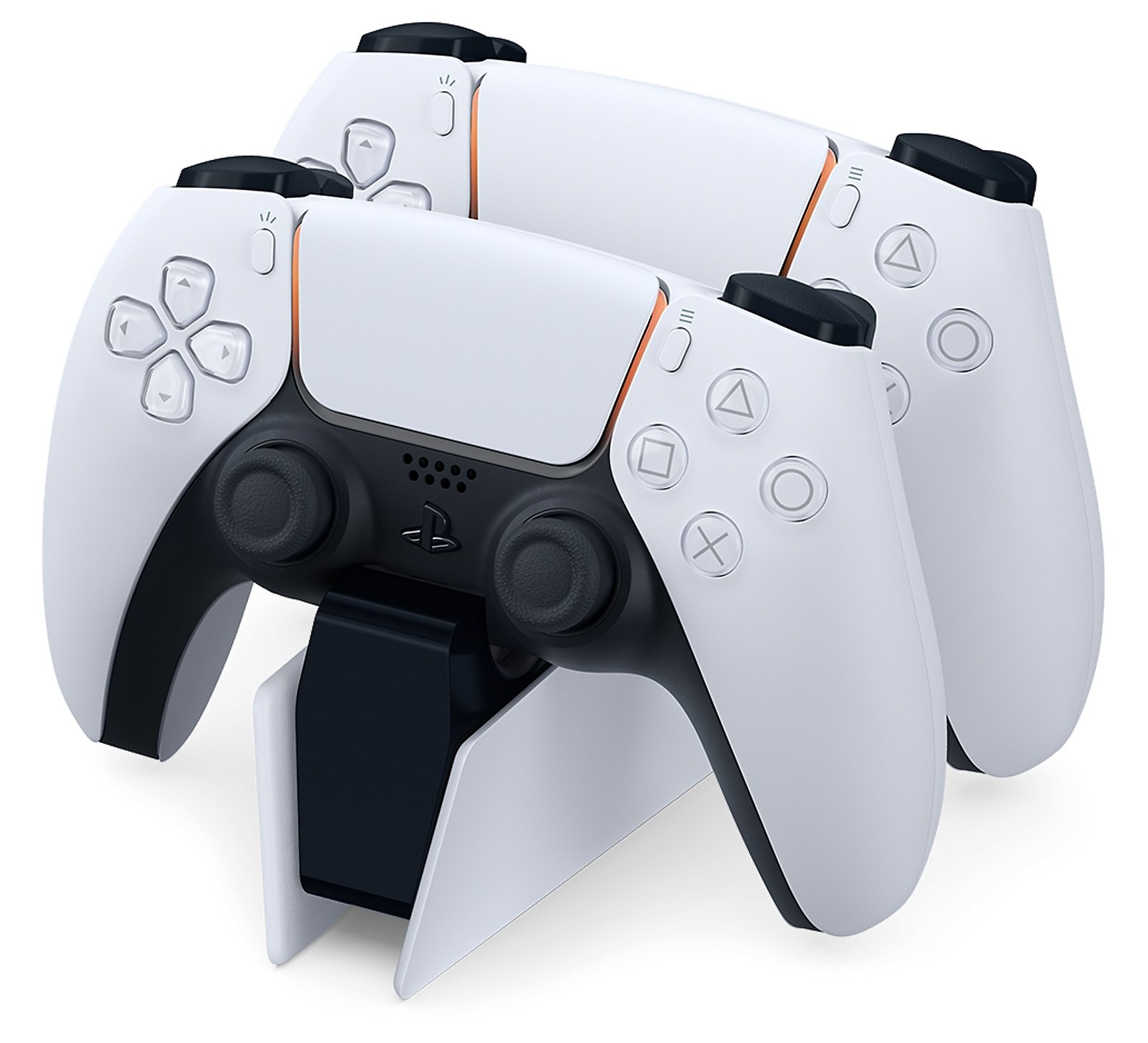
| Sony DualSense Charging Station for PS5 | KSh 5,495 | Official DualSense charging station |
| Disc Drive for PS5 Digital Edition Slim and PS5 Pro | KSh 17,495 | Disc drive for compatible later console model groups |
| Sony HD Camera for PlayStation 5 | KSh 7,495 | HD Camera for supported broadcast functions |
| Sony PlayStation 5 Media Remote | KSh 5,495 | Media Remote for convenient entertainment controls |
| PlayStation Link USB Adapter | KSh 7,995 | Extra PlayStation Link USB adapter when needed |
| WD_BLACK SN850P 1TB NVMe SSD for PS5 Consoles | KSh 32,995 | WD_BLACK SN850P 1TB; licensed third-party storage |
| WD_BLACK SN850P 2TB NVMe SSD for PS5 Consoles | KSh 53,500 | WD_BLACK SN850P 2TB; verify the exact package |
Buy a second controller for a real second player
Check that your games support the local multiplayer mode you want. Another controller cannot turn an online-only multiplayer mode into shared-screen play. Confirm the controller model, colour and condition and test every input before paying.
Standard DualSense is the normal starting point. Edge is relevant if its custom controls solve a specific need. Read DualSense vs Edge before paying a premium for profiles and rear buttons that you may not use.
Charging stations and stands
A compatible charging station provides a tidy place to recharge controllers. Check its supplied power adapter, supported controllers and stable placement. It does not add battery capacity to the controller or establish that every third-party dock has the same safety and charging behaviour.
The catalogue cooling stand with controller charging is a separate third-party-style accessory listing. Do not assume every PS5 needs an extra fan. Use the correct console support, follow Sony’s ventilation guidance and keep required clearances rather than filling the area around the console with unnecessary equipment.
Disc drives require an exact console match
Sony’s current add-on drive instructions apply to CFI-2000/7000 consoles and require internet pairing during setup. The original CFI-1000 Digital Edition cannot be converted with this drive. Confirm the console label before ordering.
Check that the drive package contains its required cover and support components. Ask for a working setup demonstration if the seller is installing it for you. A USB optical drive for a computer is not an equivalent replacement for Sony’s compatible console drive.
Cameras, remotes and audio adapters
The HD Camera supports relevant broadcasting functions. It is not a required external tracking camera for PS VR2, whose tracking cameras are built into the headset. It also should not be confused with the older PlayStation Camera and adapter used for original PS VR.
A Media Remote is a convenience purchase for supported entertainment apps and controls; app and service availability vary. An extra PlayStation Link USB adapter can simplify switching supported audio devices between equipment, but check what the headset already includes so you do not buy a duplicate unnecessarily.
Storage is a compatibility purchase
PlayStation’s current M.2 guidance specifies a supported PCIe Gen4 x4 NVMe drive, capacity and physical dimensions, with appropriate heat dissipation. A SATA M.2 drive is not an interchangeable substitute. Follow the exact console installation instructions and check the heatsink clearance.
An external USB drive serves different storage functions from an internal compatible M.2 expansion. Do not assume you can launch PS5 games directly from every external drive. Compare the actual storage problem, budget and supported behaviour before choosing a capacity.
Frequently asked questions
What should most buyers check first?
Check the console package, games and current problem. Buy an accessory when it has a clear use, rather than assuming a full bundle is necessary.
Do all games support a second player on one console?
No. Confirm the specific game’s local multiplayer mode before buying a second controller for that purpose.
Does the official charging station support Edge?
PlayStation lists DualSense Edge compatibility with the DualSense charging station. Confirm the exact official product and supplied power adapter.
Can the optional drive fit an original Digital PS5?
No. Sony’s current add-on guidance names CFI-2000/7000 model groups, rather than the original CFI-1000 Digital Edition.
Does disc-drive setup require internet?
Yes. Internet pairing is required during setup. Confirm access and the complete compatible package.
Do I need HD Camera for PS VR2 tracking?
No. PS VR2 uses built-in tracking cameras. The HD Camera has separate supported broadcasting uses.
Is the WD_BLACK SSD made by Sony?
No. WD_BLACK is a Western Digital product line. Licensing and PS5 compatibility do not make it a Sony-manufactured drive.
Will any M.2 SSD work?
No. Check PlayStation’s interface, capacity, dimensions, heat-dissipation and other requirements. M.2 SATA is not supported.
Do I need a separate cooling fan stand?
Do not assume so. Follow Sony’s placement and ventilation instructions and check any accessory’s exact compatibility before purchase.
Should I buy an extra Link adapter with every headset?
No. Check the included package first and buy another adapter only when it solves a real connection or switching need.
Related buying guides
DualSense vs DualSense Edge in Kenya: Is Edge Worth It?
PS5 Disc vs Digital Edition in Kenya: Total Cost Guide
Sources and buying support
PlayStation disc-drive requirements
PlayStation M.2 SSD requirements
PlayStation PS VR2 camera and tracking explanation
PlayStation charging-station compatibility
Manufacturer pages describe the specified regional models; local packages can differ. For a written quotation and model confirmation, contact Infinite Tech at Rehema House, Standard Street, Nairobi, or call 0720 450 148. Read the warranty terms and delivery information before payment.
2 thoughts on “PS5 Accessories Buying Guide Kenya: What to Buy First”
Comments are closed.