

Latest News & Articles
Connect BOYA Shotgun Microphone DSLR: Camera Setup Guide

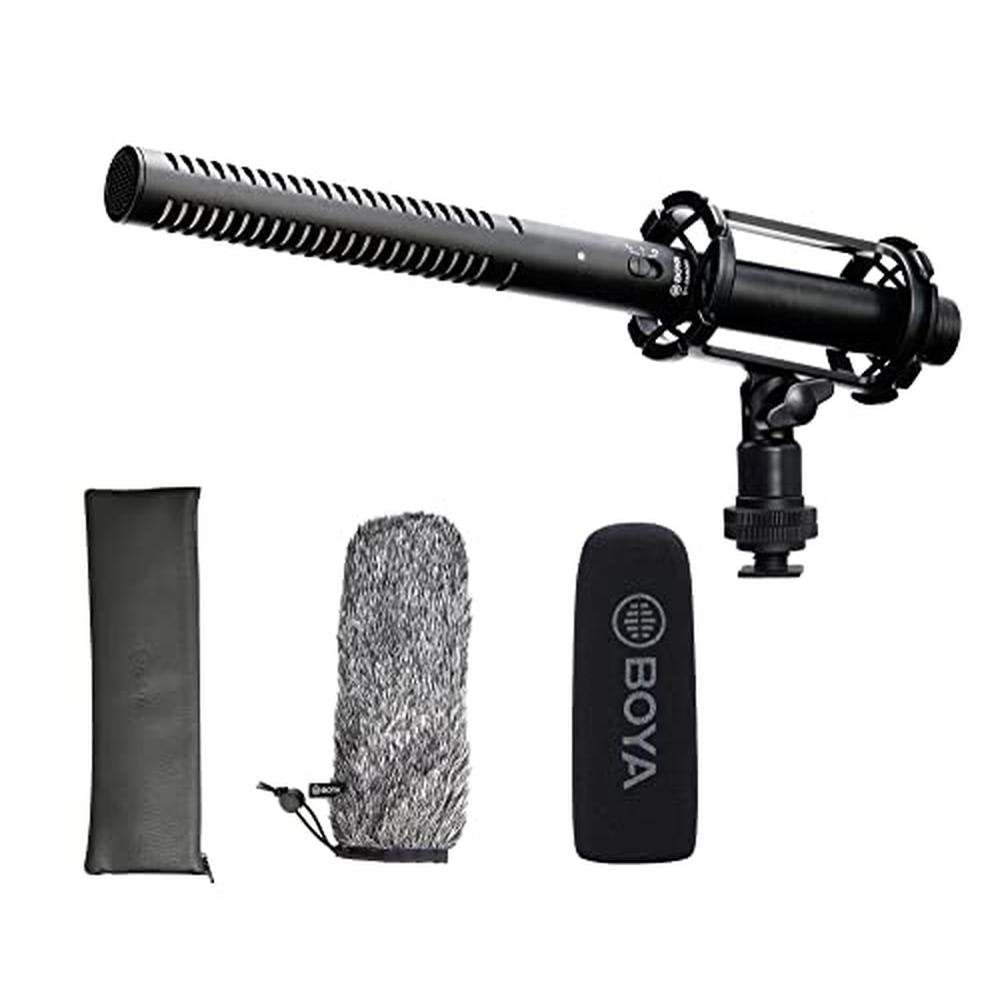
October 2026 technical guide. Camera shotgun microphones may have 3.5mm or XLR outputs. Before attaching one, identify the camera’s microphone input and whether the mic requires plug-in power, batteries or phantom power. These steps are general troubleshooting, not a substitute for the exact manufacturer’s instructions for your microphone and recording device.
Step-by-step procedure
- Step 1. Locate the camera’s true external mic input. Do not confuse a similarly sized headphone output with a microphone input.
- Step 2. Match the microphone output: a supported 3.5mm TRS camera mic may connect directly, while an XLR shotgun typically needs a compatible preamp/recorder.
- Step 3. Mount the shotgun in a shock mount or camera shoe, leaving clearance from the lens and avoiding handling vibration.
- Step 4. Connect the cable securely and turn off wireless or internal microphone settings that might override your selected input.
- Step 5. Speak at normal and loud levels while watching input meters; use manual gain if your camera supports it.
- Step 6. Outside, install a compatible windscreen and check that it does not intrude into the camera frame.
- Step 7. Make a test clip and review on headphones; camera meters alone do not reveal every noise problem.
Related microphones and accessory prices in Kenya
| Model | Price | Use case |
|---|---|---|
| BOYA BY-MM1 | KSh 6,450 | compact camera shotgun mic |
| BOYA BY-VM600 | KSh 7,450 | directional on-camera microphone |
| BOYA BY-BM6060 | KSh 11,450 | professional XLR shotgun |
| BOYA BY-BM6060L | KSh 15,445 | long XLR shotgun |
| RØDE VideoMicro II | KSh 15,445 | compact camera microphone |
| BOYA BY-WS1000 Windshield | KSh 15,945 | compatible microphone wind protection |
How the equipment changes your setup
BOYA BY-MM1
Use case: compact camera shotgun mic. For clearer audio, position the microphone appropriately and test it under the actual environmental conditions. Infinite Tech lists it at KSh 6,450. BOYA BY-MM1.
BOYA BY-VM600
Use case: directional on-camera microphone. For troubleshooting, verify the plug, power supply and software input first before concluding that the product is defective. Infinite Tech lists it at KSh 7,450. BOYA BY-VM600.
BOYA BY-BM6060
Use case: professional XLR shotgun. For clearer audio, position the microphone appropriately and test it under the actual environmental conditions. Infinite Tech lists it at KSh 11,450. BOYA BY-BM6060.
BOYA BY-BM6060L
Use case: long XLR shotgun. For troubleshooting, verify the plug, power supply and software input first before concluding that the product is defective. Infinite Tech lists it at KSh 15,445. BOYA BY-BM6060L.
RØDE VideoMicro II
Use case: compact camera microphone. For clearer audio, position the microphone appropriately and test it under the actual environmental conditions. Infinite Tech lists it at KSh 15,445. RØDE VideoMicro II.
BOYA BY-WS1000 Windshield
Use case: compatible microphone wind protection. For troubleshooting, verify the plug, power supply and software input first before concluding that the product is defective. Infinite Tech lists it at KSh 15,945. BOYA BY-WS1000 Windshield.
Pre-shoot audio quality checklist
Before live lessons, weddings, interviews, podcasts or product videos, run a short test recording with the exact camera or application you will use. Verify that the external microphone — not the device’s built-in microphone — supplied the sound. Record quiet speech, normal speech and a loud phrase; watch for clipping and listen for unexpected hum or clothing rub.
Check battery status, wireless receiver pairing, cable strain and wind protection. When two presenters speak, place a separate clip-on microphone on each if supported. Close excessive ambient noise sources and choose a less echoing room where possible. Keep a fallback recording method ready if the main system fails.
Frequently asked questions
Can BOYA BM6060 plug directly into a DSLR?
Start with the device input type and the exact manufacturer model; incompatible power, cabling or receiver routing is a common cause of missing audio.
Which is simpler, BY-MM1 or an XLR shotgun?
Record a short clip in a supported app and listen to the microphone channel; a power indicator does not always prove that the correct input was selected.
Why does a camera still record its internal mic?
Sound quality depends heavily on distance, placement, room acoustics and handling. Correct setup matters more than the brand name alone.
Will a shotgun mic pick up sound across a hall?
If the problem persists, test with another known compatible setup and ask the retailer to confirm supported connections and warranty conditions.
Keep learning
Android microphone setup · iPhone troubleshooting · DSLR microphones · Podcast equipment prices · BOYA price guide.
Browse recording equipment or contact Infinite Tech Kenya. Official references: BOYA, RØDE.
Matching the audio chain to a camera
3.5mm TRS camera input
Consumer mirrorless bodies and DSLRs often accept a 3.5mm TRS microphone if they provide a true external mic input. Confirm whether the microphone needs battery power or uses plug-in power supplied by the camera. Cable length and shoe-mount stability affect reliability, particularly when a camera is on a gimbal.
Professional XLR shotgun pathway
BOYA BM6060 and BM6060L are professional microphone designs with XLR connection needs. They may require a suitable camera XLR adapter, portable field recorder or mixer, plus the correct phantom power setup where specified. A simple physical 3.5mm-to-XLR connector does not substitute for microphone preamplification.
Positioning for intelligible dialogue
A shotgun on top of a camera still becomes distant when filming someone across a room. An operator using a properly mounted boom can move the microphone near the actor while staying outside the video frame. Alternatively, a wireless lavalier can be easier for a moving subject.
Pre-event soundcheck
After setting recording levels, put on headphones and listen to both quiet and loud speech. Touch the camera grip and turn the lens during the test: vibration or autofocus motor noise may be picked up. Fit wind protection and secure the cable before recording outdoor ceremonies or interviews.