

Best USB-C and Thunderbolt Docks in Kenya: MacBook and Windows Compatibility Guide

Infinite Tech Kenya guide · Updated 27 October 2026
A dock can turn a portable laptop into a full desk setup, but the same USB-C connector can hide very different capabilities. This guide explains what Kenyan buyers should verify when connecting a MacBook, HP EliteBook, Lenovo ThinkPad or Dell laptop to monitors, Ethernet and other peripherals.
USB-C is a connector, not a promise of speed
USB-C describes a plug shape. A particular laptop’s USB-C port might support charging, USB data, DisplayPort output, Thunderbolt or some combination—not necessarily all of them. A dock cannot create video output that the computer does not support. Check the exact laptop model and its official port specifications rather than relying on a generic ‘USB-C compatible’ label.
Thunderbolt 3, 4 and 5: what changes?
Thunderbolt combines high-speed data and display support under specific device requirements. Apple publishes model-by-model Mac port descriptions, including which MacBook Air and Pro generations support Thunderbolt 4 or 5. A Thunderbolt 5 dock only reaches its strongest capabilities when the host port, cable and devices all support them; otherwise the negotiated connection may be slower.
How many monitors do you need?
A dock with two HDMI sockets does not prove that your laptop can drive two independent external screens. Some Macs have model-specific external display limits, and some USB-C docks duplicate rather than extend a monitor on certain systems. Before buying, state the exact monitor count, resolution, refresh rate and operating system. Test the required arrangement if possible.
Laptop charging through a dock
Check USB Power Delivery output in watts and whether the laptop accepts USB-C charging. A 45W pass-through hub may not keep up with a workstation that expects a 90W or higher power source. Some inexpensive hubs advertise 100W input but deliver a smaller wattage to the laptop after reserving power for their own electronics. If in doubt, use the original charger.
Which ports matter for Kenyan offices?
For accounting desks, Ethernet and multiple USB-A ports can matter more than an SD card slot. For video creators, consider fast storage interfaces and media cards. For sales teams making presentations, test HDMI output and projector resolution. For a university student, a compact hub with HDMI, USB-A and reliable USB-C power pass-through may be enough.
Comparison checklist at Infinite Tech
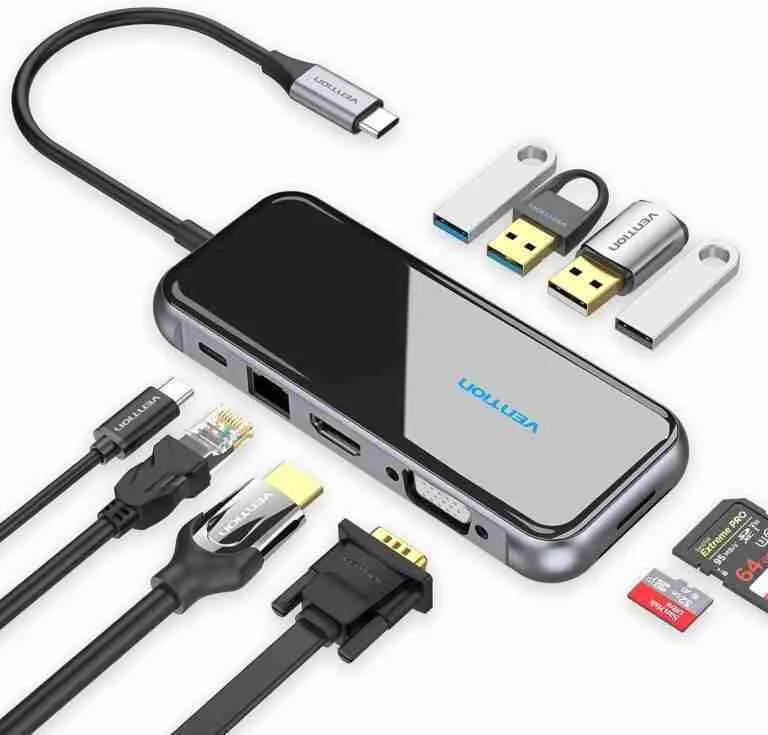
Compare the number and type of ports, data speed, video resolution, power delivery, compatibility with your laptop, cable length, warranty and whether a power adapter is included. Browse Infinite Tech accessories or ask about a specific Vention or Ugreen docking station. Avoid assuming a hub labelled ’10-in-1′ has better core performance than a genuine Thunderbolt dock.
Make the desk safer and cleaner
Use rated cables, do not overload outlets, keep ventilation clear and avoid stringing several unpowered hubs together. A reliable monitor, keyboard and Ethernet connection often improves daily productivity more than buying a hub with many redundant ports.
Frequently asked questions
Is USB-C the same as Thunderbolt?
No. Thunderbolt uses the USB-C connector but has additional protocol and performance requirements.
Can any USB-C dock run two monitors?
No. Host hardware and operating-system display limits matter.
Will a dock charge a laptop?
Only if the dock and laptop support suitable USB Power Delivery and wattage.
Can I use a MacBook dock on an HP laptop?
Often, but port capabilities and display behaviour must be checked on both models.
Do I need Thunderbolt 5?
Not for typical keyboard, Ethernet and one-monitor office tasks. It is most valuable for supported high-bandwidth workflows.
Are Ugreen and Vention docks identical?
No. Compare their exact model numbers and specs, not merely the brand.
Need help in Nairobi?
Infinite Tech, Rehema House, 1st Floor, Shop 2, Standard Street off Kimathi Street, Nairobi CBD. Call/WhatsApp 0720450148 or visit our online electronics store. Confirm any quoted stock, price, warranty or service availability first.
Source: Apple support: identify Mac ports. Editorial buying information; no products were independently laboratory-tested for this article.
Quick action checklist
- Write down the laptop model and supported port standard
- Specify monitor count, resolution and refresh rate
- Confirm the dock’s actual power output to your laptop

One thought on “Best USB-C and Thunderbolt Docks in Kenya: MacBook and Windows Compatibility Guide”
Comments are closed.