
Lenovo Yoga vs ThinkPad Yoga: Differences Buyers Should Understand

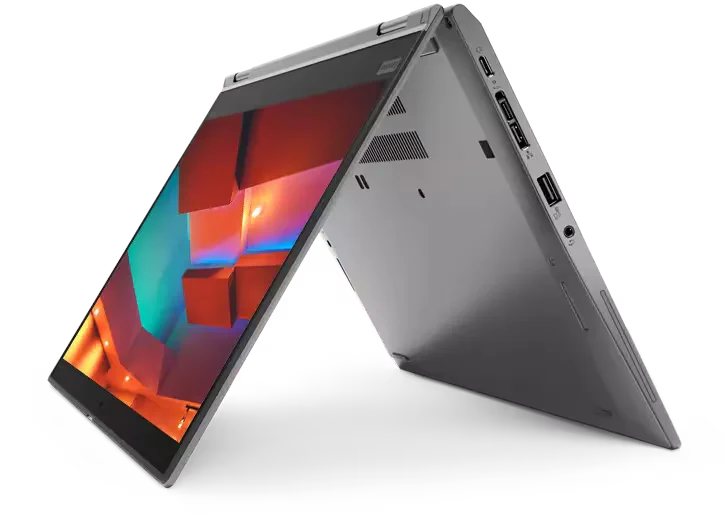
Lenovo Yoga and ThinkPad Yoga are names to investigate, not a complete specification. For a Kenyan buyer, the important questions are whether the exact device is a 360-degree convertible, whether it accepts the pen you need, and whether its processor, memory and display fit the work. This guide separates the buying checks so that a familiar Yoga name does not hide a different generation or form factor.
Catalogue and references checked: 20 October 2026. Prices below are Infinite Tech catalogue asking prices for the stated configuration. Confirm the actual unit, availability, accessories and written warranty before payment.
The university laptop guide helps establish whether handwritten notes or portability should influence the purchase. The HP x360 buying guide offers a comparable checklist for another convertible range.
The EliteBook vs ThinkPad comparison covers a wider business-laptop choice. Use Surface Pro vs HP x360 vs Lenovo Yoga when deciding between a detachable tablet and a hinged notebook.
Lenovo Yoga vs ThinkPad Yoga: convertible checks
| Choice | What to compare | Buying implication |
|---|---|---|
| Yoga-branded offer | Full model code and confirmed form factor | Do not assume every product with Yoga in the name has identical features |
| ThinkPad Yoga offer | Business-model generation, touch and pen specification | Check the particular X390, X13 or other design |
| IdeaPad Flex or 2-in-1 | Hinge, panel and accessories in the actual offer | Compare it as a separate product rather than renaming it ThinkPad Yoga |
Confirm the hinge design and the way you will use it
A true convertible can be useful for presenting across a desk, reading documents in a narrow space or taking handwritten notes. But the value depends on the positions you will actually use. Open the device through its supported range while following its handling instructions and check that the screen stays where placed.
Look for hinge looseness, clicking, chassis separation or an uneven lid. These are unit-inspection issues rather than guaranteed faults of an entire family. A standard notebook with a touchscreen does not become a 360-degree model simply because touch is present. Keep the full product code visible when comparing photographs, documentation and the written quotation.
Treat finger touch and pen input as separate features
Finger touch, active-pen compatibility, pressure sensitivity and pen charging are different questions. Ask which exact pen is supported by the exact laptop and whether it is included in the quoted price. A stylus pictured beside a laptop can be illustrative rather than part of the package.
If handwriting matters, try a real note-taking task with the proposed pen. Check the edges of the display, palm rejection and the app you intend to use. Confirm where the pen is stored and how it receives power. Do not assume an existing pen from a phone, tablet or another laptop will work just because the screen responds to a finger.
Compare performance without mixing generations
A refurbished ThinkPad X390 Yoga and a much newer Yoga 7 are not equivalent just because both can be used as convertibles. Their processors, memory designs, display options and support arrangements may differ. Compare a real configuration against another real configuration, then ask which differences affect your work.
Memory deserves particular attention when it cannot be upgraded. Check the full Lenovo platform specification for the machine type rather than buying on an assumption. For study and office work, test your typical document, call and browser workload. For design work, inspect colour requirements and the application publisher’s hardware guidance. Touch is a control method, not proof of workstation performance.
Price the accessories and present condition together
Include the correct charger, compatible pen, any case and a display adapter if needed. For a used convertible, inspect both the screen surface and its touch behaviour, then test charging, battery health, keyboard and webcam. The extra moving positions make a careful physical inspection especially useful.
For a unit sold as new, match the boxed code to the invoice and ask for the actual local warranty terms. For a refurbished offer, establish what has been checked and which parts, if any, were changed. The linked listings are real shopping paths, but they should not be treated as interchangeable quotations. A lower-priced unit may be sensible if its limitations are understood and the condition is right.
Real Infinite Tech catalogue examples
These links lead to individual listings, not a promise that every model in the wider family is available. Compare the complete configuration rather than the processor badge alone.
| Exact listing | Listed price | Next check |
|---|---|---|
| Lenovo ThinkPad X390 Yoga Core i7 8th Gen 16GB RAM 512GB SSD Touchscreen x360 | KSh 38,000 | Confirm unit condition, exact components and what is included |
| Lenovo ThinkPad X13 Yoga Gen 1 Core i5 10th Gen 8GB RAM 256GB SSD Touchscreen | KSh 30,000 | Confirm unit condition, exact components and what is included |
| Lenovo Yoga 7 2-in-1 83JT0047US Core Ultra 7 256V 16GB RAM 512GB SSD | KSh 152,500 | Confirm unit condition, exact components and what is included |
| Lenovo IdeaPad Flex 5 14IAU7, Intel Core i7 1255U, 16GB RAM, 512GB SSD, 14-inches – 82R700E0UE | KSh 120,000 | Confirm unit condition, exact components and what is included |
A practical buying decision
Choose the convertible whose exact touch, pen and hinge features solve a real task. Compare ThinkPad Yoga, Yoga 7 and IdeaPad Flex on full model codes, installed memory, condition and total accessory cost. The best name on the lid is the one attached to the right complete configuration.
Frequently asked questions
Is ThinkPad Yoga the same product as Yoga 7?
No. They are different product lines and must be checked by full model code.
Does every touchscreen accept an active pen?
No. Confirm the supported pen technology and the exact compatible accessory.
Is a pictured pen automatically included?
No. Ask for included accessories to be written into the quote.
Should I buy a convertible for ordinary typing?
Only if its additional positions or pen features are useful to you. Compare a conventional laptop too.
Related Infinite Tech buying pages
More Lenovo buying guides
- Lenovo Laptop Prices in Kenya: ThinkPad, IdeaPad and Yoga Compared
- Lenovo ThinkPad vs IdeaPad for University Students
- Used ThinkPad Buying Checklist: Battery, USB-C Charging and BIOS Locks
- Surface Pro vs HP x360 vs Lenovo Yoga: Choosing a Touchscreen Computer
Manufacturer references and research method
This is a research-based buying guide, not a hands-on test or a benchmark report. Manufacturer references describe supported options; the linked catalogue identifies the configuration being offered. Model-specific details should be matched to the full product code or service tag.
- Lenovo ThinkPad T480 specifications
- Lenovo ThinkPad T480s platform specifications
- Lenovo ThinkPad T490s specifications
Confirm your laptop with Infinite Tech
Contact Infinite Tech at Rehema House, Nairobi, on 0720450148. Ask for the full model code, a written specification and the applicable warranty. Read warranty information, delivery information and contact Infinite Tech before placing an order.
2 thoughts on “Lenovo Yoga vs ThinkPad Yoga: Differences Buyers Should Understand”
Comments are closed.