

Latest News & Articles
Microphone Background Noise Reduction: BOYA and RØDE Tips

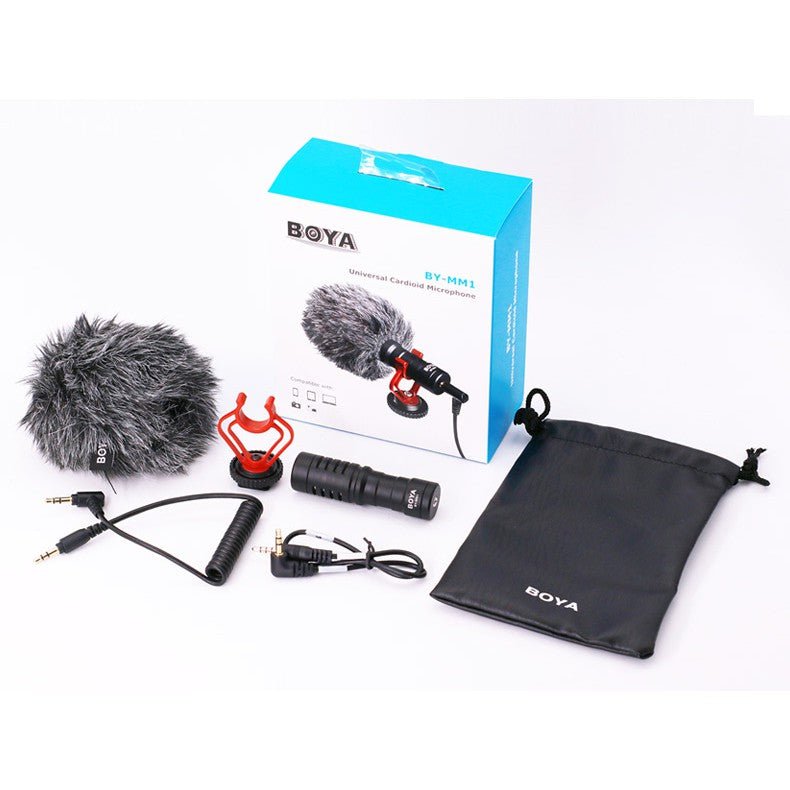
October 2026 technical guide. Background noise can come from traffic, wind, fans, room echo, microphone rubbing and gain settings. Cleaning it after filming often introduces distortion, so improve recording conditions first. These steps are general troubleshooting, not a substitute for the exact manufacturer’s instructions for your microphone and recording device.
Step-by-step procedure
- Step 1. Listen to a 20-second recording and identify whether the issue is wind, steady hum, echo, hiss or clipping. Each calls for a different fix.
- Step 2. Move the microphone closer to the speaker, but avoid hitting clothing or lips. A strong close voice reduces the need to amplify distant background sounds.
- Step 3. For wind, use fitted foam/furry shields. Rotate the capsule away from direct gusts without pointing it away from the voice.
- Step 4. Turn off noisy fans or appliances, close windows if possible and add soft materials to reflective rooms.
- Step 5. Check input gain: increase carefully while keeping loud speech below clipping; excessive gain amplifies hiss and background.
- Step 6. If the equipment supports it, enable moderate noise reduction and listen for artificial or robotic voice artifacts.
Related microphones and accessory prices in Kenya
| Model | Price | Use case |
|---|---|---|
| BOYA BY-V10 | KSh 6,250 | clip-on USB-C creator microphone |
| BOYA BY-V20 | KSh 7,750 | two-person wireless mobile mic |
| BOYA BY-VM600 | KSh 7,450 | directional on-camera microphone |
| BOYA BY-MM1 | KSh 6,450 | compact camera shotgun mic |
| RØDE VideoMicro II | KSh 15,445 | compact camera microphone |
How the equipment changes your setup
BOYA BY-V10
Use case: clip-on USB-C creator microphone. For clearer audio, position the microphone appropriately and test it under the actual environmental conditions. Infinite Tech lists it at KSh 6,250. BOYA BY-V10.
BOYA BY-V20
Use case: two-person wireless mobile mic. For troubleshooting, verify the plug, power supply and software input first before concluding that the product is defective. Infinite Tech lists it at KSh 7,750. BOYA BY-V20.
BOYA BY-VM600
Use case: directional on-camera microphone. For clearer audio, position the microphone appropriately and test it under the actual environmental conditions. Infinite Tech lists it at KSh 7,450. BOYA BY-VM600.
BOYA BY-MM1
Use case: compact camera shotgun mic. For troubleshooting, verify the plug, power supply and software input first before concluding that the product is defective. Infinite Tech lists it at KSh 6,450. BOYA BY-MM1.
RØDE VideoMicro II
Use case: compact camera microphone. For clearer audio, position the microphone appropriately and test it under the actual environmental conditions. Infinite Tech lists it at KSh 15,445. RØDE VideoMicro II.
Pre-shoot audio quality checklist
Before live lessons, weddings, interviews, podcasts or product videos, run a short test recording with the exact camera or application you will use. Verify that the external microphone — not the device’s built-in microphone — supplied the sound. Record quiet speech, normal speech and a loud phrase; watch for clipping and listen for unexpected hum or clothing rub.
Check battery status, wireless receiver pairing, cable strain and wind protection. When two presenters speak, place a separate clip-on microphone on each if supported. Close excessive ambient noise sources and choose a less echoing room where possible. Keep a fallback recording method ready if the main system fails.
Frequently asked questions
Does noise reduction eliminate street traffic?
Start with the device input type and the exact manufacturer model; incompatible power, cabling or receiver routing is a common cause of missing audio.
Why does my lavalier rustle under clothing?
Record a short clip in a supported app and listen to the microphone channel; a power indicator does not always prove that the correct input was selected.
Is a directional mic always silent outside?
Sound quality depends heavily on distance, placement, room acoustics and handling. Correct setup matters more than the brand name alone.
Does a higher-priced microphone fix bad acoustics?
If the problem persists, test with another known compatible setup and ask the retailer to confirm supported connections and warranty conditions.
Keep learning
Android microphone setup · iPhone troubleshooting · DSLR microphones · Podcast equipment prices · BOYA price guide.
Browse recording equipment or contact Infinite Tech Kenya. Official references: BOYA, RØDE.
What different kinds of noise sound like
Wind buffeting
Wind typically creates irregular low-frequency rumbling and distortion, especially outdoors. Use the microphone’s correct furry windshield and move the capsule out of direct wind exposure. Digital noise filtering may struggle to restore speech when the diaphragm has physically overloaded.
Room echo and reverb
Echo or hollow voice sound arises when speech reflects from bare walls, tile floors and ceilings. Move closer to the microphone, use curtains and soft materials, and avoid recording in large empty halls if you need dry voice tracks. Software can help modestly but cannot fully recreate an untreated original.
Electrical hum and interference
A steady buzz may come from power adaptors, unbalanced connections, worn cables or devices sharing a noisy electrical supply. Isolate by testing on battery power, removing unrelated connected chargers and checking microphone cable integrity. Wireless mics can also face radio interference or dropout; these are different symptoms.
Clothing movement and plosives
A lapel microphone hidden under a shirt may scrape fabric when the speaker walks; reposition the capsule and secure the cable. Harsh pops on ‘P’ and ‘B’ sounds improve when you move slightly off the main breath stream or use an appropriate pop filter. Always listen back to the actual recording.
4 thoughts on “Microphone Background Noise Reduction: BOYA and RØDE Tips”
Comments are closed.