

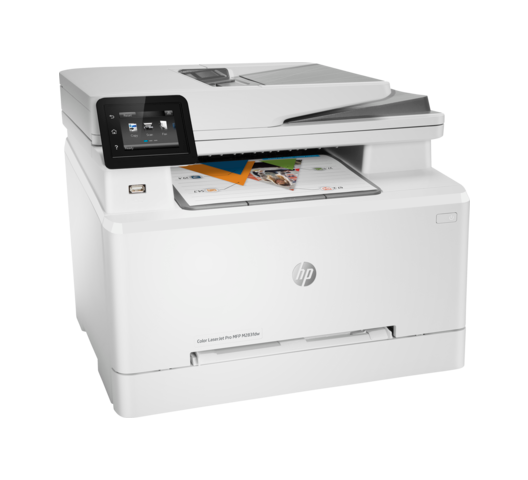
HP Color LaserJet Pro MFP M283fdw Printer – 7K
Original price was: KSh 80,000.00.KSh 71,000.00Current price is: KSh 71,000.00.
Quick answer
HP Color LaserJet Pro MFP M283fdw Printer - 7K is listed at KSh 71,000.00 at Infinite Tech Kenya and is in stock. Review the specifications on this page, then use the delivery and warranty information below before ordering.
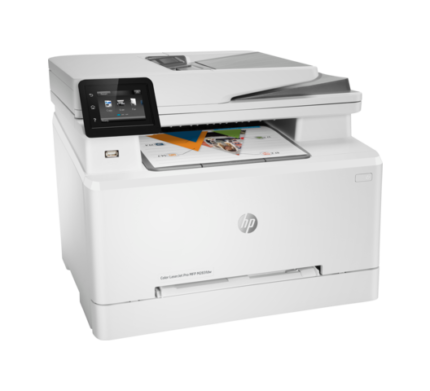
HP Color LaserJet Pro MFP M283fdw Printer, Print, Copy, Scan and Fax – Duplex Printing, ADF, Wireless, Ethernet, USB Interface with LCD Touchscreen – 7KW75A
- JetIntelligence Value: Count on Original HP Toner cartridges with JetIntelligence to enable professional-quality pages, peak printing performance every time, and protection against counterfeits with innovative anti-fraud technology
- Strong Security: Help protect your printer and business data with built-in security essentials that help detect and stop attacks – Reliable Wireless Connectivity: Have confidence in your connection with steady dual band Wi-Fi
- Impress With Color and Increase Efficiency: This business printer offers extraordinary wireless printing, fast print speeds–up to 22 ppm, automatic two-sided printing, and an intuitive 2.7″ color touchscreen
- Save Time With Customizable Shortcuts: Eliminate steps in repetitive tasks and organize documents 50% faster directly from your mobile device using exclusive office features in the HP Smart app
- Print Remotely With The HP Smart App: Set up your LaserJet printer, manage print jobs, receive notifications, and print and scan on the go with HP Smart–HP’s best-in-class mobile print app
Quick answer
HP Color LaserJet Pro MFP M283fdw Printer – 7K is currently listed at KSh 71,000.00 at Infinite Tech Kenya and is in stock. Use the live price and stock status on this page as the current commercial reference.
HP Color LaserJet Pro MFP M283fdw Printer – 7K | Ultimate All-in-One Office Solution
🖨️ Elevate Your Office Productivity
Upgrade your workspace with the HP Color LaserJet Pro MFP M283fdw (7K), brought to you by Infinite Tech. Designed for modern professionals and growing businesses, this dynamic all-in-one laser printer delivers extraordinary color performance, robust security, and unparalleled convenience. Whether you are printing high-quality marketing materials, scanning multi-page contracts, or managing workflow on the go, the M283fdw is engineered to keep your business moving efficiently.
🌟 Key Selling Points of HP Color LaserJet Pro MFP M283fdw Printer – 7K
Vibrant Professional Color: Make an impact with high-quality, vivid color and sharp black text. Perfect for everything from internal documents to client-facing presentations.
Fast, Automatic Two-Sided Printing: Save time and paper with automatic duplex printing. Breeze through large documents with print speeds of up to 22 pages per minute (ppm).
Seamless Wireless Connectivity: Features dual-band Wi-Fi for steady, reliable connections. Easily print, scan, and copy directly from your smartphone using the best-in-class HP Smart App.
50-Page Auto Document Feeder (ADF): Eliminate the need to manually feed pages one by one. The integrated ADF handles large scanning and copying tasks effortlessly, freeing you up for more important work.
Strong Security Built-In: Protect your sensitive business data. This printer comes equipped with vital security features to help detect and stop attacks, ensuring your network and information stay safe.
Smart Tasks Automation: Automate repetitive tasks via the HP Smart App. Scan directly to the cloud, email, and more with a single tap.
📊 Technical Specifications HP Color LaserJet Pro MFP M283fdw Printer – 7K
| Feature | Specification of HP Color LaserJet Pro MFP M283fdw Printer – 7K |
| Functions | Print, Copy, Scan, Fax |
| Print Technology | Laser (Color) |
| Print Speed (Black & Color) | Up to 22 ppm |
| Automatic Duplex Printing | Yes (Standard) |
| Connectivity | Dual-Band Wi-Fi, Ethernet, USB 2.0, Wi-Fi Direct |
| Mobile Capability | HP Smart App, Apple AirPrint, Mopria Certified |
| Paper Handling | 250-sheet input tray, 50-sheet ADF, 100-sheet output bin |
| Display | 2.7-inch (6.8 cm) Color Touchscreen |
| Duty Cycle (Monthly) | Up to 40,000 pages (Recommended: 150 to 2,500 pages) |
| Security Management | Secure Boot, Secure Firmware Integrity, Password Protection |
💡 Why the HP M283fdw is the Smart Choice
1. Unmatched Mobile Freedom
In today’s fast-paced environment, you are not always tied to a desk. The HP M283fdw allows you to command your printer from anywhere. Print files from your mobile device, scan receipts straight to your cloud storage, and check toner levels remotely, keeping your business running no matter where you are.
2. Cost-Effective Efficiency
The “7K” configuration ensures you are getting serious value for high-volume needs. Paired with automatic two-sided printing, you significantly cut down on paper waste and consumable costs over the printer’s lifetime.
3. Effortless Setup and Management
Get started immediately. The intuitive 2.7-inch color touchscreen makes navigating menus and initiating tasks incredibly straightforward, completely removing the learning curve typically associated with enterprise-level office electronics.
Frequently Asked Questions about the HP Color LaserJet Pro MFP M283fdw
🖨️ General Functions & Capabilities
1. What functions does the HP M283fdw perform? A: This is an “All-in-One” Multifunction Printer (MFP). It performs four main functions: printing, copying, scanning, and faxing.
2. Does this printer support automatic two-sided printing? A: Yes. The M283fdw features automatic duplex printing, meaning it will pull the paper back in to print on the other side without you needing to flip the pages manually.
3. Does the Automatic Document Feeder (ADF) scan both sides of a page automatically? A: No. While the printer prints double-sided automatically, the 50-sheet ADF only scans single-sided (simplex). To copy or scan a two-sided document, you will need to manually flip the original document.
4. What does the “fdw” in the model name stand for? A: It is HP’s naming convention for the printer’s features: f = Fax, d = Duplex (two-sided printing), and w = Wireless capability.
5. How fast does this printer print? A: It prints at a speed of up to 22 pages per minute (ppm) for both black-and-white and color documents.
6. What is the maximum paper size this printer can handle? A: The M283fdw supports standard paper sizes up to Legal (8.5 x 14 inches) and A4. It also supports envelopes, labels, and custom paper sizes.
🌐 Connectivity & Mobile Use
7. Can I print directly from my smartphone or tablet? A: Absolutely. It is fully compatible with the HP Smart App, Apple AirPrint, and Android printing platforms.
8. Do I need an active internet connection or router to print wirelessly? A: No. While you can connect it to your office Wi-Fi network, it also features Wi-Fi Direct. This allows your phone or computer to connect directly to the printer’s own wireless signal, even without a local network.
9. Can I connect this printer via a wired connection? A: Yes. In addition to dual-band Wi-Fi, it features an Ethernet port for wired network setups and a standard USB 2.0 port for a direct connection to a single computer.
10. Can I scan documents directly to my email or Google Drive? A: Yes. By setting up the “Smart Tasks” feature within the HP Smart App, you can create one-touch shortcuts to scan directly to your email, cloud storage (like Google Drive or Dropbox), or a network folder.
⚙️ Hardware & Paper Handling
11. How much paper can the trays hold? A: The main input tray holds up to 250 sheets of standard paper. The output bin holds up to 100 sheets, and the top Automatic Document Feeder (ADF) holds up to 50 sheets.
12. Can it print on thick paper, like cardstock or glossy photo paper? A: Yes. The printer supports heavy media up to 163 g/m² for un-coated paper and up to 200 g/m² for glossy laser paper. Ensure you change the paper settings in the print menu to match the paper type to avoid smudging.
13. Does the printer have a touchscreen? A: Yes, it features an intuitive 2.7-inch (6.8 cm) color graphic touchscreen that allows you to manage settings, copy, fax, and view toner levels directly from the device.
14. What are the physical dimensions of the printer? A: It measures approximately 16.5 x 16.6 x 13.2 inches (W x D x H) and weighs about 41.2 lbs (18.7 kg). It is a sturdy piece of office equipment that requires a solid desk or table.
💧 Toner & Maintenance
15. What toner cartridges does the HP M283fdw use? A: It uses the HP 206A standard-yield cartridges (approx. 1,350 black / 1,250 color pages) or the HP 206X high-yield cartridges (approx. 3,150 black / 2,450 color pages).
16. Does the printer come with toner in the box? A: Yes. It includes four pre-installed introductory HP LaserJet toner cartridges (Black, Cyan, Magenta, Yellow). Note that these starter cartridges have a lower page yield than standard replacement cartridges.
17. If a color toner runs out, can I still print in black and white? A: Like most color laser printers, the machine generally requires all cartridges to have some toner in them to operate. However, you can adjust the driver settings to “Print in Grayscale” to temporarily conserve color toner.
18. What is the recommended monthly print volume for this machine? A: HP recommends a monthly page volume of 150 to 2,500 pages to keep the machine running optimally, though its maximum monthly duty cycle is up to 40,000 pages.
🛡️ Compatibility & Security
19. Is this printer compatible with Apple Mac computers? A: Yes. The HP M283fdw is fully compatible with macOS, as well as Windows 10/11 and various Linux distributions.
20. What built-in security features does it have? A: It includes essential security management tools to protect your business data, including Secure Boot, secure firmware integrity checks, password-protected network embedded web servers, and the ability to enable/disable network ports.
Explore related Infinite Tech resources
Find related products and helpful customer information:
Product questions and answers
How much is HP Color LaserJet Pro MFP M283fdw Printer – 7K in Kenya?
The current listed price of HP Color LaserJet Pro MFP M283fdw Printer – 7K at Infinite Tech Kenya is KSh 71,000.00. Prices can change with stock, promotions and supplier updates, so use the live price shown on this page as the current reference.
Is HP Color LaserJet Pro MFP M283fdw Printer – 7K available at Infinite Tech?
HP Color LaserJet Pro MFP M283fdw Printer – 7K is currently listed as in stock at Infinite Tech.
What are the key specifications of HP Color LaserJet Pro MFP M283fdw Printer – 7K?
HP Color LaserJet Pro MFP M283fdw Printer, Print, Copy, Scan and Fax – Duplex Printing, ADF, Wireless, Ethernet, USB Interface with LCD Touchscreen – 7KW75A JetIntelligence Value: Count on Original HP Toner…
Does Infinite Tech deliver HP Color LaserJet Pro MFP M283fdw Printer – 7K in Kenya?
Infinite Tech provides delivery options in Kenya. Delivery timing and cost depend on destination and order details; check the Delivery Information page or contact Infinite Tech to confirm your location.
What warranty applies to HP Color LaserJet Pro MFP M283fdw Printer – 7K?
Warranty terms depend on the product, brand and supplier. Check Infinite Tech’s Warranty Information page or contact the store for the warranty that applies to this exact item before purchase.
Delivery information · Warranty information · Contact Infinite Tech
Related products
Apple Studio Display-Standard Glass: Tilt
Buy HP Color LaserJet Pro MFP 4303dw
Buy HP Laser MFP 135w Printer (4ZB83A)
Buy HP LaserJet MFP M236sdn Printer (9YG08A)
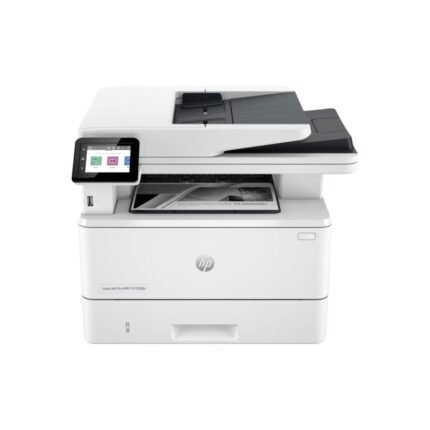
Buy HP LaserJet Pro MFP 4103fdn Printer (2Z628A)
HP LaserJet Pro MFP 4103fdn Printer (2Z628A) Highlights
- Print Technology Laser Functions Print, Copy, Scan, Fax Print Speed Up to 40 ppm (pages per minute) First Page Out Time As fast as 6.3 seconds (from ready mode) Print Resolution Up to 1200 x 1200 dpi (dots per inch) Duplex Printing Automatic (standard) Automatic Document Feeder 50-sheet automatic document feeder (ADF) Scan Resolution Up to 1200 x 1200 dpi Fax Resolution Up to 300 x 300 dpi Copy Resolution Up to 600 x 600 dpi Connectivity 1 Hi-Speed USB 2.0 device port
Reviews
There are no reviews yet.