
Hisense 16-Inch Stand Fan Setup and Maintenance: HSF40WE58DR vs HSF35WE73M

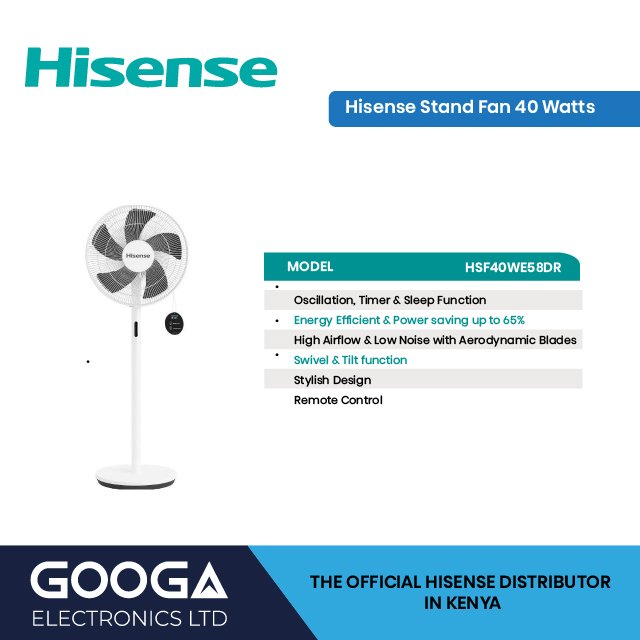
The Hisense HSF40WE58DR and HSF35WE73M are listed as 16-inch stand fans. The HSF40WE58DR product record identifies remote control, while the HSF35WE73M is listed as a pedal-control model. Both need a stable base, clear airflow and routine dust removal. Safe assembly and cleaning matter because the appliance has a rotating blade and electrical components.
Assemble the stand on a stable floor
Follow the model’s assembly diagram and make sure the base, pole, motor housing, grille and blade are secured in the correct order. Tighten only the fasteners supplied for the fan; do not improvise with unsuitable screws. Check that the stand does not wobble before switching on.
Place the fan on a level surface away from curtains, loose fabric, water splashes and walkways where the cable can be tripped over. Keep the intake and outlet clear. Do not position the fan where it can be knocked over by a door or passing trolley.
- Confirm all grille clips and blade fasteners are locked.
- Set the height and oscillation direction before operation.
- Keep the power cord away from hot surfaces and foot traffic.
Know the control difference
The HSF40WE58DR is listed with a remote, while the HSF35WE73M is a pedal-control stand fan. Check the supplied remote, battery requirements and control functions for the exact unit. Do not assume that a remote-control feature is present on the pedal model.
Use a speed and oscillation setting that suits the room. Keep the fan at a safe distance from children and pets, and never insert fingers or objects through the grille. Switch the appliance off before changing height or moving it.
Clean the grille and blades safely
Switch the fan off and unplug it before cleaning. Wait until the blades stop completely. Remove the front grille only if the manual describes it as user-removable. Use a soft cloth or brush to remove dust from the grille and blade surfaces.
Do not spray water or cleaning liquid into the motor housing, controls or electrical connection. Do not operate the fan while the grille is removed. Let all cleaned parts dry completely before reassembly and check that every clip is secure.
Inspect the fan before seasonal storage
Check the cable, plug, base, pole joints, grille and blade for cracks or damage. If the fan vibrates excessively, smells hot or makes a new grinding sound, stop using it and arrange service. Do not lubricate sealed motor parts unless the manufacturer instructs you to.
Before storing, unplug the fan, clean dust from the grille and keep the unit in a dry place. Store the remote and any accessories together so they are available when the fan is needed again.
Product listing and related guidance
See the live Hisense HSF40WE58DR 16-inch Remote Stand Fan listing Also compare the HSF35WE73M pedal-control fan. for the current price, stock status and exact model details. Also browse the Hisense Knowledge Centre for related buying and ownership guides. Always follow the exact manufacturer manual for safe operation, cleaning and maintenance.
Stand-fan setup and cleaning checklist
- Assemble the base, pole, grille and blade using the model diagram.
- Check that the fan stands level and all grille clips are locked.
- Unplug and wait for the blades to stop before cleaning.
- Keep liquid away from the motor and controls; dry all parts before reassembly.
- Inspect the cable, plug, base and blade before seasonal storage.
Compare the HSF40WE58DR remote fan and HSF35WE73M pedal fan.
Frequently asked questions
What size are the HSF40WE58DR and HSF35WE73M?
Both product records identify them as 16-inch stand fans.
Which model has a remote?
The HSF40WE58DR listing identifies remote control; the HSF35WE73M is listed as a pedal-control model.
Can I clean the fan while it is plugged in?
No. Switch it off, unplug it and wait for the blades to stop before cleaning.
Can I wash the motor housing?
No. Keep water and cleaning spray away from the motor and electrical controls.
What should I do if the fan wobbles or overheats?
Stop using it, unplug it and check only the user-serviceable assembly points. Arrange qualified service if the fault remains.
Independent retailer guidance by Infinite Tech, Nairobi. Model features and maintenance steps must be checked against the exact unit manual.
