
HP EliteBook vs ProBook: Which Should You Buy?

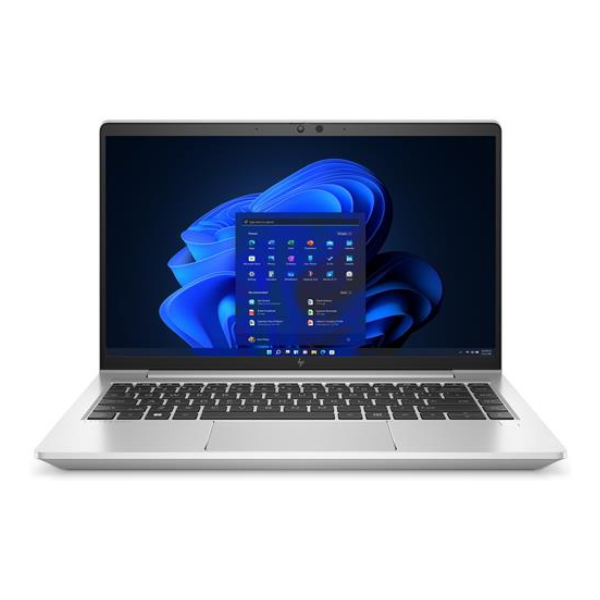
HP EliteBook versus ProBook is a useful starting comparison for office and student laptops in Kenya, but it is not a substitute for comparing generations and configurations. An older EliteBook and a newer ProBook can reverse the value expected from their family positions. Choose on the actual CPU, memory, screen, condition, support and complete price.
Catalogue and references checked: 20 October 2026. Prices below are Infinite Tech catalogue asking prices for the stated configuration. Confirm the actual unit, availability, accessories and written warranty before payment.
Start with the HP EliteBook buying guide to understand the business range. The EliteBook 840 G7 vs G8 comparison shows why generation and configuration matter more than the family label alone.
For business workloads, use the business laptop buying guide to define your requirements. Check the HP laptop price guide before comparing the complete cost of a ProBook and an EliteBook offer.
EliteBook vs ProBook: compare the exact configuration
| Choice | What to compare | Buying implication |
|---|---|---|
| EliteBook offer | Business-model generation and installed configuration | Check the actual panel, memory and condition |
| ProBook offer | Generation, processor and service options | Do not assume every ProBook has the same features |
| Either family | Your applications and ready-to-use total | Family positioning does not settle workload suitability |
Compare generations before comparing the family tier
A comparison between a sixth-generation ProBook and an eleventh-generation EliteBook includes a substantial age and platform difference. It cannot be presented as a controlled test of the family names. The catalogue examples below make these differences visible so that their prices are not mistaken for equivalent offers.
Ask for the exact CPU identifier, RAM, SSD and full model code. If you receive a quote for a different configuration, compare it again rather than assuming all versions of the same family are interchangeable. A family name can help organise the search, but the machine being sold must remain the unit of comparison.
Inspect the features that improve your working day
Try the keyboard and touchpad with a real document and spreadsheet. Check the screen at your normal viewing distance and confirm its actual resolution. Inspect the webcam and microphone with a short call, then test the monitor, printer or dock you need if practical.
Do not assume that every EliteBook has a premium panel or that every ProBook lacks a useful business feature. Configuration options and generations matter. A particular fingerprint reader, backlit keyboard, touchscreen or security feature should be demonstrated on the actual unit. Avoid paying a family premium for optional equipment that is not fitted or that you will not use.
Check memory and storage as separate buying decisions
Enough memory for the normal workload and a suitable SSD can matter more than a processor badge. A larger drive provides space but does not replace RAM. For heavier multitasking or a technical course, consult the software requirements and compare a realistic working configuration.
Ask whether RAM and storage can be changed on the exact model, using HP’s matching documentation. Do not generalise one EliteBook’s layout to every generation or to ProBook. Include supported upgrade parts and labour in the ready-to-use total. If a fixed-memory unit is insufficient, another configuration may be a better choice than buying first and hoping a technician can add capacity later.
Let condition, support and the full quote settle value
For used or refurbished units, inspect battery health, stable charging, screen condition and hinges. Confirm legitimate personal setup and essential firmware access. For a machine sold as new, match the product code and stated configuration to the actual package and local warranty arrangement.
Check the intended operating system and application support for older hardware. A Windows desktop does not itself prove supported Windows 11 eligibility. Add required accessories, delivery and any immediate service work before comparing prices. The better purchase is the complete configuration that meets your needs with acceptable condition and written terms, rather than a family label chosen in isolation.
Real Infinite Tech catalogue examples
These links lead to individual listings, not a promise that every model in the wider family is available. Compare the complete configuration rather than the processor badge alone.
| Exact listing | Listed price | Next check |
|---|---|---|
| HP ProBook 640 G2 Intel Core i5 6th Gen 8GB RAM 256GB SSD Non-Touch | KSh 19,995 | Confirm unit condition, exact components and what is included |
| HP EliteBook 840 G7 Core i5 10th Gen 8GB RAM 256GB SSD Non-Touch | KSh 34,000 | Confirm unit condition, exact components and what is included |
| HP EliteBook 840 G8 Core i5 11th Gen 8GB RAM 256GB SSD Touchscreen | KSh 38,500 | Confirm unit condition, exact components and what is included |
| Hp Elitebook 845 G7 Ryzen 5 16GB RAM 512GB SSD | KSh 36,000 | Confirm unit condition, exact components and what is included |
A practical buying decision
Choose an EliteBook or ProBook after comparing equivalent generations and the features you will use. A well-specified, properly checked offer in either family can be sensible. Keep older low-cost models separate from newer configurations in the value calculation.
Frequently asked questions
Is EliteBook always faster than ProBook?
No. The exact processor, memory, storage and generation determine the configuration.
Does every EliteBook have a touchscreen?
No. Check the actual panel in the individual listing.
Should I compare a much older ProBook with a newer EliteBook?
You can compare their suitability and cost, but disclose the generation difference rather than treating it as a family-only test.
Which is better for ordinary office work?
The configuration that meets the applications, screen, keyboard, support and budget requirements with acceptable condition.
Related Infinite Tech buying pages
More HP buying guides
- HP Laptop Prices in Kenya: New vs Refurbished Buying Guide
- HP EliteBook 840 G7 vs G8: Is the Upgrade Worth It?
- HP EliteBook 845 G7 Ryzen vs 840 G7 Intel: Which Offers Better Value?
Manufacturer references and research method
This is a research-based buying guide, not a hands-on test or a benchmark report. Manufacturer references describe supported options; the linked catalogue identifies the configuration being offered. Model-specific details should be matched to the full product code or service tag.
- HP EliteBook 840 G8 specifications
- HP EliteBook 840 G7 model specifications
- Microsoft: Windows 11 system requirements
- Microsoft: Windows 10 support transition
Confirm your laptop with Infinite Tech
Contact Infinite Tech at Rehema House, Nairobi, on 0720450148. Ask for the full model code, a written specification and the applicable warranty. Read warranty information, delivery information and contact Infinite Tech before placing an order.
2 thoughts on “HP EliteBook vs ProBook: Which Should You Buy?”
Comments are closed.