

How to Inspect iPhone Cameras, Speakers and Charging Before Buying in Kenya

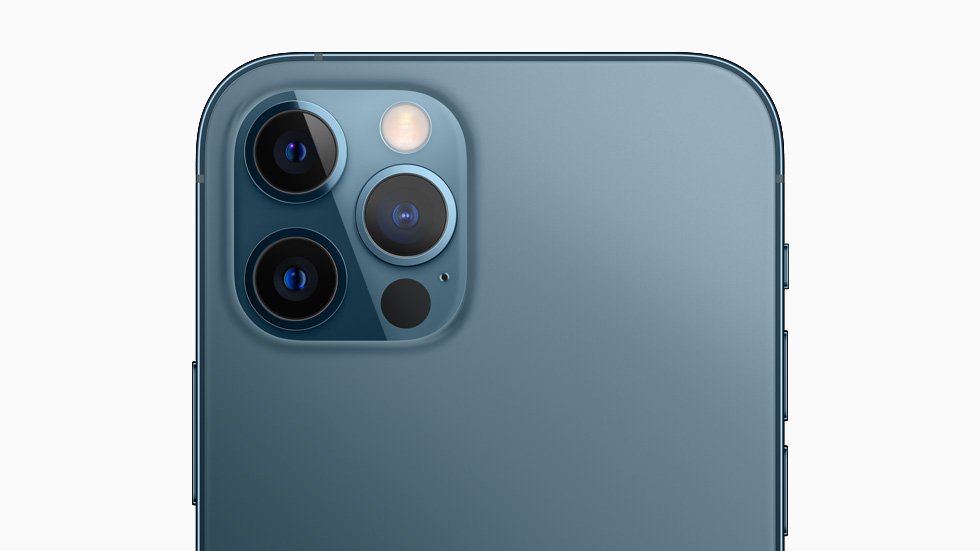
Independent Kenya buying advice, 31 October 2026. Use the native Camera app to check every listed focal length in good and low light, both rear and front cameras, autofocus, flash and video sound. Inspect lens covers for scratches and check whether portrait and zoom functions behave as expected for the specific model.
Kenya buying and verification notes: How to Inspect iPhone Cameras, Speakers and Charging Before Buying in Kenya
Decision guidance: Check charger wattage, USB-C cable capability, Qi/Qi2/MagSafe support and genuine certification. Match features to practical use cases rather than assuming a newer or more expensive configuration is universally better.
Check the product’s model identifier, included accessories, seller warranty and local network or service compatibility where applicable. Prices can change, and the site stock indicator alone does not prove a specific unit is ready in Nairobi. Request confirmation before travelling or placing an order.
Relevant Infinite Tech listings: View related Apple charging product · Compare alternative. Verify availability and variation before payment.
FAQ: What should I verify before purchasing?
Confirm the exact device or accessory generation, genuine condition, compatibility with your existing equipment and how warranty issues are handled. Manufacturer claims should be checked against the specific model, not a broad product family.
Verified source route: Apple manufacturer and support information. This article is researched guidance, not a substitute for checking actual stock.
The main technical and buying considerations
Play audio through the earpiece and loudspeaker; record a Voice Memo and a short video to test microphones. Plug in a suitable Lightning or USB-C cable to check reliable charging, port fit and heat. Avoid inserting metal probes into charging connectors.
How to decide whether the phone is a sensible purchase
Check Face ID, touchscreen, brightness, cellular calling and Wi-Fi before accepting a used phone. The true condition belongs to the individual handset, not to Apple’s generic model photographs. Ask for current photos of the actual unit where possible.
Do not substitute a broad description such as ‘very clean’ or ‘100% original’ for an actual inspection. Price should be assessed alongside the item’s capacity, condition, verification evidence, local SIM support, returns policy and the expected cost of any battery or display service. A lower-cost offer can be poor value if the handset is not correctly unlocked or its essential functions do not work.
Inspection checklist for Kenyan iPhone buyers
- Exact model, storage and region
- IMEI and Activation Lock
- Battery health and service history
- Face ID, screen and all cameras
- Mobile data, SIM or eSIM setup
- Included accessories, warranty and receipt
Make inspection specific to the model. For example, iPhone 11 is a 4G LTE device, while iPhone 12 and iPhone 13 support 5G. The iPhone 12 Pro offers a dedicated 2× telephoto camera and LiDAR; the standard iPhone 12 does not. Do not test a model for features it was never manufactured with.
What Infinite Tech shoppers should request
Before paying, request the exact storage tier, colour, an honest description of used versus new condition, battery-health status where available, supporting original-unit photographs, warranty information and the final checkout price. Ask whether the supplied phone is X-UK, refurbished or factory-sealed, rather than assuming that the terms are interchangeable.
Visit Infinite Tech Nairobi CBD
Infinite Tech is located at Rehema House, Standard Street, off Kimathi Street, first floor Shop 2, Nairobi CBD. Call 0720450148 about stock and individual handset verification. Compare iPhone listings, read the new versus refurbished guide, and check battery-health information.
Frequently asked questions
Is an ex-UK iPhone the same as Apple Certified Refurbished?
No. A regional import label by itself does not establish Apple’s certification, any refurbishment process or the exact condition.
Can I rely on the manufacturer’s photograph?
No. Manufacturer photographs describe the model, not the physical state of the specific phone for sale.
Do all iPhones show Parts and Service History?
The information depends on model and iOS version; check the particular handset and Apple’s official instructions.
Does an advertised warranty cover everything?
Not necessarily. Confirm duration, exclusions, refund or repair remedies in writing.
Should I buy an Activation Locked iPhone?
No. Apple advises buyers not to purchase a device that remains Activation Locked.
Can I verify compatibility with Safaricom or Airtel?
Yes. Test a suitable unlocked regional model and confirm activation with the carrier before payment.
Apple guidance: How to buy a preowned iPhone, Parts and Service History. No unverified seller warranty or handset grade is implied by this article.
