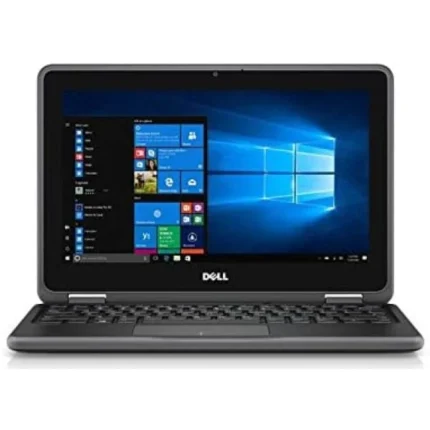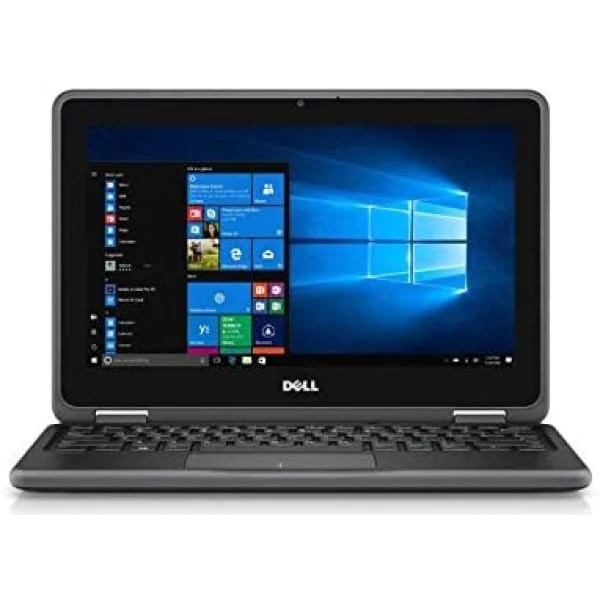
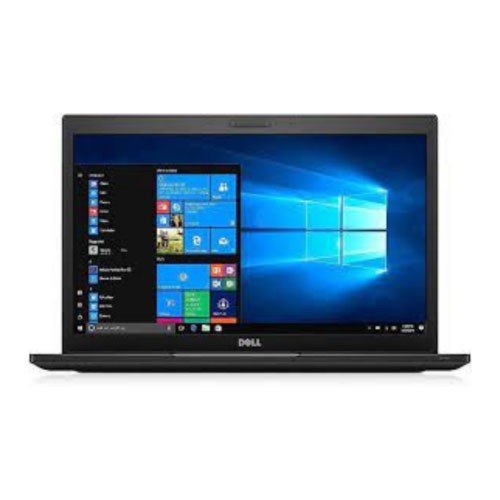
Dell 3189 x360 Touchscreen 4GB RAM 128gb SSD Pentium convertible laptop
KSh 28,500.00 Original price was: KSh 28,500.00.KSh 17,500.00Current price is: KSh 17,500.00.
Dell 3189 x360 Touchscreen 4GB RAM 128gb SSD Pentium convertible laptop
-
Model: HP EliteBook x360 1040 G8
-
Processor: Intel Core i7 (11th Gen)
-
Memory: 32GB RAM for smooth multitasking
-
Storage: 512GB SSD for fast boot and ample storage
-
Display: 14-inch Full HD Touchscreen
-
Design: Convertible 2-in-1 design with 360° hinge
-
Build: Sleek, durable, and professional-grade aluminum chassis
-
Features: Backlit keyboard, fingerprint reader, and enhanced security options
-
Operating System: Typically ships with Windows 10 Pro or Windows 11
-
Ideal for: Business professionals, productivity, and mobile work environments
Dell 3189 x360 Touchscreen 4GB RAM 128gb SSD Pentium convertible laptop
The Dell 3189 X360 is a versatile touchscreen convertible laptop that has been designed to cater to various user needs, seamlessly merging functionality with aesthetic appeal. This innovative device features a robust hinge mechanism that allows the laptop to transform effortlessly between traditional laptop mode and tablet mode, making it an ideal choice for on-the-go professionals, students, and casual users alike. The flexibility provided by this convertible feature enables users to adapt their working style according to the situation, facilitating both productivity and leisure activities.
Constructed with a durable design, the Dell 3189 X360 combines portability with resilience, essential for daily tasks and travel. Its sleek chassis and clean lines exhibit a modern aesthetic that not only attracts attention but also assures quality and build integrity. The lightweight form factor makes it easy to carry, while the durable exterior ensures that it can withstand the rigors of everyday use. The laptop’s touch-enabled display enhances user interaction by providing an engaging experience, whether in laptop mode for typing or tablet mode for browsing and drawing.
This convertible laptop finds its way into a variety of environments. For students, it serves as both a study tool and a personal entertainment device, accommodating different learning and leisure styles. Professionals in creative fields can benefit from its dual functionality, using it for presentations, design work, or note-taking during meetings. In essence, the Dell 3189 X360 appeals to a broad audience, particularly those seeking a device that adapts to their dynamic lifestyles while maintaining performance and usability across varying applications.
Performance and Specifications
The Dell 3189 X360 is equipped with a robust set of specifications that cater to a wide range of user needs, making it an adaptable choice in the convertible laptop market. At its core lies an Intel Pentium processor, which provides a balanced performance for everyday computing tasks. This processor is designed to handle basic applications with efficiency, whether it involves web browsing, document editing, or streaming multimedia content.
Central to the device’s capabilities is its 4GB of RAM, which plays a crucial role in ensuring smooth multitasking. While this amount of memory may not be sufficient for intensive software applications, it is adequate for casual users who simultaneously run several lightweight apps. Tasks such as working on multiple browser tabs, utilizing productivity suites like Microsoft Office, or engaging in video conferencing can be executed with a commendable degree of efficiency.
Storage-wise, the Dell 3189 X360 features a 128GB SSD, which markedly improves boot times and application loading speeds compared to traditional hard drives. The solid-state drive not only increases the laptop’s responsiveness but also provides enough space for essential files and applications. Users who require additional storage can take advantage of cloud services or external drives, further enhancing flexibility and convenience.
When it comes to graphics, the Dell 3189 X360 integrates Intel HD Graphics, which offers satisfactory performance for everyday visuals. This capability ensures that users can enjoy media consumption without significant lag, making it an appealing option for casual gaming, streaming videos, or browsing images. In real-world scenarios, this laptop excels in providing a practical solution for students and professionals alike, ensuring they have a dependable companion for their daily tasks.
Touchscreen Experience and User Interface
The Dell 3189 X360 stands out with its robust touchscreen capabilities, offering users a fluid and engaging interaction with the device. Equipped with a 11.6-inch HD touchscreen, the laptop provides not only decent color accuracy but also excellent brightness, ensuring visibility under various lighting conditions. The sensitivity of the touchscreen is remarkable, enabling swift and precise navigation across the user interface. This responsiveness is essential for efficient usage, which is particularly beneficial for students and professionals who require seamless multitasking.
Running on Windows 10, the Dell 3189 X360 utilizes the operating system’s inherent features such as Snap Assist and Virtual Desktops, enhancing the overall user experience. The integration of these features with the touchscreen allows users to interact naturally, utilizing gestures like swiping, pinching, and tapping to manage applications. The effectiveness of Windows 10 in harnessing touchscreen capabilities is notably advantageous for those engaged in creative tasks or light gaming, as it can significantly streamline workflows. However, for users reliant on precise mouse navigation for tasks like graphic design, the touchscreen may not completely replace traditional input methods.
Furthermore, app compatibility for touchscreen use significantly contributes to the laptop’s versatility. Popular applications such as Microsoft Office and note-taking software are optimized for touch input, allowing effortless navigation through menus and documents. Additionally, web browsing becomes an interactive experience, with users able to scroll, zoom, and select content with simple gestures. While the touchscreen enhances user engagement, it is crucial to recognize that reliance on touch input may not suit all users. Nevertheless, the overall enhancements provided by the touchscreen feature bolster the laptop’s appeal for a diverse range of users—from students seeking note-taking solutions to professionals pursuing productivity on the go.
Pros, Cons, and Final Thoughts
The Dell 3189 X360 stands out in the crowded market of convertible laptops, offering a blend of functionality and flexibility that appeals to a wide range of users. One of the key advantages of this device is its impressive portability. Weighing just over three pounds, it is easily transportable, making it an excellent choice for students and professionals who are often on the go. Furthermore, the 360-degree hinge allows users to switch between laptop mode, tent mode, and tablet mode, enhancing versatility for both work and leisure activities.
Battery life is another strong point of the Dell 3189 X360. With up to 10 hours of usage on a single charge, it holds its own against competitors in the market, thereby reducing the worry about frequent recharging during a busy day. This extended battery performance adds to the overall appeal for users who require a reliable device that can keep up with their lifestyle.
However, it is essential to consider the limitations of this convertible laptop as well. Although the performance is suitable for everyday tasks, it may struggle with intensive applications, such as advanced graphic design software or high-performance gaming. Hence, users seeking powerful performance might find it less appealing. Additionally, while the display is adequate for most usages, it may not satisfy users looking for a high-resolution screen for detailed visual tasks.
In terms of value for money, the Dell 3189 X360 is competitive but may need to justify its price through features that stand out against other models. It is best suited for students, educators, or casual users who prioritize versatility and portability over heavy-duty performance. Overall, weighing its strengths and weaknesses will assist potential buyers in determining if the Dell 3189 X360 aligns with their specific needs and requirements.
Related products
HP EliteBook 830 G6 8th Gen Intel Core i5-8365U 8GB RAM 256GB SSD 13.3″ TouchScreen
HP EliteBook 830 G6 8th Gen Intel Core i5-8365U 8GB RAM 256GB SSD 13.3" TouchScreen
-
Model: HP EliteBook 830 G6
-
Processor: 8th Gen Intel Core i5-8365U (Quad-Core)
-
Memory: 8GB DDR4 RAM
-
Storage: 256GB SSD for fast performance and quick boot times
-
Display: 13.3-inch Full HD Touchscreen, ideal for intuitive interaction
-
Build: Sleek, durable, and lightweight design for business professionals
-
Operating System: Typically comes with Windows 10 Pro (may vary)
-
Security Features: Includes fingerprint reader and HP Sure Start BIOS protection
-
Connectivity: USB-C, HDMI, Wi-Fi, Bluetooth, and docking support
-
Battery Life: Long-lasting battery suitable for all-day productivity
HP EliteBook 840 G6 [i5, 8GB RAM, 256GB SSD]
-
Processor: Intel Core i5 (8th Gen)
-
RAM: 8GB DDR4 for smooth multitasking
-
Storage: 256GB SSD for fast boot and file access
-
Display: 14-inch Full HD (1920x1080) anti-glare screen
-
Build: Slim, lightweight, and durable design (aluminum chassis)
-
Ports: Multiple USB 3.1, USB-C, HDMI, and RJ-45 for connectivity
-
Security: Integrated webcam with privacy shutter, fingerprint reader, TPM 2.0
-
Battery: Long-lasting, supports quick charging
-
Operating System: Windows 10 Pro
-
Weight: Approx. 1.56 kg (3.44 lbs)
Hp elitebook 840 G9/12th gen/corei7/32gb ram/512gb ssd/14 inches
-
Model: HP EliteBook 840 G9
-
Processor: 12th Gen Intel Core i7
-
RAM: 32GB
-
Storage: 512GB SSD
-
Display: 14-inch screen
-
Design: Sleek and durable build
-
Performance: High-speed processing for multitasking and demanding applications
-
Battery Life: Long-lasting for all-day productivity
-
Connectivity: Advanced ports and wireless options
-
Security: Enterprise-grade security features
-
Operating System: Windows 11 Pro (likely, but verify)
HP EliteBook Folio 1040 G3 Ultrabook Core i7-6300U @2.40GHz 8GB DDR4 RAM 256GB SSD 14″ Touchscreen
HP EliteBook Folio 1040 G3 Ultrabook Core i7-6300U @2.40GHz 8GB DDR4 RAM 256GB SSD 14" Touchscreen
-
Model: HP EliteBook Folio 1040 G3
-
Processor: Intel Core i7-6300U @ 2.40GHz
-
RAM: 8GB DDR4
-
Storage: 256GB SSD
-
Display: 14" Touchscreen
-
Design: Ultrabook, slim and lightweight
-
Operating System: Pre-installed with Windows (likely Windows 10/11)
-
Connectivity: Multiple ports, Wi-Fi, Bluetooth
-
Battery Life: Long-lasting, suitable for productivity
-
Security Features: Fingerprint reader, TPM (Trusted Platform Module)
-
Use Case: Ideal for business professionals, students, and on-the-go users
HP EliteBook Folio 9480m Intel® Core™ i5-4310U Laptop 35.6 cm (14″) HD 8 GB RAM 500 GB HDD
HP EliteBook Folio 9480m Intel® Core™ i5-4310U Laptop 35.6 cm (14") HD 8 GB RAM 500 GB HDD
-
Model: HP EliteBook Folio 9480m
-
Processor: Intel® Core™ i5-4310U (Dual-core, 4th Gen)
-
Display: 35.6 cm (14") HD (1366 x 768)
-
Memory: 8 GB RAM
-
Storage: 500 GB HDD
-
Graphics: Integrated Intel HD Graphics 4400
-
Operating System: Typically comes with Windows 10 Pro (varies by seller)
-
Build: Ultra-slim and lightweight business laptop
-
Ports: Includes USB 3.0, VGA, DisplayPort, Ethernet, and docking connector
-
Connectivity: Wi-Fi, Bluetooth, optional 4G LTE (depending on configuration)
-
Battery Life: Up to 10 hours (may vary with use)
-
Security Features: Fingerprint reader, TPM chip, HP BIOS Protection
Hp Folio 9470M Ultrabook Intel Corei7-3437@ 2.3GHz 8GB RAM 500GB HDD
Hp Folio 9470M Ultrabook Intel Corei7-3437@ 2.3GHz 8GB RAM 500GB HDD Features and price in Kenya
-
Model: HP Folio 9470M Ultrabook
-
Processor: Intel Core i7-3437U @ 2.3GHz
-
Memory: 8GB RAM
-
Storage: 500GB HDD
-
Display: 14-inch HD screen
-
Design: Lightweight and slim ultrabook form factor
-
Build: Durable aluminum chassis
-
Ports: Includes USB 3.0, VGA, DisplayPort, Ethernet, and docking connector
-
Battery: Long-lasting battery life suitable for business use
-
Operating System: Varies by configuration (often Windows 10 or Windows 8 Pro)
Hp ProBook 11 G2 Intel core i3 4gb Ram 128GB ssd Touch screen
-
Model: HP ProBook 11 G2
-
Processor: Intel Core i3 (5th Gen)
-
Memory: 4GB RAM
-
Storage: 128GB SSD
-
Display: 11.6-inch HD Touchscreen
-
Build: Durable design, ideal for education or business
-
Operating System: Typically ships with Windows (version may vary)
-
Ports: USB 3.0, HDMI, Ethernet, audio jack, SD card reader
-
Keyboard: Spill-resistant
-
Battery: Long battery life suitable for daily tasks
HP ProBook 430 G8 Core i5 11th Gen 16GB RAM 512GB SSD 13.3″
HP ProBook 430 G8 Core i5 11th Gen 16GB RAM 512GB SSD 13.3"
-
Model: HP ProBook 430 G8
-
Processor: Intel Core i5, 11th Generation
-
RAM: 16GB DDR4 – ideal for multitasking
-
Storage: 512GB SSD – fast boot and load times
-
Display: 13.3-inch Full HD (1920 x 1080) – compact and sharp
-
Graphics: Integrated Intel Iris Xe Graphics
-
Build: Lightweight and professional design – suitable for business use
-
Operating System: Typically ships with Windows 10/11 Pro
-
Ports: USB-C, USB-A, HDMI, audio jack, microSD slot
-
Security Features: Fingerprint reader, TPM 2.0, HP Sure Start

Reviews
There are no reviews yet.