

Latest News & Articles
Oraimo Watch Nova 2 Lite OSW-814L: Pairing and Model Verification

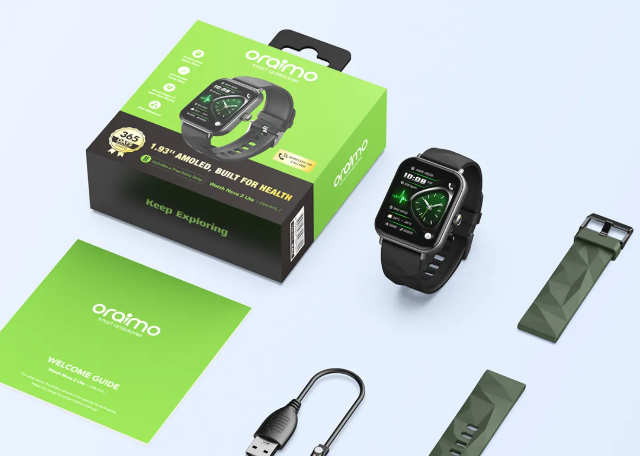
Updated 10 October 2026. Avoid confusion between Nova 2 Lite, Watch 5 Lite and other Oraimo watches when setting up a new wearable. Infinite Tech has organised this guide around the actual Oraimo model numbers used in its Kenya catalogue. Features and battery figures are manufacturer claims rather than independent lab measurements.
Shop the Oraimo models in this guide
Go directly to the product page for exact stock, variant and the latest price.
Useful comparisons: watch 6 vs 6r vs 5r · health app pairing notifications
Prices and model-specific buying links
| Model | Store price | Relevant difference | Purchase |
|---|---|---|---|
| Watch Nova 2 Lite OSW-814L | KSh 3,500 | Nova series, check model and companion-app details | Buy or check stock |
| Watch 5 Lite OSW-804 | KSh 2,500 | entry-level model, do not confuse with OSW-805 | Buy or check stock |
| Watch 5R Pro OSW-830 | KSh 5,250 | AMOLED display and 11-day manufacturer normal-use rating | Buy or check stock |
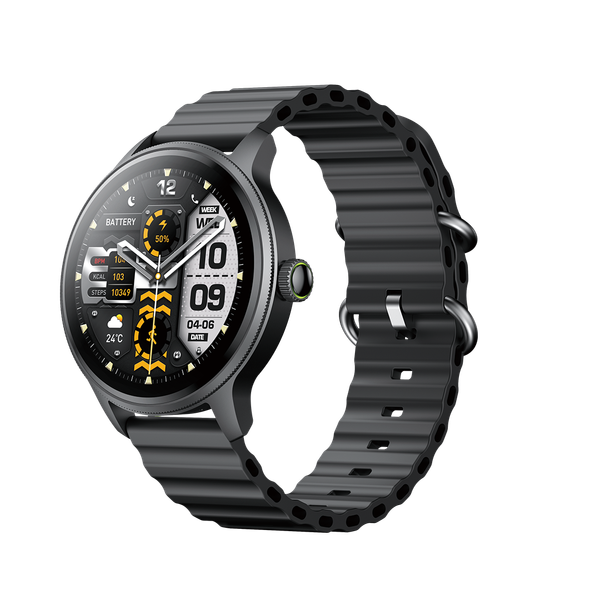
Clickable smartwatch images
Detailed model advice
Use the precise OSW model code
The live listing identifies Nova 2 Lite as OSW-814L. That identifier should be compared with the label and user guide when you need a replacement strap or charging lead. Marketing titles sometimes omit important suffixes, so do not assume another Nova model has identical accessories.
Pair to the recommended companion app
Begin with the app and pairing steps specified for your exact model. Bluetooth pairing at the phone level does not always grant notification permission or call-audio support. Make sure the app can operate in the background where required and review permissions according to your privacy preferences.
Check display features without borrowing other models’ specs
The Nova 2 Lite has its own watch-face and display configuration. A figure published for Watch 5R Pro’s AMOLED screen or Watch 6’s size should not be copied as if it described this model. Request confirmation from the retail box if a specification cannot be independently found.
Test alerts and charging before relying on it
Charge using the provided appropriate cable, allow the supported firmware to update and send a test notification from your phone. Check vibration strength, call permission and wrist fit in ordinary use. Keep the invoice in case the model code or colour differs from the order.
Decision points for Kenyan shoppers
Start by identifying your principal task: reading notifications, following workouts, wearing a stylish timepiece, or answering short calls. These needs lead to different choices. Someone who works at a desk may want a slim case and readable messages; someone active may value a comfortable band, quick glanceable time and dependable battery life. Avoid buying a sensor solely because marketing suggests it can replace medical equipment.
Remember that claimed battery life is sensitive to settings. Bluetooth calls, always-on displays where available, bright watch faces and constant monitoring can reduce real runtime. When a product lists separate standby and normal-use figures, they should not be treated as interchangeable. Check what charging accessories are included, along with available strap materials and warranty terms.
A model-verification routine before setting up Nova 2 Lite
The first useful step happens before pairing: examine the back label and box and confirm OSW-814L. Record the name exactly so that you do not accidentally follow instructions for another Nova model. Similar marketing language can appear across different generations, but replacement straps and chargers are usually more model-specific than the general brand name.
When testing pairing, keep the phone near the watch and start from the manufacturer’s supported app. Grant only permissions needed for the functions you want. Check that notifications and calls work as separate tasks. If they do not, examine battery restrictions and Bluetooth audio routing before resetting all settings. Updates can alter the location of options in an app, so use the latest official guide rather than an older unrelated screenshot.
For a comparison, open the current Nova 2 Lite product page next to Watch 5 Lite and Watch 5R Pro. Confirm each watch’s display type rather than inferring it from a picture of another series. The dated Infinite Tech price is only a starting point. Ask about colour, included charger and warranty, and verify the final amount at checkout. A smartwatch should solve your actual notification or activity needs, not merely appear visually impressive.
Questions customers frequently ask
Does every Oraimo watch use the same app?
Not necessarily; use the exact model’s own packaging or manufacturer instructions.
Does this replace a medical device?
No. Consumer wrist sensors offer general wellness estimates and do not diagnose medical conditions.
Are the prices accurate today?
Prices shown are store catalogue figures checked 10 October 2026; follow the product link to confirm the current checkout price.
Can I call without a phone nearby?
Bluetooth calling generally uses a paired phone unless standalone cellular support is specifically stated for that exact model.
Is an IP68 watch suitable for swimming?
Do not assume so; follow the model-specific manufacturer use limits and avoid hot water or diving without explicit approval.
Which app should I install?
Follow the manufacturer’s app and pairing instructions for the exact OSW model code.
Is this based on hands-on testing?
No. It is a documented manufacturer-and-store buying guide; no original laboratory test is claimed.
Further buying guides and internal links
Oraimo smartwatch price list · Best Oraimo smartwatches · Oraimo buying and price centre · Oraimo Watch 5R Pro OSW-830: AMOLED, 11-Day Battery and HD Calling Guide · Oraimo Watch 6R OSW-823: Panda Glass, Watch Faces and Sport Modes · Oraimo Watch 6 vs Watch 5: Notifications, Calling and Wrist Comfort · Oraimo Watch 5 Lite OSW-804: Budget Fitness and Smartwatch Buying Tips
Sources and editorial standards
Oraimo manufacturer’s website is the primary specification reference. Model prices and purchase destinations are taken from Infinite Tech’s connected WooCommerce catalogue as checked on 10 October 2026. Verify the model code, last price, stock and delivery terms before placing an order; this article is informational, not a first-hand product test.
3 thoughts on “Oraimo Watch Nova 2 Lite OSW-814L: Pairing and Model Verification”
Comments are closed.