
Best HP Laptops to Buy in Kenya: 2026 Buying Guide

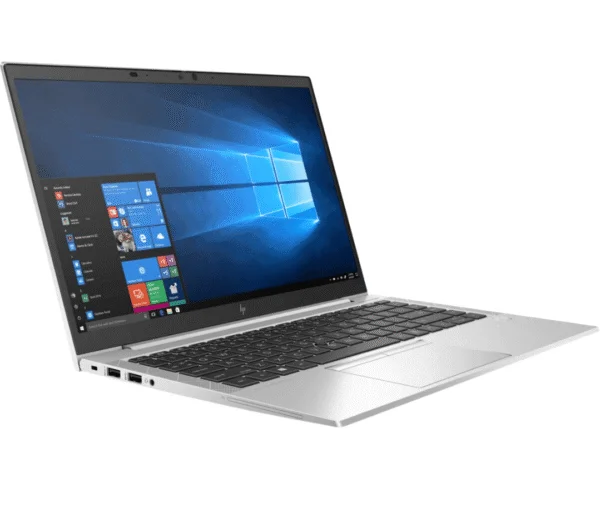
The best HP laptops in Kenya depend on your budget, applications and whether you prefer a brand-new or refurbished machine. For lighter office work and study, compare the EliteBook 840 G5 configuration below. For programming and heavier multitasking, the EliteBook 840 G8 with 16GB RAM offers more memory and storage. If you want a brand-new alternative, compare the HP 240 G9 offer and confirm its screen and operating-system package.
HP laptops to compare by your workload
| HP listing | Listed hardware | Who should compare it | Before ordering |
|---|---|---|---|
| HP EliteBook 840 G5 | Core i5, 8GB RAM, 256GB SSD, non-touch | Students and office buyers considering a refurbished business laptop | Confirm CPU code, battery health, panel and condition |
| HP EliteBook 840 G8 | Core i7-1165G7, 16GB RAM, 512GB SSD, 14-inch FHD | Professional multitasking and moderate software development | Check application requirements, battery and warranty; touchscreen is not established for this offer |
| HP 240 G9 | Core i7-1255U, 8GB RAM, 512GB SSD, 14-inch family | Buyers comparing brand-new HP laptops for general business and study | Confirm display resolution, FreeDOS or Windows licence, and upgrade options |
These are specific configurations, not a ranking of every HP laptop. Open each listing for the current price and availability. A newer CPU does not automatically compensate for less RAM in your applications, and these offers do not establish dedicated workstation graphics.
Browse the Infinite Tech laptop catalogue for other HP configurations. For engineering, CAD, 3D work or GPU-heavy applications, start with the ZBook, EliteBook and ProBook comparison and verify the exact GPU required by your software.
Choosing the right HP laptop
- Choose the processor generation based on the workload
- Prefer an SSD for faster startup and applications
- Choose 8GB RAM for normal work and 16GB or more for heavier multitasking
- Consider screen size, touchscreen and x360 requirements
- For graphics work or gaming, check the dedicated GPU rather than CPU alone
Buying used or refurbished HP laptops
Check battery health, display, keyboard, ports, charger, hinges and physical condition. Confirm the exact CPU generation, RAM and SSD configuration before paying. For more guidance, see our laptop buying guide for budgets up to KSh 50,000.
Choose by your actual workload, not only the HP badge
For business and university study, compare EliteBook models by generation and condition. For engineering and 3D work, consult the ZBook versus EliteBook versus ProBook comparison before purchasing: the real GPU, RAM and software requirements matter more than an i5/i7 label. For price-versus-condition decisions, use the new versus refurbished HP laptop guide. Verify the exact unit and live price on the individual product listing.
Buy HP laptops in Kenya
Infinite Tech lists HP laptops with different configurations and prices. Open the laptop catalogue and individual product pages to confirm the current specifications, price and availability.
Compare two HP EliteBook configurations
For everyday office work and study, review the HP EliteBook 840 G5 Core i5, 8GB RAM and 256GB SSD. For more demanding spreadsheets, multitasking and moderate coding, compare the HP EliteBook 840 G8 Core i7-1165G7, 16GB RAM and 512GB SSD. These are different models and configurations rather than interchangeable offers: open each product to verify its current price, screen specification, condition and stock before ordering.
Which HP laptop family suits which buyer?
| HP family | Typical buyer | What to compare |
|---|---|---|
| EliteBook | Business users, students and remote workers who value build quality and ports | Generation, battery condition, RAM, SSD, display and security features |
| ProBook | General business and office use | CPU generation, memory, storage, screen and condition |
| Pavilion | Home, school and general-purpose buyers | Processor, display, battery, build and upgrade options |
| Spectre / premium x360 | Buyers prioritising premium design, touch and convertible use | Touchscreen, hinge, battery, ports and exact processor |
| Victus / OMEN | Gaming, design and GPU-heavy workloads | Exact GPU, cooling, display refresh rate, RAM and power requirements |
EliteBook buying path
For refurbished business buyers, the EliteBook range is one of the strongest HP research areas on Infinite Tech. Compare the Best HP EliteBook Laptops in Kenya guide, the EliteBook 840 G5 vs G6 comparison and the 840 G6 vs G7 comparison. These pages are more useful than choosing from the EliteBook name alone because processors, displays, RAM, SSDs and condition vary substantially between individual units.
HP laptop decision checklist
- Identify the workload: office and study, programming, design, engineering, gaming or travel all place different demands on the laptop.
- Verify the processor: check the exact Intel or AMD model and generation, not only the Core i5/i7 or Ryzen label.
- Match RAM to the workload: 8GB is practical for routine work; 16GB or more provides more headroom for development, design and heavy multitasking.
- Choose SSD capacity: verify whether 256GB, 512GB or 1TB matches your storage needs.
- Check display and form factor: confirm screen size, resolution, touch support and x360 hinge if required.
- For refurbished units, inspect condition: battery, hinges, keyboard, webcam, charger, ports and display all affect real value.
- For GPU workloads, verify the exact graphics hardware: never infer gaming or design performance from the CPU name alone.
How this HP guide is verified
HP model names can cover many configurations, so Infinite Tech buying guidance should match the exact processor, RAM, SSD, display, graphics and condition of the individual listing. Manufacturer support or specification documentation should be used where available for technical claims, while Infinite Tech product pages remain the commercial source for current price, stock, condition and warranty.
Related laptop research
- Laptop Knowledge Centre Kenya
- Best Laptops Under KSh 50,000 in Kenya
- Best Business Laptops in Kenya
- Best Laptops for University Students
- Best Refurbished Laptops in Kenya
- Infinite Tech Laptop Review Methodology
For the site-wide sourcing, exact-variant and correction rules, see the Infinite Tech Editorial Standards & Review Methodology.
Questions about buying an HP laptop in Kenya
Which HP laptop should I compare for office work?
Start with a tested business configuration that matches your budget and software. The 840 G5 listed above has 8GB RAM and a 256GB SSD; the 840 G8 has 16GB RAM and a 512GB SSD for more multitasking headroom. Compare battery, screen and condition as well as price.
Is an HP Core i7 always better than a Core i5?
No. Compare the full CPU model, generation, power class, memory and cooling. A family label alone does not determine how a laptop performs in your workload.
Should I buy 8GB or 16GB RAM?
8GB can suit lighter documents, browsing and study. 16GB or more is worth comparing for larger spreadsheets, development tools, containers and heavier multitasking. Check the memory requirements of your actual applications.
Is brand-new better value than refurbished?
Compare the complete offer: hardware, battery, cosmetic condition, operating-system licence, warranty and current price. A refurbished business laptop and a brand-new entry business model can serve different priorities.
Where can I buy or collect an HP laptop in Nairobi?
Contact Infinite Tech at Rehema House, Standard Street, Nairobi CBD, on 0720 450 148. Confirm stock, the exact configuration, written warranty and delivery or collection arrangements before travelling or paying.

2 thoughts on “Best HP Laptops to Buy in Kenya: 2026 Buying Guide”
Comments are closed.